
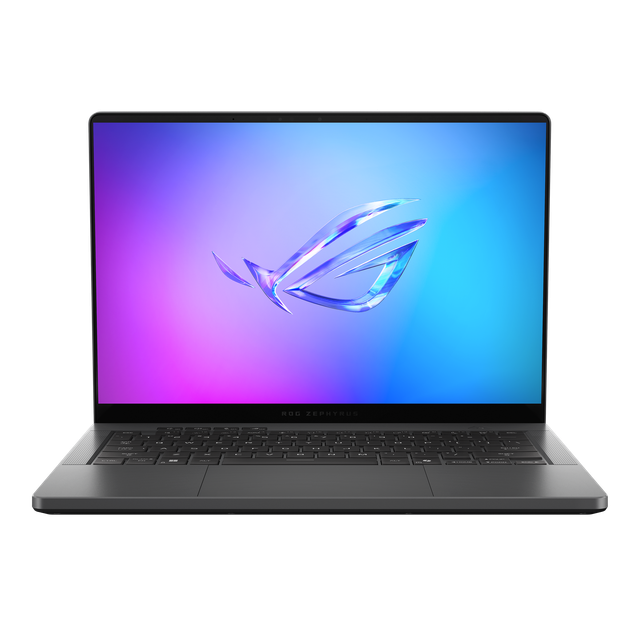
ASUS ROG Zephyrus G14
- CPU:
- Ryzen AI 9 HX 370
- GPU:
- GeForce RTX 5080 Laptop GPU
- RAM:
- 64GB LPDDR5X
- Display:
- 14" 2880x1800 OLED 120Hz
Upgrade and repair this laptop
Consumercarts is reader-supported. Learn more
Disclaimer: The price and specification of the given product may differ from the actual product. Please confirm on the retailer's website before buying.
Manufacturer: ASUS Last updated: 2026-09-30
ASUS ROG Zephyrus G14 Review
The ASUS ROG Zephyrus G14 (2025) GA403WW is a 14-inch gaming laptop from 2025 built around the AMD Ryzen AI 9 HX 370 and NVIDIA GeForce RTX 5080 Laptop GPU. The screen is a 2880x1800 OLED panel at 120Hz. It weighs 1.58 kg.
Where it shines: an OLED screen. What holds it back: soldered memory, loud fans under load (54.4 dB(A)) and PWM flicker at lower brightness.
Processor performance
Measurements come from NotebookCheck's review unit with the Ryzen AI 9 HX 370, RTX 5080 Laptop, 64GB of RAM and a 2TB SSD (a European configuration; US listings of the RTX 5080 model ship with 32GB).
The AMD Ryzen AI 9 HX 370 has 12 cores (4 performance and 8 efficiency), boosting to 5.1 GHz. Video exports, code builds and heavy multitasking are all comfortable. Its NPU is rated at 50 TOPS for on-device AI features.
NotebookCheck measured about 80W of sustained CPU power in this chassis. Makers publish the chip rating, but this sustained figure is what long exports actually get. Across the 33 systems NotebookCheck has tested with the AMD Ryzen AI 9 HX 370, it averages 1,085 points in Cinebench 2024 multi-core (range 621 to 1,299) and 117 single-core. Where this laptop lands in that range depends on how much power it lets the chip draw.
Graphics and gaming
The NVIDIA GeForce RTX 5080 Laptop GPU has 16GB of VRAM and draws up to 110W here. The same GPU name covers a wide power range across laptops, so this wattage matters more than the model number. It can switch the display straight to the dedicated GPU (Advanced Optimus), which avoids the small performance loss of routing frames through the integrated graphics.
On battery the graphics card is capped at about 43 W, so gaming away from the charger is far weaker than when plugged in.
Gaming (average across systems). These are NotebookCheck's average frame rates for the NVIDIA GeForce RTX 5080 Laptop across every system it has tested with this GPU, not this laptop alone. Power limits differ between laptops, so this one can land above or below the average.
| Game | Settings | Average fps | Systems tested |
|---|---|---|---|
| Cyberpunk 2077 | Ultra, 1080p | 136 | 19 |
| Cyberpunk 2077 | Ultra, 1440p | 95 | 20 |
| Baldur's Gate 3 | Ultra, 1080p | 177 | 18 |
| Baldur's Gate 3 | Ultra, 1440p | 129 | 18 |
| F1 24 | Ultra, 1440p | 79 | 13 |
| Assassin's Creed Shadows | Ultra, 1440p | 52 | 13 |
| Indiana Jones and the Great Circle | Ultra, 1440p | 93 | 10 |
Memory, storage and upgrades
Memory: fixed. 64GB of LPDDR5x-8000 is soldered to the board, so buy the amount you will need for the life of the laptop.
Storage: replaceable. One M.2 slot, already in use (M.2 2280), M.2 NVMe PCIe 4.0.
The RAM is soldered, and getting inside now means removing two screws hidden under glued rubber feet, after which the SSD, Wi-Fi card, fans and screwed-in battery can be reached.
Display
The 14-inch OLED panel runs at 2880x1800 (243 pixels per inch) and 120Hz. NotebookCheck measured 424 nits and 42,300:1 contrast. Color coverage is 100% sRGB and 100% P3, good enough for photo and video work. Response time is 0.7 ms, so motion stays sharp. The panel flickers at 960 Hz (PWM) at lower brightness, which matters if you are sensitive to it.
The OLED panel is the same Samsung unit as in the 2024 model, with very accurate P3 and sRGB factory profiles, but the glossy surface reflects a lot and its SDR and HDR peak brightness trails other OLED laptops.
Thermals and noise
NotebookCheck measured 54.4 dB(A) under load and 29.1 dB(A) at idle. Plan on headphones when gaming. The hottest surface reached 51.2 °C, warm enough to notice on your lap.
To handle the higher power limits, these models get a wider main heatpipe, an extra heatpipe for the graphics memory and two thicker fans in place of the three-fan layout used on the slower versions. Quiet mode often switches the fans off completely during everyday work, while Turbo mode keeps a constant, slightly pulsing fan noise even at idle and gets loud enough in games that headphones are recommended.
Battery life
The battery is 73Wh, smaller than 69% of the gaming laptops we list. NotebookCheck got 10 hours 27 minutes of Wi-Fi browsing and 14 hours 58 minutes of video playback, but only 1 hour 21 minutes under full load. A full charge takes about 1 hour 37 minutes.
Design and build
Materials: Aluminum unibody. At 1.58 kg it is lighter than every other gaming laptop we list. It measures 311x220x15.9-18.3 mm.
The RTX 5070 Ti and RTX 5080 versions use a chassis that is about 2 mm thicker at the back than the RTX 5070 version and last year's G14, which adds roughly 100 grams.
Keyboard and touchpad
The chiclet keyboard has 1.7 mm of key travel and a very precise, comfortable feel that NotebookCheck rates as one of the better keyboards it has tested, though the RGB backlight is only a single zone. Backlight: 1-zone RGB.
The clickpad glides smoothly and has muffled, high-quality clicks, but the review unit showed a small amount of play on its left side. Sign-in: IR camera for Windows Hello face login.
Ports and connectivity
There is no Thunderbolt, but USB4 40Gbps instead ports cover most of the same docks and fast drives. It charges over USB-C.
Full list: 1x USB4 Type-C (40Gbps, DisplayPort, Power Delivery), 1x USB 3.2 Gen 2 Type-C, 2x USB 3.2 Gen 2 Type-A, 1x HDMI, 1x microSD card reader, 1x 3.5mm combo audio jack. Wireless: Wi-Fi 7 and Bluetooth 5.4.
There is no Thunderbolt, but the USB4 port covers fast docks, and the left USB-C port is wired to the integrated GPU so an external monitor does not force the Nvidia GPU to stay awake.
Webcam, speakers and extras
Webcam: 1080p FHD with IR, no privacy shutter. Speakers: 4-speaker system (dual force woofers) with 2 tweeters and Smart Amp, Dolby Atmos.
The 1080p webcam takes only average pictures and has no privacy shutter, but it supports Windows Studio Effects and has IR for face login.
Which configuration to buy
The ASUS ROG Zephyrus G14 (2025) GA403WW name covers several builds. Processors: AMD Ryzen AI 9 HX 370 and AMD Ryzen 9 270. Graphics: NVIDIA GeForce RTX 5070 Laptop, NVIDIA GeForce RTX 5070 Ti Laptop and NVIDIA GeForce RTX 5080 Laptop. Memory: 16GB or 32GB LPDDR5X on board in the US lineup (64GB offered in other regions), not upgradeable. Check the exact configuration on the listing before you buy.
No longer the newest G14: ASUS has released the ROG Zephyrus G14 (2026) GU405 with Intel Panther Lake (Core Ultra 9 386H) and RTX 5070 Ti or RTX 5080, which NotebookCheck has reviewed; the 2025 GA403 is still listed on the ASUS US site.
Alternatives to consider
- ASUS TUF Gaming A16 (2025) FA608UM-NS73: Ryzen 7 260, heavier at 2.20 kg, a bigger 90Wh battery and upgradeable RAM.
- Razer Blade 16 (2025), Ryzen AI 9 HX 370, RTX 5090, 64GB, 2TB: Ryzen AI 9 HX 370, heavier at 2.14 kg and a 16-inch screen.
- MSI Katana 15 HX B14WGK (Core i9 HX, RTX 5070, 16GB): Intel Core i9 HX (14th Gen), heavier at 2.40 kg, upgradeable RAM and a 15.6-inch screen.
Sources
Measurements come from NotebookCheck's review unit with the Ryzen AI 9 HX 370, RTX 5080 Laptop, 64GB of RAM and a 2TB SSD (a European configuration; US listings of the RTX 5080 model ship with 32GB).
- NotebookCheck: 14 inches with the GeForce RTX 5080 Laptop - Asus ROG Zephyrus G14 2025 review (GA403WW)
- ASUS ROG Zephyrus G14 (2025) GA403 Tech Specs (US)
- ASUS ROG Zephyrus G14 (2025) GA403 product page
- NotebookCheck: Asus ROG Zephyrus G14 2026 review (GU405AR)
- NotebookCheck: AMD Ryzen AI 9 HX 370 Benchmarks and Specs
Our verdict
Reviewed by Burooj Alam. Rated by us, not by users.
Best for
- High-refresh 1440p gaming
- Photo and video editing on the built-in screen
Not for
- Anyone who wants to upgrade memory later
- Quiet rooms under heavy load
- People sensitive to PWM flicker
Specifications
What these specs meanIdentity and variant
| Brand | ASUS |
|---|---|
| Series | ROG Zephyrus G14 |
| Series ID | asus-rog-zephyrus-g14-2025 |
| SKU Name | ASUS ROG Zephyrus G14 (2025) GA403WW (Ryzen AI 9 HX 370, RTX 5080, 64GB, 2TB) |
| Chassis Code | GA403 |
| Region Sold | Global |
Class and platform
| Laptop Class | Gaming |
|---|---|
| Release Year | 2025 |
| Operating System | Windows 11 Home |
| Weight | 1.58 kg |
Processor
| CPU Brand | AMD |
|---|---|
| CPU Model | Ryzen AI 9 HX 370 |
| CPU Cores | 12 |
Sustained power
| Sustained CPU Power | 80 W |
|---|---|
| Sustained Power Source | Third Party Review |
| Power Adapter Wattage | 200 W |
Graphics
| GPU Brand | NVIDIA |
|---|---|
| GPU Model | GeForce RTX 5080 Laptop GPU |
| VRAM | 16 GB |
| GPU Max Graphics Power | 110 W |
| Graphics Switching | Advanced Optimus |
Memory
| RAM Capacity | 64 GB |
|---|---|
| RAM Type | LPDDR5X |
| RAM Speed | 8000 MT/s |
| Memory Form Factor | Soldered |
| Memory Soldered | Yes |
| Max RAM Supported | 64 GB |
Upgradability
| RAM Slots | 0 |
|---|---|
| RAM Slots Free | 0 |
| Storage Slots | 1 |
| Storage Slots Free | 0 |
| Storage Form Factor | M.2 2280 |
| Storage Interface | PCIe 4.0 x4 |
| SATA Bay Present | No |
Storage as shipped
| Storage Capacity | 2000 GB |
|---|---|
| Storage Type | NVMe SSD |
Display
| Display Size | 14 inches |
|---|---|
| Resolution Width | 2880 px |
| Resolution Height | 1800 px |
| Refresh Rate | 120 Hz |
| Panel Type | OLED |
| Brightness Condition | Vendor Unstated |
| sRGB Coverage | 100 % |
| Touchscreen | No |
Battery and ports
| Battery Capacity | 73 Wh |
|---|---|
| Battery Life Light Load | 10.4 hours |
| Thunderbolt Support | USB4 |
| WiFi Standard | WiFi 7 |
FAQs
Can you upgrade the RAM in the ASUS ROG Zephyrus G14 (2025) GA403WW?
No. The memory is soldered, so choose the amount you need when you buy (up to 64GB).
Can the storage be upgraded?
There is no free slot, but the existing SSD can be swapped for a larger one.
What is the battery life like?
10 hours 27 minutes of Wi-Fi browsing in NotebookCheck's test, and about 1 hour 21 minutes under full load.
Is it good for gaming?
Across the 19 systems NotebookCheck has tested with the NVIDIA GeForce RTX 5080 Laptop, Cyberpunk 2077 averages 136 fps at Ultra settings and 1080p. This laptop's power limit can move it above or below that.
Does it support Thunderbolt docks?
No Thunderbolt, but it has USB4 40Gbps instead, which works with most USB4 and many Thunderbolt docks.
Is the display color accurate?
Yes. It covers 100% of sRGB and 100% of P3.
What power adapter comes with it?
A 200W adapter. It can also charge from a USB-C charger.
What does it weigh?
1.58 kg.