
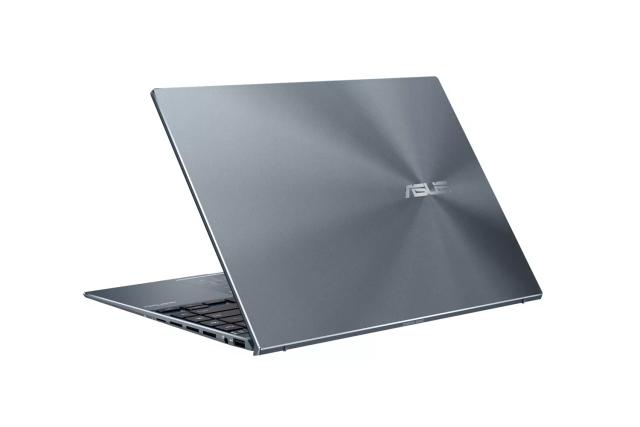
ASUS Zenbook 14X UX5401
Expert rating7.7 / 10
- CPU:
- Core i7-1195G7
- RAM:
- 16GB soldered LPDDR4X
- Display:
- 14" 2.8K OLED Touch
Upgrade and repair this laptop
Consumercarts is reader-supported. Learn more
Disclaimer: The price and specification of the given product may differ from the actual product. Please confirm on the retailer's website before buying.
Manufacturer: ASUS Last updated: 2026-10-10
Where to buy
- ASUS StoreGo to store
ASUS Zenbook 14X UX5401 Review
ASUS Zenbook 14X UX5401 with Intel Core i7-1195G7, Iris Xe Graphics, 16GB soldered LPDDR4X, 512GB SSD, 14-inch 2.8K (2880x1800) 90Hz OLED touchscreen.
One of ASUS's early 90Hz OLED thin-and-lights, the Zenbook 14X UX5401 paired a vivid 2.8K panel with a compact 14-inch chassis targeting creative professionals on a budget below the premium ZenBook Pro line.
Overview
Part of ASUS's broad push to bring OLED displays into the mainstream Zenbook lineup, the UX5401 offers a meaningfully sharper and higher-contrast screen than the IPS panels typical of its 11th-gen Intel competitors.
Screen replacement note
This chassis (and the closely related UX3402/UM3402 Zenbook 14) uses a Samsung Display ATNA40YK04-0 or ATNA40YK07-series 14" 2.8K OLED panel, a well-stocked replacement part shared across several Zenbook 14 generations.
Our verdict
Reviewed by Burooj Alam. Rated by us, not by users.
Expert rating7.7 / 10
This 14-inch Zenbook offers a 2880 x 1800 OLED at 90Hz in a 1.4 kg body, with a Core i7-1195G7, 16GB of LPDDR4X and a 512GB drive. Thunderbolt 4 and a 63Wh battery keep it practical, and the display is the main draw for photo review and media.
This is a 2022 platform with integrated graphics. The 16GB is soldered and the storage slot is full, so it is a poor choice for anyone who wants to upgrade or needs discrete graphics.
Best for
- Buyers wanting an OLED display in a compact 14-inch chassis
Not for
- Users needing discrete graphics or upgradeable memory
Specifications
What these specs meanIdentity and variant
| Brand | ASUS |
|---|---|
| Series | Zenbook 14X |
| Series ID | asus-zenbook-14x-ux5401 |
| Chassis Code | UX5401 |
| Region Sold | Global |
Class and platform
| Laptop Class | Thin and Light |
|---|---|
| Release Year | 2022 |
| Operating System | Windows 11 Home |
| Weight | 1.4 kg |
Processor
| CPU Brand | Intel |
|---|---|
| CPU Model | Core i7-1195G7 |
| CPU Cores | 4 |
Sustained power
| Sustained Power Source | Not Measured |
|---|
Graphics
| GPU Brand | Intel |
|---|---|
| GPU Model | Iris Xe Graphics |
Memory
| RAM Capacity | 16 GB |
|---|---|
| RAM Type | LPDDR4X |
| Memory Form Factor | Soldered |
| Memory Soldered | Yes |
| Max RAM Supported | 16 GB |
Upgradability
| RAM Slots | 0 |
|---|---|
| RAM Slots Free | 0 |
| Storage Slots | 1 |
| Storage Slots Free | 0 |
| Storage Form Factor | M.2 2280 |
| Storage Interface | PCIe 4.0 x4 |
| SATA Bay Present | No |
Storage as shipped
| Storage Capacity | 512 GB |
|---|---|
| Storage Type | NVMe SSD |
Display
| Display Size | 14 inches |
|---|---|
| Resolution Width | 2880 px |
| Resolution Height | 1800 px |
| Refresh Rate | 90 Hz |
| Panel Type | OLED |
| Touchscreen | Yes |
Battery and ports
| Battery Capacity | 63 Wh |
|---|---|
| Thunderbolt Support | Thunderbolt 4 |
| WiFi Standard | WiFi 6 |
FAQs
Can you upgrade the RAM in the ASUS Zenbook 14X UX5401?
No. The memory (16 GB of LPDDR4X) is soldered to the motherboard and there are no memory slots, so it cannot be upgraded after purchase. Choose the capacity you need when you buy.
Can you upgrade the SSD in the ASUS Zenbook 14X UX5401?
Yes. It has 1 M.2 2280 slot (PCIe 4.0 x4). As shipped the slot is in use, so upgrading means replacing the existing drive. It ships with 512 GB NVMe SSD.
What display does the ASUS Zenbook 14X UX5401 have?
The ASUS Zenbook 14X UX5401 has a 14-inch, 2880x1800, OLED, 90 Hz touch display.
Does the ASUS Zenbook 14X UX5401 have Thunderbolt?
Yes. It supports Thunderbolt 4.
How big is the battery in the ASUS Zenbook 14X UX5401?
The ASUS Zenbook 14X UX5401 has a 63 Wh battery.
Compare and read more
- Acer Swift Go 14 SFG14 (Core Ultra 5 125H, 16GB, 512GB) vs ASUS Zenbook 14X UX5401 (Core i7-1195G7, 16GB, 2.8K OLED)
- ASUS Zenbook 14 OLED UX3405 (Core Ultra 7 155H, 32GB, 1TB) vs ASUS Zenbook 14X UX5401 (Core i7-1195G7, 16GB, 2.8K OLED)
- ASUS Zenbook 14X UX5401 (Core i7-1195G7, 16GB, 2.8K OLED) vs Dell Inspiron 14 Plus 7440 (Core Ultra 7 155H, 16GB, 512GB)
- ASUS Zenbook 14X UX5401 (Core i7-1195G7, 16GB, 2.8K OLED) vs Samsung Galaxy Book4 Edge 14 (Snapdragon X Elite, 16GB, 512GB)
- ASUS Zenbook 14X UX5401 (Core i7-1195G7, 16GB, 2.8K OLED) vs Samsung Galaxy Book4 Pro 14 (Core Ultra 7 155H, 16GB, 512GB)
- Laptop Upgradability in 2026: Which Laptops Still Let You Add RAM/Storage
- Best Mechanical Keyboard Switches Explained: Linear vs Tactile vs Clicky