
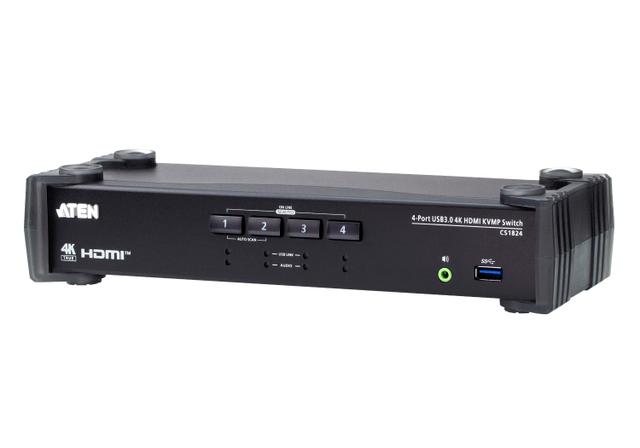
ATEN CS1824
Expert rating7.7 / 10
- Port Count:
- 4
- Video Standard:
- HDMI
- Max Resolution:
- 4K@60Hz
Consumercarts is reader-supported. Learn more
Disclaimer: The price and specification of the given product may differ from the actual product. Please confirm on the retailer's website before buying.
Manufacturer: ATEN Last updated: 2026-10-06
ATEN CS1824 Review
The ATEN CS1824 is a 4-port USB 3.0 HDMI KVMP switch that runs four computers from one HDMI monitor, keyboard and mouse, with a 2-port USB 3.1 Gen 1 hub and audio switching.
ATEN's current CS1824 page lists 4096x2160 at 60Hz and 2560x1440 at 144Hz over HDMI 2.0, not the 30Hz cap this model is often sold under. That makes it a full-speed single-monitor switch for four machines, with ATEN's default EDID mode, Video DynaSync, RS-232 control and mouse switching on top of buttons and hotkeys.
We would buy it for a four-PC desk with one 4K monitor. If you run two monitors per machine, step up to the CS1844. If all four machines are networked Windows PCs with their own screens, Mouse Without Borders is free.
Specifications
Computers: 4
Monitors: 1 (HDMI console port)
Video: HDMI 2.0, HDCP compliant
Max resolution: 4096x2160 at 60Hz, 2560x1440 at 144Hz
EDID: ATEN default EDID mode, Video DynaSync
Switching: pushbuttons, hotkeys, mouse, RS-232 (RJ-11 serial port), Auto Scan 1 to 99 seconds
USB: 4x USB 3.1 Gen 1 Type-B to computers, 2x USB 3.1 Gen 1 hub ports (front and rear), 2x USB Type-A console ports
Audio: 3.5mm per port, Audio Mixer Mode, HD audio over HDMI
Power: 5V DC, 2.535W typical
Size: 27.0 x 8.8 x 5.55cm, 0.94kg, metal and plastic
In the box
One CS1824, four HDMI 2.0 cables, four USB 3.0 cables and four audio cables, all 1.8m, plus a power adapter and user instructions.
That is a full set for four computers, which is not a given in this category. ATEN does not list a wired remote or an RS-232 cable for this model, so budget for a serial lead if you plan to script switching.
If your machines sit more than about a metre and a half from the switch, the 1.8m cables will be the limit, not the switch.
Design and build
A metal and plastic box, 27.0 x 8.8 x 5.55cm and 0.94kg. Small enough to sit beside a monitor stand.
One hub port is on the front, one on the rear, so a flash drive does not mean reaching behind the desk. Each port has three LEDs: online, USB link and audio focus, which helps once you start splitting focus between machines.
It draws 2.535W typical from a 5V adapter. ATEN rates it for 0 to 40C.
The headline claim, examined
HDMI 2.0 tops out at a 600 MHz TMDS clock: 18 Gbit/s on the wire, 14.4 Gbit/s of actual pixel data after 8b/10b encoding.
4K at 60Hz uses a 594 MHz pixel clock. At 8-bit RGB that is 14.26 Gbit/s of data, or 17.82 Gbit/s on the wire. It fits, at 99 percent of the ceiling.
10-bit 4K60 RGB would need 22.3 Gbit/s. It does not fit. HDR at 4K60 over any HDMI 2.0 switch means 4:2:2 chroma.
1440p at 144Hz runs at roughly 587 MHz, about 14.1 Gbit/s of data. Also fits, also with almost nothing spare.
So ATEN's 4K60 and 1440p144 claims are physically plausible on HDMI 2.0.
The defining limitation
There is one video output. Four computers, one monitor. If any of your machines drives two screens, this switch cannot carry the second one.
The second catch is audio. ATEN notes that HD audio carried inside HDMI cannot be switched independently. It follows the video. Only the analog 3.5mm path gets independent focus and the Audio Mixer Mode, which can blend two sources.
Mouse switching also needs a plain USB 3-button wheel mouse in emulation mode. A gaming mouse with extra buttons may force you back to hotkeys.
Living with it
ATEN's default EDID mode and Video DynaSync exist to stop the black screen and resolution reset when you switch or boot. That is the main reason to pay ATEN money over a generic switch.
With a single monitor, window layout matters less than on a dual-head unit. If windows still jump on switch:
Windows 11: Settings, System, Display, Multiple displays. Tick "Remember window locations based on monitor connection" and untick "Minimize windows when a monitor is disconnected".
Windows 10 has no such switch. PersistentWindows, free on GitHub, restores layouts after a link drop.
macOS: in System Settings, Desktop and Dock, Mission Control, turn off "Automatically rearrange Spaces based on most recent use".
Versus the competition
TESmart HKS401-P23-V2: four computers, one HDMI 2.0 monitor, 4K60 plus 1440p120 and 1080p240, EDID emulation and a wired remote. Winner for high-refresh gaming on one PC.
SIIG CE-H25611-S1: four HDMI 2.0 inputs, 4K, fixed EDID, buttons and hotkeys. Winner if you want the simplest box.
ATEN CS1844: same family, two HDMI monitors per computer. Winner for dual-screen desks.
Mouse Without Borders: free, four Windows PCs, each on its own screen. Winner unless you have fewer monitors than computers.
Overall, the CS1824 wins on control options: RS-232, mouse switching and audio mixing in one box.
Our verdict
Reviewed by Burooj Alam. Rated by us, not by users.
Expert rating7.7 / 10
A solid 4-port HDMI 2.0 switch for office and server-console use, with full 4K@60Hz support.
Best for
- Four-computer desks with one 4K HDMI monitor
- Labs and control rooms that want RS-232 scripted switching
- Users who mix audio from two machines at once
Not for
- Dual-monitor setups (see the ATEN CS1844)
- DisplayPort-only machines without HDMI outputs
- Buyers who want HDR at 4K60 in full RGB
Specifications
What these specs meanIdentity
| Brand | ATEN |
|---|---|
| Model Number | CS1824 |
| Switching Method | Pushbutton, hotkey, mouse, RS-232 commands |
Topology
| Computers Supported | 4 computers |
|---|---|
| KVM Segment | Desk |
Video & Features
| Video Standard | HDMI |
|---|---|
| Max Resolution | 4096x2160 @ 60Hz |
| USB Hub Ports | 2 |
| Audio Support | Yes |
Per display capability
| Max Resolution Single Display | 4096x2160 |
|---|---|
| Max Refresh At Max Resolution | 60 Hz |
| Max Refresh At 4K | 60 Hz |
USB peripheral switching
| USB Switching Speed | USB 3.0 5Gbps |
|---|
Switching control
| Mouse Or Cursor Switching | Yes |
|---|
In the box and price
| Price | 426.51 USD |
|---|
FAQs
Does the ATEN CS1824 do 4K at 60Hz?
ATEN's current product page says yes: 4096x2160 and 3840x2160 at 60Hz, plus 2560x1440 at 144Hz, over HDMI 2.0. Some listings still describe it as 4K at 30Hz. Check the seller's listing against ATEN's spec before buying.
Can I run two monitors per computer on the CS1824?
No. It has one HDMI console port. For two monitors per computer, ATEN's CS1844 is the four-port dual-display version.
How do I switch between computers?
Front pushbuttons, keyboard hotkeys, mouse switching in emulation mode with a USB 3-button wheel mouse, or RS-232 commands through the RJ-11 serial port. Auto Scan cycles ports every 1 to 99 seconds.
Will HDR work through it?
At 4K60 only with 4:2:2 chroma, because 10-bit RGB needs about 22.3 Gbit/s and HDMI 2.0 carries 18. ATEN's page does not mention HDR, so treat it as unconfirmed.
Can I hear one computer while working on another?
Yes, for analog audio. The 3.5mm path switches independently and Audio Mixer Mode can mix two sources. HD audio inside HDMI follows the video and cannot be split off.
Do I need to buy cables?
Not for four computers within 1.8m. ATEN includes four HDMI 2.0, four USB 3.0 and four audio cables. Longer runs need your own cables.
Is the CS1824 worth it over a cheaper HDMI KVM?
If you want RS-232 control, audio mixing and ATEN's EDID handling, yes. If you only need hotkey switching for one 4K monitor, a TESmart HKS401-P23-V2 covers that with higher refresh options.
Featured in
Compare and read more
- Adder ALIF1104T (HDMI KVM-over-IP Transmitter over 1GbE) vs ATEN CS1824 (4-Port USB HDMI KVMP Switch / 4K@60Hz)
- Adder AdderView PRO AV4PRO (4-8 Computers / 1-4 Monitors / DVI-VGA / Modular Multi-Head) vs ATEN CS1824 (4-Port USB HDMI KVMP Switch / 4K@60Hz)
- Adder AdderLink IPEPS (IPEPS) (1 Server / IP-Based Remote KVM over IP / Single-Port Extender) vs ATEN CS1824 (4-Port USB HDMI KVMP Switch / 4K@60Hz)
- Adder ADDERView PRO (AV4PRO-DVI) (4 Computers / DVI / Secure Desktop KVM) vs ATEN CS1824 (4-Port USB HDMI KVMP Switch / 4K@60Hz)
- Adder ALIF1002P (Network DVI Extender Transmitter & Receiver) vs ATEN CS1824 (4-Port USB HDMI KVMP Switch / 4K@60Hz)
- Do KVM Switches Support 144Hz? What to Check Before You Buy
- EDID Emulation Explained: Why Your Monitor Resets When You Switch