
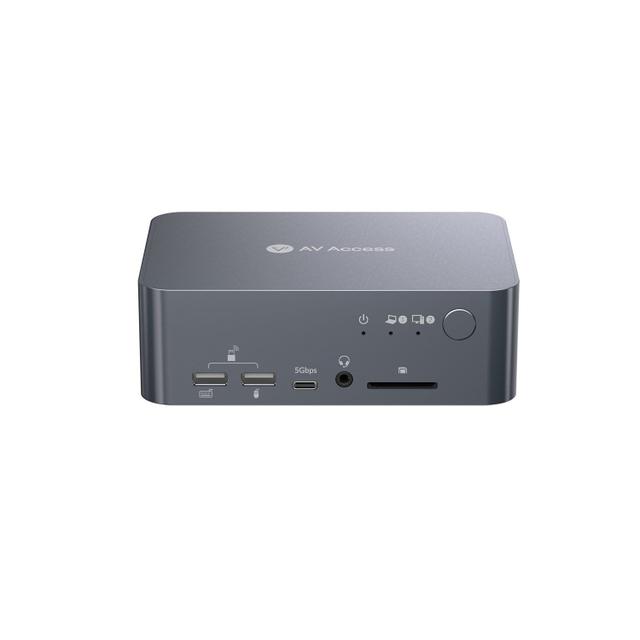
AV Access iDock C10 USB-C KVM Docking Station
Expert rating9 / 10
- Port Count:
- 2
- Video Standard:
- USB-C
- Max Resolution:
- 4K@60Hz
Consumercarts is reader-supported. Learn more
Disclaimer: The price and specification of the given product may differ from the actual product. Please confirm on the retailer's website before buying.
Manufacturer: AV Access Last updated: 2026-10-10
AV Access iDock C10 USB-C KVM Docking Station Review
The AV Access KVM Switch Dock is a 2-computer, 2-monitor KVM switch supporting dual 4K@60Hz over USB-C with 60W power delivery per device, EDID emulation for stable switching, plus 1G Ethernet and an SD card slot.
Named the best KVM switch for two computers and two monitors in 2026, it handles dual 4K displays at 60Hz, includes EDID emulation for stable switching, supports USB-C laptops with 60W power delivery per device, and adds 1G Ethernet and an SD card slot. EDID emulation is specifically the most important feature for stable switching, preventing the monitor flicker and signal renegotiation that plagues cheaper KVMs lacking this feature. 60W USB-C power delivery per device is a genuinely meaningful inclusion for laptop users, letting the same single cable handle video, USB peripherals, and laptop charging simultaneously without a separate power brick. The added 1G Ethernet and SD card slot extend this beyond a pure KVM into a genuine docking station, letting it serve double duty for users who want one device handling both computer switching and general connectivity expansion.
Best for Two Computers and Two Monitors
Named the best KVM switch for two computers and two monitors in 2026, handles dual 4K displays at 60Hz, includes EDID emulation for stable switching, supports USB-C laptops with 60W power delivery per device, and adds 1G Ethernet and an SD card slot.
EDID Emulation for Stable Switching
EDID emulation is specifically the most important feature for stable switching, preventing the monitor flicker and signal renegotiation that plagues cheaper KVMs lacking this feature.
USB-C Docking and Expansion
60W USB-C power delivery per device is a genuinely meaningful inclusion for laptop users, letting the same single cable handle video, USB peripherals, and laptop charging simultaneously without a separate power brick. The added 1G Ethernet and SD card slot extend this beyond a pure KVM into a genuine docking station, letting it serve double duty for users who want one device handling both computer switching and general connectivity expansion.
Comparison to Alternatives
Versus the Hearvo HDMI KVM Switch, that budget option skips USB-C docking and Ethernet/SD card expansion for a considerably lower price, appropriate for buyers not needing laptop charging or docking features. Versus the ConnectPro UDH2-4K-PLUS, that's a similar USB-C plus power delivery option for laptop users in professional environments, a direct competitor in the same use case.
Our verdict
Reviewed by Burooj Alam. Rated by us, not by users.
Expert rating9 / 10
The best KVM for two-computer, two-monitor setups with USB-C laptops, docking station features alongside stable EDID-based switching.
Best for
- Two-computer, two-monitor setups specifically involving USB-C laptops wanting docking station features alongside KVM switching.
Not for
- Budget buyers who don't need USB-C docking, Ethernet, or SD card features, a simpler HDMI-only KVM covers basic switching for less.
Specifications
What these specs meanHow much this switch can do compared with other desk KVM switches, rated from its specifications.
Identity
| Brand | AV Access |
|---|---|
| Model Number | iDock C10 |
Topology
| Computers Supported | 2 computers, 2 monitors |
|---|---|
| Displays Per Computer | 2 displays |
| KVM Segment | Desk |
Video & Features
| Video Standard | USB-C |
|---|---|
| Max Resolution | Dual 4K@60Hz |
| USB Hub Ports | 3 |
Video interface
| Video Connector | Mixed |
|---|
Per display capability
| Max Resolution Single Display | 3840x2160 |
|---|---|
| Max Refresh At Max Resolution | 60 Hz |
| Max Refresh At 4K | 60 Hz |
Display continuity
| EDID Emulation | Yes |
|---|
USB peripheral switching
| USB Switching Speed | USB 3.0 5Gbps |
|---|
USB-C and power delivery
| USB-C Host Ports | 1 ports |
|---|---|
| Power Delivery Wattage | 60W per device (USB-C) |
Switching control
| Button Switching | Yes |
|---|
Physical and power
| External Power Required | Yes |
|---|
In the box and price
| Price | 203.99 USD |
|---|
FAQs
What are the key specifications of the AV Access KVM Switch Dock (2 Computers / 2 Monitors / Dual 4K@60Hz / USB-C 60W PD / EDID Emulation / 1G Ethernet / SD Card Slot)?
Key specs for the AV Access iDock C10 USB-C KVM Docking Station: USB Hub Ports 3x USB 3.0, 2x USB 2.0, 1x USB-C (5Gbps), Max Resolution Dual 4K@60Hz, Max Resolution Single Display 3840x2160, Max Refresh At Max Resolution 60 Hz, Max Resolution Per Display 3840x2160.
Who is the AV Access KVM Switch Dock (2 Computers / 2 Monitors / Dual 4K@60Hz / USB-C 60W PD / EDID Emulation / 1G Ethernet / SD Card Slot) best suited to?
Best suited to: Two-computer, two-monitor setups specifically involving USB-C laptops wanting docking station features alongside KVM switching.
What are the drawbacks of the AV Access KVM Switch Dock (2 Computers / 2 Monitors / Dual 4K@60Hz / USB-C 60W PD / EDID Emulation / 1G Ethernet / SD Card Slot)?
Not the best fit for: Budget buyers who don't need USB-C docking, Ethernet, or SD card features, a simpler HDMI-only KVM covers basic switching for less.
Featured in
Compare and read more
- Adder AdderView PRO AV4PRO (4-8 Computers / 1-4 Monitors / DVI-VGA / Modular Multi-Head) vs AV Access iDock C10 USB-C KVM Docking Station (Dual 4K60)
- Adder ALIF1104T (HDMI KVM-over-IP Transmitter over 1GbE) vs AV Access iDock C10 USB-C KVM Docking Station (Dual 4K60)
- Adder AdderLink IPEPS (IPEPS) (1 Server / IP-Based Remote KVM over IP / Single-Port Extender) vs AV Access iDock C10 USB-C KVM Docking Station (Dual 4K60)
- Adder ADDERView PRO (AV4PRO-DVI) (4 Computers / DVI / Secure Desktop KVM) vs AV Access iDock C10 USB-C KVM Docking Station (Dual 4K60)
- Adder ALIF1002P (Network DVI Extender Transmitter & Receiver) vs AV Access iDock C10 USB-C KVM Docking Station (Dual 4K60)
- Best KVM Switch for a Two-PC Battlestation (2026)
- Do KVM Switches Support 144Hz? What to Check Before You Buy
- EDID Emulation Explained: Why Your Monitor Resets When You Switch