
CKL CKL-42MVKVM-A
Expert rating7 / 10
- Ports:
- 4 computers, 2 monitors, multi-viewer
- Video:
- HDMI 2.0, 4K@30Hz
- USB Hub:
- 2x USB 3.0 + 2x USB 2.0
- Price:
- $389.00
Consumercarts is reader-supported. Learn more
Disclaimer: The price and specification of the given product may differ from the actual product. Please confirm on the retailer's website before buying.
Manufacturer: CKL Last updated: September 16, 2026
Where to buy
- CKL StoreGo to store
CKL CKL-42MVKVM-A Review
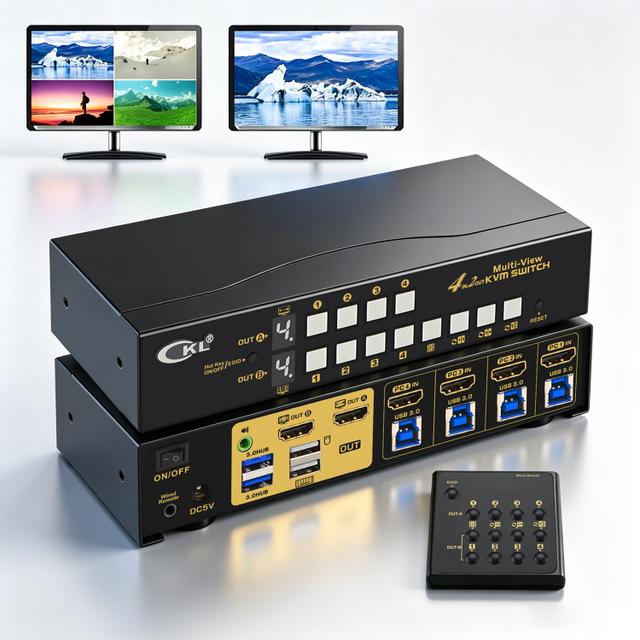
The CKL-42MVKVM-A is a 4x2 multi-viewer HDMI KVM switch for 4 computers and 2 monitors, running 4K@30Hz or 1080p@60Hz with quad-view, picture-in-picture and dual-view layouts, fixed EDID, a USB 3.0 hub, hotkey, mouse-click and wired remote switching.
One screen shows you all four machines. The other gives you one of them full screen with the keyboard, mouse and USB attached. That's the whole idea, and it's a good one.
The price is 4K at 30Hz. That's not CKL being cheap. A 2,255 dollar ATEN CM1284 has the same 30Hz ceiling, because compositing four 4K streams is a memory bandwidth problem, not a cable problem.
Before you buy, answer one question. Do you need to watch all four at once, or just switch between them? If it's just switching, CKL's own 942HUA-3 at 199 dollars gives you the same four computers and two monitors at 4K60, for half the money.
Specifications
Computers: 4 (or 2 dual-output, or 1 quad-output)
Monitors: 2, OUT-A and OUT-B, not interchangeable
Video: HDMI 2.0
Max resolution: 3840x2160@30Hz or 1920x1080@60Hz, fixed
1440p: not supported at any refresh
Both outputs forced to the same resolution
EDID: two fixed profiles, toggled by button
Switching: hotkey, mouse click, wired remote, panel button
USB: 4x USB 3.0 Type-B in, 2x HID + 2x USB 3.0 out
Audio: 2x 3.5mm, de-embedded from HDMI
Size: 200 x 75 x 42mm, 0.65kg, metal
Power: 5V DC, 5W
Warranty: 1 year
In the box
The switch, 4x HDMI 2.0 cables, 4x USB 3.0 cables, the wired remote, a power adapter and a manual.
That's a genuinely generous bundle. One owner put the cables alone at 50 dollars or more.
The remote runs about 5.9 feet and CKL says it extends to around 50 feet with a longer 3.5mm cable.
One warning from page one of the manual: power-on order matters. KVM first, then monitors, then computers. Get it wrong and you'll be troubleshooting a blank screen that isn't a fault.
One owner reported receiving no printed manual. Another did.
How the two outputs work
This is the bit the spec sheet doesn't explain, and it's the reason to buy the thing.
OUT-A is your work screen. Always one machine, full screen. Switching OUT-A also moves the keyboard, mouse, USB 3.0 hub and audio to that machine.
OUT-B is the wall. It cycles through layouts: equal four-way split, one large plus three small, picture-in-picture, dual view, single full screen, or mirror.
So you work full screen on one machine while watching the other three. Same architecture ATEN uses on the CM1284 at nearly six times the price.
With two dual-GPU machines instead of four, you also get extended and splicing modes.
Does the mouse cross the quadrants?
Yes, but not the way you're imagining.
CKL calls it Through-screen Operation Mode. The cursor moves between PC1 and PC4 up, down, left, right or diagonally.
The catch is you don't just drift across a border the way you would on an ATEN. You hold the middle mouse button down, drag to the target pane, then release. Hotkey mode has to be on.
It works. It's also buried behind a gesture nobody discovers on their own. One of CKL's seven reviewers asked for a feature the unit already has, which tells you how findable it is.
There's also a sync mode that drives all four machines with the same keystrokes at once.
Why 4K is capped at 30Hz
HDMI 2.0 carries 18 Gbps. 4K60 at 8-bit needs 17.82 Gbps on the wire. It fits, barely. That's why a plain HDMI 2.0 KVM does 4K60.
The output isn't the problem. A multi-viewer has to receive four streams at once, decode each to pixels, scale them, hold them in memory and composite a new image.
A 4K frame is 24.9MB. Writing four of them plus reading for compositing needs roughly 7 GB/s at 30Hz and 15 GB/s at 60Hz. One cheap DDR3 channel achieves about 4.5 GB/s.
4K30 fits on a narrow memory bus. 4K60 needs a wider one, which means more pins, more layers, more money.
The ATEN proves it's not CKL being cheap
The ATEN CM1284 costs 2,254.95 dollars at B&H. Four in, two out, same architecture, 2-year warranty, true boundless mouse switching.
Its multi-view ceiling is 4096x2160 at 30Hz.
Same 30Hz. Nearly six times the price.
The AV Access 4KMV41 at 199 dollars: 4K30. SIIG's 2-port at around 600: 4K30. Rextron's QSKEM-2014: 4K30.
The only units breaking it are newer silicon with one output instead of two, like Rextron's QSKM-3114 and the OREI UKM-401MV.
So if you want 4K60 multi-view, you give up the second monitor. That's the actual trade, and nobody in the category states it.
What 30Hz costs you
Text stays sharp at 30Hz. The pixels are exact. The problem is scaling, not refresh.
A 4K source shrunk into one quadrant of a 4K screen lands in 1920x1080 of screen area. Half linear scale. Nine point text becomes four and a half point. You can see a machine is doing something. You cannot read it.
The fix nobody tells you: set the three watched machines to 1080p. The quadrants become pixel perfect.
Cursor position updates every 33ms instead of 17ms, plus the scaler's own delay. Expect noticeable pointer drag and overshoot on small targets.
Also gone: HDR, VRR, 1440p at any refresh, and per-monitor resolution.
Where CKL is honest about the problems
The manual's own FAQ is more useful than any review, because CKL pre-announces its bugs.
Question one: if the keyboard and mouse stop working after a while, power cycle the switch so it re-identifies the USB devices. That's a vendor telling you about a USB enumeration bug up front.
Gaming mice and multi-function keyboards may not work on the HID ports. Move them to the USB 3.0 hub, which also kills hotkeys, mouse-click switching and through-screen mode.
Audio is fragile. You must pick HDMI audio in the OS, and in split modes it defaults to PC1 only. CKL's own workaround is a USB sound dongle.
Blank screen after install is question two. Press the EDID button.
Returns and warranty
One year warranty. ATEN gives two, SIIG gives two, TESmart gives up to five. CKL is the shortest in this group.
Returns are 30 days with a 20 percent restocking fee, and you pay return shipping. Original shipping is not refunded.
On a 389 dollar switch, changing your mind costs about 78 dollars plus freight. That's the harshest term of any unit in this comparison and you should know it before ordering.
Defect claims need a video of the fault emailed within 30 days.
US returns go to Irving, Texas. International returns go to Shenzhen.
Versus the competition
CKL 942HUA-3, 199 dollars: same brand, same four computers and two monitors, but 4K@60Hz, EDID emulation and hotkeys. No multi-view. Winner for most buyers. The 190 dollar premium on the -A buys exactly one thing, seeing all four at once, and costs you 4K60, 1440p, HDR and low latency.
ATEN CM1284, 2,254.95 dollars: true boundless mouse switching, daisy-chains to 16 sources, 2-year warranty. Same 30Hz ceiling. Winner if budget is not the constraint.
OREI UKM-401MV, 219 dollars: claims 4K60 multi-view, seven modes, optical audio out. One output only, so no full-screen work monitor. Winner on price and refresh, loses the whole two-output idea.
Mouse Without Borders, free: cursor and clipboard across four Windows PCs, each on its own native screen. Winner unless you physically have fewer monitors than machines.
Price and availability
389 dollars direct from CKL, in stock. 4.7 stars from seven reviews, hosted on CKL's own site.
Watch the model number. There is a CKL-42MVKVM without the A at 299 dollars. The 90 dollar difference buys keyboard hotkey switching, mouse-click switching and through-screen mode. Search results mix them up constantly.
A Newegg marketplace seller lists the cheaper non-A model at 399.28 shipping from China, which is more than CKL charges direct for the better unit. Buy direct.
Also ignore one bullet on CKL's own page claiming 4K@60Hz. The manual says 4K30 and 1080p60 only, and the manual is right.
FAQ: setup
What order do I power things on?
KVM first, then monitors, then computers. It's page one of the manual and it prevents a blank screen that looks like a fault.
How do I switch?
Double-tap right Ctrl, then the port number, then Enter. Remappable to Num Lock, Scroll Lock or left Ctrl. Or use the panel button, the wired remote, or click into a pane.
My keyboard and mouse stopped working.
Power cycle the switch. CKL documents this as expected behaviour, not a fault.
I have no picture after installing.
Press the EDID button. It toggles between a 1080p60 and a 4K30 profile.
FAQ: performance
Can I read the quadrants?
Not if the sources are 4K. A 4K source in a quadrant lands at half linear scale and nine point text becomes four and a half. Set the watched machines to 1080p and it's pixel perfect.
Does the mouse move between panes?
Yes. Hold the middle mouse button, drag to the pane, release. Hotkey mode must be on.
Will 30Hz feel bad?
For supervising machines, no. For working, yes. Expect visible cursor drag.
Can I run 1440p?
No. Only 4K30 and 1080p60 exist on this unit, and both outputs are forced to match.
FAQ: buying
Do I actually need multi-view?
Only if you need to watch four machines at once. If you just switch between them, CKL's 942HUA-3 at 199 does the same ports at 4K60 for half the money.
What's the difference between 42MVKVM and 42MVKVM-A?
Ninety dollars, and the A adds keyboard hotkey switching, mouse-click switching and through-screen cursor movement. Worth it.
Can I return it?
Thirty days, 20 percent restocking fee, you pay return shipping. About 78 dollars to change your mind.
Is software cheaper?
Mouse Without Borders is free and does four Windows PCs. It cannot show you four machines on one screen.
Our verdict
Reviewed by Burooj Alam. Rated by us, not by users.
Expert rating7 / 10
Two outputs doing different jobs is the right design. One screen works full screen with the keyboard and USB attached, the other shows all four machines. A 2,255 dollar ATEN CM1284 does the same thing with the same 4K@30Hz ceiling, so at 389 dollars this is 83 percent cheaper for the same architecture and CKL throws in eight cables. The 30Hz cap is a memory bandwidth limit the whole category shares, not CKL cutting corners. What holds the score back is a 1-year warranty against ATEN's 2 and TESmart's 5, a 20 percent restocking fee that costs 78 dollars to change your mind, and no 1440p at any refresh. Buy it if watching four machines at once is the job. If you only ever work on one at a time, CKL's own 942HUA-3 at 199 is 4K60 and half the price.
Best for
- Your job is watching four machines and occasionally acting on one, which is what this design is for
- You have fewer monitors than computers, the one problem software cursor sharing cannot solve
- Your machines are air-gapped or on separate security domains, where software sharing is not an option
- You want the ATEN CM1284 architecture at 17 percent of the ATEN price
Not for
- You only ever work on one machine at a time. CKL's own 942HUA-3 at 199 is 4K60 for half the money
- You need 4K at 60Hz, 1440p, HDR or VRR. None of them exist on this unit
- Anything twitch-based. 30Hz plus scaler delay means visible cursor drag
- You need to read detail in the quadrants from 4K sources. Set them to 1080p or you can't
- All four machines are networked Windows boxes with their own screens. Mouse Without Borders is free
Specifications
What these specs meanHow much this switch can do compared with other desk KVM switches, rated from its specifications.
Identity
| Switching Method | Keyboard hotkey, mouse, wired remote, push button |
|---|
Topology
| Computers Supported | 4 computers |
|---|---|
| Displays Per Computer | 2 displays |
| KVM Segment | Desk |
Video & Features
| Video Standard | HDMI |
|---|---|
| Max Resolution | 4K (3840x2160) |
| USB Hub Ports | 2 |
| Audio Support | Yes |
Video interface
| Video Interface Version | HDMI 2.0 |
|---|
Per display capability
| Max Resolution Single Display | 3840x2160 |
|---|---|
| Max Refresh At Max Resolution | 30Hz (at 4K); 60Hz at 1080p |
| Max Refresh At 4K | 30 Hz |
Display continuity
| EDID Emulation | Yes |
|---|
USB peripheral switching
| USB Switching Speed | USB 3.0 5Gbps |
|---|
USB-C and power delivery
| Power Delivery Wattage | No |
|---|
Physical and power
| External Power Required | Yes |
|---|---|
| Power Supply | DC 5V power adapter (included) |
In the box and price
| Price | 389.00 USD |
|---|---|
| Included Cables | 4 HDMI 2.0 cables, 4 USB 3.0 cables, wired remote |
FAQs
What are the key specifications of the CKL CKL-42MVKVM-A (4x2 Multi-Viewer HDMI KVM Switch / Dual Monitor / 4K@30Hz)?
Key specs for the CKL CKL-42MVKVM-A: USB Hub Ports 2 USB 3.0 (peripherals) + 2 USB 2.0 (keyboard/mouse), Max Resolution 4K (3840x2160), Max Resolution Per Display 3840x2160, USB Version USB 3.0 (5Gbps), Audio Support Yes (decoded HDMI digital audio via 3.5mm jack), Video Standard HDMI.
Who is the CKL CKL-42MVKVM-A (4x2 Multi-Viewer HDMI KVM Switch / Dual Monitor / 4K@30Hz) best suited to?
Your job is watching four machines and occasionally acting on one, which is what this design is for. You have fewer monitors than computers, the one problem software cursor sharing cannot solve. Your machines are air-gapped or on separate security domains, where software sharing is not an option. You want the ATEN CM1284 architecture at 17 percent of the ATEN price.
What are the drawbacks of the CKL CKL-42MVKVM-A (4x2 Multi-Viewer HDMI KVM Switch / Dual Monitor / 4K@30Hz)?
Not the best fit for: You only ever work on one machine at a time. CKL's own 942HUA-3 at 199 is 4K60 for half the money; You need 4K at 60Hz, 1440p, HDR or VRR. None of them exist on this unit; Anything twitch-based. 30Hz plus scaler delay means visible cursor drag; You need to read detail in the quadrants from 4K sources. Set them to 1080p or you can't; All four machines are networked Windows boxes with their own screens. Mouse Without Borders is free.
Compare and read more
- Adder AdderLink IPEPS (IPEPS) (1 Server / IP-Based Remote KVM over IP / Single-Port Extender) vs CKL CKL-42MVKVM-A (4x2 Multi-Viewer HDMI KVM Switch / Dual Monitor / 4K@30Hz)
- Adder ADDERView PRO (AV4PRO-DVI) (4 Computers / DVI / Secure Desktop KVM) vs CKL CKL-42MVKVM-A (4x2 Multi-Viewer HDMI KVM Switch / Dual Monitor / 4K@30Hz)
- Adder ALIF1002P (Network DVI Extender Transmitter & Receiver) vs CKL CKL-42MVKVM-A (4x2 Multi-Viewer HDMI KVM Switch / Dual Monitor / 4K@30Hz)
- Adder AdderView PRO AV4PRO (4-8 Computers / 1-4 Monitors / DVI-VGA / Modular Multi-Head) vs CKL CKL-42MVKVM-A (4x2 Multi-Viewer HDMI KVM Switch / Dual Monitor / 4K@30Hz)
- Adder ALIF1104T (HDMI KVM-over-IP Transmitter over 1GbE) vs CKL CKL-42MVKVM-A (4x2 Multi-Viewer HDMI KVM Switch / Dual Monitor / 4K@30Hz)
- EDID Emulation Explained: Why Your Monitor Resets When You Switch
- Does a KVM Switch Work With Two Different Monitors?