
Corsair iCUE Link 3500X
Expert rating8 / 10
- Case Type:
- Mid-Tower
- Motherboard Support:
- ATX
- GPU Clearance:
- 370mm
- Radiator Support:
- 360mm front
Consumercarts is reader-supported. Learn more
Disclaimer: The price and specification of the given product may differ from the actual product. Please confirm on the retailer's website before buying.
Manufacturer: Corsair Last updated: 2026-09-12
Where to buy
- CorsairGo to store
- NeweggGo to store
Corsair iCUE Link 3500X (Mid-Tower ATX/Dual-Chamber Tempered Glass/3x QX120 iCUE Link RGB Fans Included/Single-Cable Fan Hub) Review
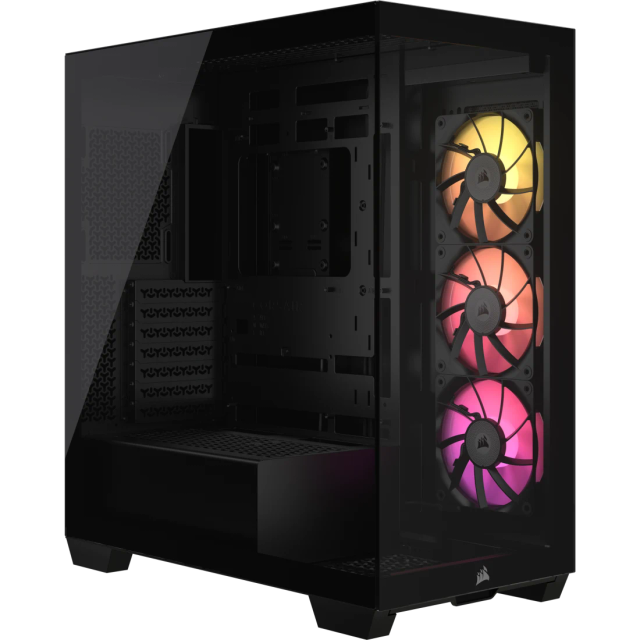
If you're building around Corsair's iCUE Link ecosystem and want a case that ships with the fans already using it, the iCUE Link 3500X is the one to check.
It comes with three QX120 iCUE Link fans daisy-chained on a single cable instead of the usual rat's nest of individual PWM and RGB headers, which is the whole selling point if you're already committed to Corsair's connector system.
iCUE Link System
Each fan connects to the next with one small link cable instead of separate power and RGB runs, and the chain terminates in a single cable back to the motherboard and a SATA power lead. It cuts real time out of a build if you're running six or more Link-compatible fans.
Comparison to Alternatives
It's a mid-tower counterpart to the Corsair 6500X in our catalog, smaller and cheaper but sharing the same dual-chamber design; against the older Corsair iCUE 5000T RGB, it swaps standard RGB fans for the newer Link connector standard.
Specifications
Identity
| Brand | Corsair |
|---|---|
| Model | iCUE Link 3500X |
| Typical Price | 170 USD |
Design
| Motherboard Support | ATX, mATX, ITX |
|---|---|
| Case Type | Mid-Tower |
| Panel Type | Tempered glass, dual-chamber |
Clearance & Cooling
| GPU Clearance | 370 mm |
|---|---|
| CPU Cooler Clearance | 170 mm |
| Included Fans | 3 |
| Radiator Support | Front up to 360mm, top up to 360mm |
| Front USB-C | Yes |
| Dimensions | 478 x 230 x 465mm |
|---|
Expert Review
Reviewed by Burooj Alam. Rated by us, not by users.
Expert rating8 / 10
The cleanest cabling you'll get out of the box if you're buying into iCUE Link fans, with a solid mid-tower dual-chamber design underneath.
Best for
- iCUE Link ecosystem builds
- Cable-management-obsessed builders
- Mid-size dual-chamber showcase builds
Not for
- Non-Corsair fan ecosystems
- E-ATX motherboards
- Budget builds
FAQs
What are the key specifications of the Corsair iCUE Link 3500X (Mid-Tower ATX/Dual-Chamber Tempered Glass/3x QX120 iCUE Link RGB Fans Included/Single-Cable Fan Hub)?
The Corsair iCUE Link 3500X (Mid-Tower ATX/Dual-Chamber Tempered Glass/3x QX120 iCUE Link RGB Fans Included/Single-Cable Fan Hub) is a PC case from Corsair. Key specs: Case Type Mid-Tower, Motherboard Support ATX, mATX, ITX, Panel Type Tempered glass, dual-chamber, GPU Clearance 370, CPU Cooler Clearance 170.
Will the Corsair iCUE Link 3500X (Mid-Tower ATX/Dual-Chamber Tempered Glass/3x QX120 iCUE Link RGB Fans Included/Single-Cable Fan Hub) work with my current setup?
The Corsair iCUE Link 3500X (Mid-Tower ATX/Dual-Chamber Tempered Glass/3x QX120 iCUE Link RGB Fans Included/Single-Cable Fan Hub) lists Motherboard Support is ATX, mATX, ITX. Check that against the hardware you already own before buying, since this is the field that most often decides whether a part fits.
Who is the Corsair iCUE Link 3500X (Mid-Tower ATX/Dual-Chamber Tempered Glass/3x QX120 iCUE Link RGB Fans Included/Single-Cable Fan Hub) best suited to?
It suits icue link ecosystem builds, cable-management-obsessed builders, mid-size dual-chamber showcase builds.
What are the drawbacks of the Corsair iCUE Link 3500X (Mid-Tower ATX/Dual-Chamber Tempered Glass/3x QX120 iCUE Link RGB Fans Included/Single-Cable Fan Hub)?
It is a poor fit for non-corsair fan ecosystems, e-atx motherboards, budget builds.
Compare and read more
- Cooler Master HAF 500 (Mid-Tower ATX/Polygonal Mesh Front/3x 120mm ARGB Fans Included/Airflow-Focused) vs Corsair iCUE Link 3500X (Mid-Tower ATX/Dual-Chamber Tempered Glass/3x QX120 iCUE Link RGB Fans Included/Single-Cable Fan Hub)
- Corsair iCUE Link 3500X (Mid-Tower ATX/Dual-Chamber Tempered Glass/3x QX120 iCUE Link RGB Fans Included/Single-Cable Fan Hub) vs Deepcool CK560 (Dual-Chamber Mid-Tower ATX/Mesh Front/4x 120mm ARGB PWM Fans/360mm Radiator Support)
- Corsair iCUE Link 3500X (Mid-Tower ATX/Dual-Chamber Tempered Glass/3x QX120 iCUE Link RGB Fans Included/Single-Cable Fan Hub) vs NZXT H5 Elite (Mid-Tower ATX/Tempered Glass Front & Side/3x F-Series RGB Fans/Built-In Fan Controller)
- ASUS TUF Gaming GT502 (Mid-Tower ATX/Mesh Front Panel/3x 140mm ARGB Fans/360mm Radiator Support) vs Corsair iCUE Link 3500X (Mid-Tower ATX/Dual-Chamber Tempered Glass/3x QX120 iCUE Link RGB Fans Included/Single-Cable Fan Hub)
- Corsair iCUE Link 3500X (Mid-Tower ATX/Dual-Chamber Tempered Glass/3x QX120 iCUE Link RGB Fans Included/Single-Cable Fan Hub) vs Deepcool CH780 (Full-Tower E-ATX Support/Dual-Chamber Panoramic Glass/4x 140mm ARGB Fans Included/High-Capacity Showcase)