
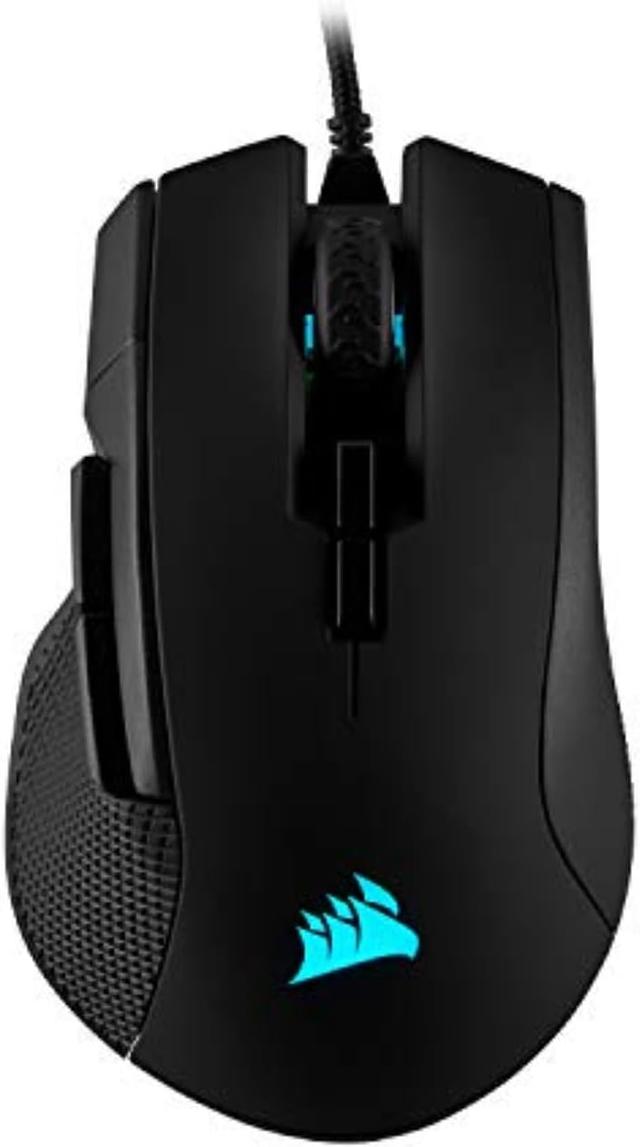
Corsair Ironclaw RGB
Expert rating8 / 10
- Weight:
- 105g
- Connectivity:
- Wired
- Shape:
- Ergonomic
- Max DPI:
- 18
Consumercarts is reader-supported. Learn more
Disclaimer: The price and specification of the given product may differ from the actual product. Please confirm on the retailer's website before buying.
Manufacturer: Corsair Last updated: 2026-09-12
Corsair Ironclaw RGB Review
The Corsair Ironclaw RGB gets searched by players who specifically want a claw-grip friendly ergonomic shape, since Corsair designed the raised rear hump for that grip style rather than pure palm grip.
It uses the same flagship PMW3391 sensor as Corsair's wireless Dark Core, but in a wired-only shell that's noticeably cheaper and slightly lighter, making it a good value pick for claw grip players who don't need wireless.
Built for Claw Grip
The steep rear arch and forward-weighted design cater specifically to claw grip, where fingers arch and only the palm's heel rests on the shell.
Flagship Sensor, Wired Price
Getting the PMW3391 sensor without paying for wireless keeps the Ironclaw RGB's price down compared to the Dark Core RGB Pro that shares the same sensor.
Comparison to Alternatives
Against the Logitech G502 Hero, the Ironclaw RGB has fewer buttons but a more claw-grip focused shape. Compared to the Razer DeathAdder V2, both are wired ergonomic options, but the Ironclaw leans harder into claw grip specifically rather than palm grip. If you like this sensor but want wireless, the Corsair Dark Core RGB Pro is the direct step up.
Specifications
Identity
| Brand | Corsair |
|---|---|
| Model | Ironclaw RGB |
Design
| Connectivity | Wired |
|---|---|
| Grip Type | Right-Handed |
| Shape | Ergonomic |
Performance
| Sensor Tier | Flagship |
|---|---|
| Buttons | 7 |
| Polling Rate | 1000 Hz |
| RGB Lighting | Yes |
Sensor
| Max DPI | 18000 DPI |
|---|
Weight and size
| Weight | 105 g |
|---|
Buttons and switches
| Switch Type | Mechanical |
|---|
| Sensor | PixArt PMW3391 |
|---|---|
| Switch Rating | 50 million clicks |
Expert Review
Reviewed by Burooj Alam. Rated by us, not by users.
Expert rating8 / 10
A strong wired pick specifically for claw grip players who want a flagship sensor without paying for wireless.
Best for
- Claw grip players wanting a shape built specifically for them
- Buyers who want a flagship sensor at a wired-only price
- Right-handed users who prioritize accuracy over low weight
Not for
- Palm grip players who want a fuller shell
- Anyone who wants a wireless connection
- Left-handed or ambidextrous users
FAQs
What are the key specifications of the Corsair Ironclaw RGB?
The Corsair Ironclaw RGB is a gaming mouse from Corsair. Key specs: Connectivity Wired, Grip Type Right-Handed, Shape Ergonomic, Weight 105, Sensor PixArt PMW3391.
Will the Corsair Ironclaw RGB work with my current setup?
The Corsair Ironclaw RGB lists Sensor is PixArt PMW3391. Check that against the hardware you already own before buying, since this is the field that most often decides whether a part fits.
Who is the Corsair Ironclaw RGB best suited to?
It suits claw grip players wanting a shape built specifically for them, buyers who want a flagship sensor at a wired-only price, right-handed users who prioritize accuracy over low weight.
What are the drawbacks of the Corsair Ironclaw RGB?
It is a poor fit for palm grip players who want a fuller shell, anyone who wants a wireless connection, left-handed or ambidextrous users.
Compare and read more
- Corsair Ironclaw RGB vs Endgame Gear XM2we (Wireless/Ambidextrous Symmetrical/66g/PAW3370 Sensor up to 19,000 DPI/1000Hz/70hr Battery/Kailh GM 8.0 Switches)
- Corsair Ironclaw RGB vs Logitech G703 Lightspeed
- Corsair Ironclaw RGB vs Razer Naga X
- Corsair Ironclaw RGB vs Roccat Burst Pro Air (Wireless/Ambidextrous Symmetrical Honeycomb/75g/Owl-Eye Optical up to 19,000 DPI/1000Hz/100hr Battery/Titan Optical Switches)
- BenQ Zowie S2 vs Corsair Ironclaw RGB