
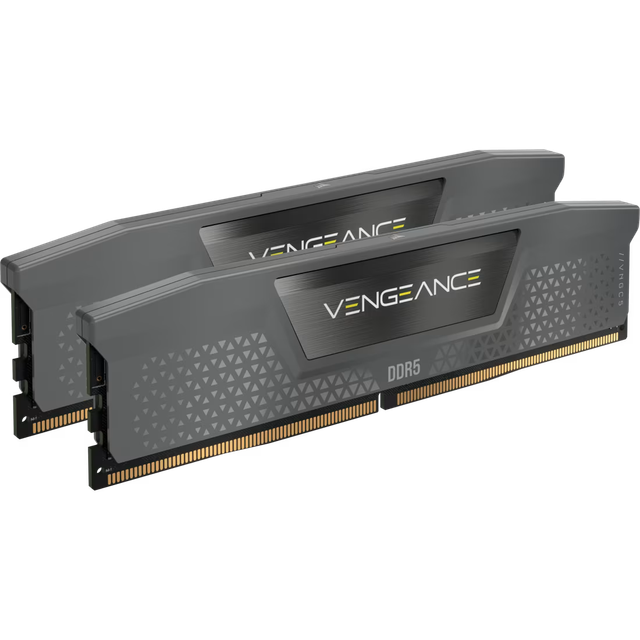
Corsair Vengeance CMK32GX5M2B6000Z30
- Model:
- Corsair Vengeance
- Capacity:
- 32GB
- DDR Generation:
- DDR5
- Speed:
- 6000MHz
- CAS Latency:
- CL30
- Voltage:
- 1.40V
- Overclocking:
- Intel XMP 3.0
- Heat Spreader:
- Anodized Aluminum, No RGB
- Colour:
- Grey
- Form Factor:
- Desktop DIMM
- Compatibility:
- Intel and AMD DDR5 Platforms
- Warranty:
- Limited Lifetime
Consumercarts is reader-supported. Learn more
Disclaimer: The price and specification of the given product may differ from the actual product. Please confirm on the retailer's website before buying.
Manufacturer: Corsair Last updated: September 7, 2026
Where to buy
- AmazonGo to store
- NeweggGo to store
Corsair Vengeance CMK32GX5M2B6000Z30 Review
The Corsair Vengeance CMK32GX5M2B6000Z30 is a 32GB (2x16GB) DDR5 memory kit running at 6000MHz (PC5-48000) with CL30 primary timings, 30-36-36-76 secondary timings, and 1.40V operating voltage. It is the plain, non-RGB entry in Corsair's Vengeance DDR5 line, built with an anodized aluminum heat spreader, individually screened memory ICs, 288-pin construction, and onboard voltage regulation controllable through Corsair iCUE. It supports both Intel XMP 3.0 and AMD EXPO, meaning the same kit reaches its rated speed with one profile toggle on either platform, and it ships in a single gray colorway.
6000MHz CL30 is widely treated as the price-to-performance ceiling for DDR5 right now: it is also the frequency where AMD's infinity fabric on Ryzen 7000 and 9000 series runs most efficiently at a 1:1 ratio, so this exact speed and timing combination shows up as the recommended kit on nearly every AM5 build guide. This particular SKU is the no-lighting version, aimed at buyers who want that performance tier without paying for RGB they may never see once the case is closed.
Performance and Timings
CL30 at 6000MHz gives a true latency of exactly 10ns, calculated as CAS latency divided by half the rated speed. That places this kit at the tight end of mainstream DDR5, ahead of the CL36 and CL38 kits in Corsair's own lineup at the same 6000MHz speed, and it is why this specific speed and CAS combination is the one most reviewers point to when asked "what DDR5 kit should I buy."
The secondary timings, 30-36-36-76, are the standard profile Corsair ships across the B-revision 6000MHz CL30 family regardless of color or lighting, so this kit performs identically to its RGB siblings at the same speed grade. The only real-world difference between this kit and a CL36 kit at the same frequency is a few percent in memory-latency-sensitive workloads and a marginal frame-rate gain in CPU-bound games at 1080p. In GPU-bound gaming and in most productivity work, the difference all but disappears.
Compatibility
This is a DDR5 kit and only fits DDR5 motherboards; it does not physically or electrically work in any DDR4 board. On Intel systems, enable XMP 3.0 in BIOS to reach 6000MHz. On AMD boards, enable EXPO instead, Corsair's own EXPO profile, not a re-read of the Intel XMP data, so both native profiles are stored on the module rather than one being emulated.
6000MHz is the frequency AMD explicitly recommends for Ryzen 7000 and 9000 series to keep the infinity fabric clock running 1:1 with memory, which is the main reason this speed and CL grade is the most commonly recommended DDR5 kit for AM5 builds specifically. On Intel 12th to 14th generation and Core Ultra 200 boards, 6000 CL30 is comfortably within normal XMP support on any board with a reasonable memory QVL entry.
Check your specific board's QVL before buying, particularly on boards running four DIMM slots at full capacity, where DDR5 kits are generally less forgiving than DDR4 was about running all four slots at their rated speed.
Module Count and Rank
This is a two-module kit filling two of typically four slots on a standard ATX board. DDR5 in particular benefits from running as a two-stick kit rather than four sticks of a smaller capacity, since DDR5's on-module power management and higher operating frequencies make four-DIMM configurations considerably harder to stabilise at full rated speed than they were on DDR4.
16GB modules at this speed are commonly single-rank, though Corsair does not guarantee a specific rank or IC supplier from the model number alone, and it can shift between production runs. Do not plan to add a second identical kit later to reach 64GB; buy the full capacity you want in one matched kit, since mixing kits bought separately, even under the same part number, is a common source of DDR5 boot instability.
Design and Build
This is the non-RGB Vengeance DDR5 design: a compact anodized aluminum heat spreader with no lighting bar, finished in a single gray colorway. Compared to the RGB Vengeance line at the same speed grade, the non-RGB heat spreader sits noticeably shorter, which is the main practical advantage if clearance under a large tower air cooler or a case with a tight side panel is a concern.
Onboard voltage regulation is present regardless of the lighting variant, and iCUE can still read frequency and voltage in real time and save custom profiles even without RGB hardware to control. The build otherwise matches the rest of the Vengeance DDR5 range: hand-screened ICs, a high-performance PCB for signal integrity, and Corsair's limited lifetime warranty.
Overclocking and BIOS Setup
Like all DDR5 modules, this kit boots at a JEDEC baseline well below its rated speed, generally 4800MHz with loose timings, until a profile is enabled. Enter BIOS, select XMP on Intel boards or EXPO on AMD boards, choose the listed 6000MHz CL30 profile, save, and reboot. Confirm the reported speed in CPU-Z or Task Manager to verify it actually applied.
Beyond enabling XMP or EXPO, further manual tuning is possible through iCUE's onboard voltage regulation, but headroom varies by IC batch and is not something Corsair discloses per unit.
Comparison to Alternatives
Within Corsair's own DDR5 lineup, the closest sibling is the RGB version of this exact speed and CL grade, the Vengeance RGB 32GB 6000MHz CL30 kit, which uses the same 30-36-36-76 timings and voltage but adds a taller heat spreader with per-module RGB lighting controlled through iCUE. Choose this non-RGB kit if cooler clearance or a plain aesthetic matters more than lighting; choose the RGB version if it doesn't.
Corsair's own comparison of the two RGB lines describes RGB RS as the accessible tier and standard Vengeance RGB as the higher-performance tier, and the same relationship broadly holds against this non-RGB CL30 kit: it sits above the RS-tier CL36/CL38 kits in raw latency and below Corsair's premium Dominator line in price and finish.
Who This Kit Is Actually For
AM5 Ryzen builders. 6000MHz is the frequency AMD itself points to for the best fabric-to-memory ratio, and CL30 is the tight end of what's available at that speed.
Intel builders who want the best mainstream DDR5 timing without paying for RGB.
Small form factor and large air-cooler builds. The non-RGB heat spreader clears more coolers than the taller RGB variant at the same speed.
Not for buyers who want lighting. If RGB matters, the RGB version of this exact kit exists at the same timings for a premium.
Not for anyone chasing maximum capacity. This is a 32GB kit; buyers who need 64GB should look at Corsair's higher-capacity kits directly rather than doubling up on this one later.
Our verdict
Reviewed by Burooj Alam. Rated by us, not by users.
Best for
- AM5 Ryzen builders
- Intel builders who want the best mainstream DDR5 timing without paying for RGB
- Small form factor and large air-cooler builds
Not for
- buyers who want lighting
- anyone chasing maximum capacity
Specifications
What these specs meanHow fast this kit is among DDR5 kits, rated from its speed and latency.
Identity
| Peak Bandwidth | 96.0 GB/s |
|---|---|
| Brand | Corsair |
| Part Number | CMK32GX5M2B6000Z30 |
| Series | Vengeance |
Memory
| DDR Generation | DDR5 |
|---|---|
| Capacity | 32 GB |
| Speed | 6000 MT/s |
| CAS Latency | 30 |
| Module Count | 2 |
| Voltage | 1.40 V |
Module and platform
| RAM Segment | Desktop DDR5 |
|---|---|
| Form Factor | Desktop DIMM |
| Platform Optimisation | AM5 |
Capacity
| Capacity Per Module | 16 GB |
|---|
Speed and timings
| True Latency | 10.0 ns |
|---|
Overclocking profile
| XMP Support | Yes |
|---|---|
| XMP Version | XMP 3.0 |
| EXPO Support | Yes |
Silicon
| Memory IC | Undisclosed |
|---|
Physical and lighting
| Heatspreader | Anodized Aluminum, No RGB, Compact Low-Profile Design |
|---|---|
| Colour | Grey |
Commercial
| Warranty | Limited Lifetime |
|---|
FAQs
What are the key specifications of the Corsair Vengeance CMK32GX5M2B6000Z30 (32GB 2x16GB Kit/DDR5 6000MHz/CL30 30-36-36-76/1.40V/Low-Profile Aluminum/Intel XMP 3.0 + AMD EXPO)?
Key specs for the Corsair Vengeance CMK32GX5M2B6000Z30: Capacity Per Module 16 GB, Capacity 32 GB, Speed 6000MHz, PC5-48000, OC Profile XMP 3.0 + EXPO, Voltage 1.40 V, DDR Generation DDR5.
Will the Corsair Vengeance CMK32GX5M2B6000Z30 (32GB 2x16GB Kit/DDR5 6000MHz/CL30 30-36-36-76/1.40V/Low-Profile Aluminum/Intel XMP 3.0 + AMD EXPO) work with my current setup?
The Corsair Vengeance CMK32GX5M2B6000Z30 (32GB 2x16GB Kit/DDR5 6000MHz/CL30 30-36-36-76/1.40V/Low-Profile Aluminum/Intel XMP 3.0 + AMD EXPO) lists DDR Generation is DDR5. Check that against the hardware you already own before buying, since this is the field that most often decides whether a part fits. Our upgrade checker at /upgrade can confirm compatibility for common combinations.
Who is the Corsair Vengeance CMK32GX5M2B6000Z30 (32GB 2x16GB Kit/DDR5 6000MHz/CL30 30-36-36-76/1.40V/Low-Profile Aluminum/Intel XMP 3.0 + AMD EXPO) best suited to?
Best suited to: AM5 Ryzen builders; Intel builders who want the best mainstream DDR5 timing without paying for RGB; Small form factor and large air-cooler builds.
What are the drawbacks of the Corsair Vengeance CMK32GX5M2B6000Z30 (32GB 2x16GB Kit/DDR5 6000MHz/CL30 30-36-36-76/1.40V/Low-Profile Aluminum/Intel XMP 3.0 + AMD EXPO)?
Not the best fit for: buyers who want lighting; anyone chasing maximum capacity.
Featured in
Compare and read more
- ADATA AO2V48UC8W1-BHLS 8GB vs Corsair Vengeance CMK32GX5M2B6000Z30 (32GB 2x16GB Kit/DDR5 6000MHz/CL30 30-36-36-76/1.40V/Low-Profile Aluminium/Intel XMP 3.0 + AMD EXPO)
- ADATA AX5U5200C3816G-B 16GB DDR5-5200 CL38 Bare/Tray Module vs Corsair Vengeance CMK32GX5M2B6000Z30 (32GB 2x16GB Kit/DDR5 6000MHz/CL30 30-36-36-76/1.40V/Low-Profile Aluminium/Intel XMP 3.0 + AMD EXPO)
- ADATA AD4U3200716G22-BADZ (16GB DDR4-3200 Non-ECC UDIMM/CL22/1.2V/288-Pin) vs Corsair Vengeance CMK32GX5M2B6000Z30 (32GB 2x16GB Kit/DDR5 6000MHz/CL30 30-36-36-76/1.40V/Low-Profile Aluminium/Intel XMP 3.0 + AMD EXPO)