
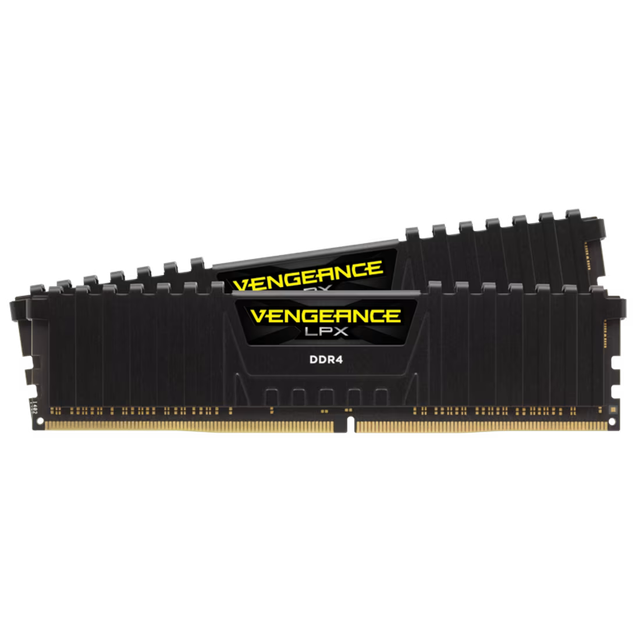
Corsair Vengeance LPX CMK16GX4M2B3200C16
Expert rating7 / 10
- Model:
- Corsair Vengeance LPX
- Capacity:
- 16GB
- DDR Generation:
- DDR4
- Speed:
- 3200MHz
- CAS Latency:
- CL16
- SPD Fallback:
- DDR4-2133
- Voltage:
- 1.35V
- Overclocking:
- Intel XMP 2.0
- Memory IC:
- ver 3.xx Micron
- Heat Spreader:
- Low-Profile Anodized Aluminum
- Colour:
- Black
- Form Factor:
- Desktop DIMM
- Compatibility:
- Intel and AMD DDR4 Platforms
- Warranty:
- Limited Lifetime
Consumercarts is reader-supported. Learn more
Disclaimer: The price and specification of the given product may differ from the actual product. Please confirm on the retailer's website before buying.
Manufacturer: Corsair Last updated: 2026-10-10
Where to buy
- Corsair StoreGo to store
- NeweggGo to store
- AmazonGo to store
Corsair Vengeance LPX CMK16GX4M2B3200C16 Review
The Corsair Vengeance LPX CMK16GX4M2B3200C16 is a 16GB (2x8GB) DDR4-3200 CL16 kit at 16-18-18-36, 1.35V, 288-pin unbuffered non-ECC, 33.5mm tall, black, one Intel XMP 2.0 profile, limited lifetime warranty.
Corsair sells three kits that all say 16GB DDR4-3200 CL16 on the box. The B runs 16-18-18-36, the D runs 16-19-19-36, the E runs 16-20-20-38. This is the tightest of the three.
The letter is the timings. The ver number on the sticker is the chips, and those vary. Every version hits the rated spec, so you're safe on speed and rolling dice on overclocking headroom.
One more thing. This variant is discontinued at most US retail. Corsair's US warranty only covers you if you buy from Corsair or an authorised reseller, so a cheap marketplace listing costs you the lifetime cover.
Specifications
Part number: CMK16GX4M2B3200C16
Capacity: 16GB, 2 x 8GB
Type: DDR4 UDIMM, 288-pin, unbuffered, non-ECC
Speed: 3200MT/s (PC4-25600)
Timings: 16-18-18-36 at 1.35V
True latency: 10.0ns
SPD fallback: 2133MT/s, 15-15-15-36, 1.2V
Profile: Intel XMP 2.0, one profile
Rank: single on ver 4.3x and 5.3x, dual on ver 4.2x
PCB: eight-layer
Size: 33.5 x 135 x 7mm
Color: black. RGB: none
Intel: 200 to 600 series, X299
AMD: 300 to 500 series, X570
Warranty: limited lifetime
In the box
Two 8GB sticks in a clamshell. No accessories, no software.
Each stick has two labels. One is the part number. The other is a version string, ver X.YY, which tells you the memory chips.
Write it down before you install. You can't read it once they're in the case.
Design and build
Anodised aluminum spreader, eight-layer PCB, no RGB and no software.
33.5mm tall. That's the whole reason to buy LPX. RGB Pro is 51mm and G.Skill Ripjaws V is 42mm, and both start fighting the fan on a big tower cooler.
No thermal sensor, so HWiNFO won't show DIMM temps. You don't need it at 1.35V.
Best for: tight clearance under a 120mm or 140mm tower cooler.
Variants: B, D and E
Three LPX kits, all badged 16GB DDR4-3200 CL16, all 1.35V.
B: 16-18-18-36
D: 16-19-19-36
E: 16-20-20-38
The difference is tRCD and tRP. At 3200 a clock is 0.625ns, so 18 against 20 costs 1.25ns per row activation.
Will you feel it in a game? No.
Winner: the B on price parity.
Which chips are inside
The letter is the timings. The ver number on the sticker is the chips.
ver 3.xx: Micron
ver 4.xx: Samsung
ver 5.xx: SK Hynix
Every version hits the rated spec, so you get what you paid for. What changes is manual tuning headroom, and Samsung versions go furthest.
You can't pick. Retailers don't list it. If overclocking is the point, buy a kit binned for a known die.
Installation
Two sticks go in the second and fourth slots from the CPU, usually A2 and B2. Your board manual wins over any general rule.
Corsair says it's for airflow. It isn't. Most boards daisy-chain their memory traces and are tuned for the far pair. Use the near pair and the far slots hang off as electrical stubs, and the board may refuse to train 3200.
Fill all four slots on AM4 and expect to drop to 2933 or 2666.
Power off at the wall, open the clips, line up the notch, press both ends until they snap shut.
BIOS setup
Out of the box it runs 2133MT/s. That's the JEDEC fallback and it's normal.
ASUS: Ai Overclock Tuner, set to D.O.C.P.
Gigabyte: Extreme Memory Profile
MSI: A-XMP
ASRock: Load XMP Setting
Intel: XMP, Profile 1
XMP and DOCP are the same thing. Nothing to convert.
On AMD, leave FCLK on Auto. It lands on 1600 by itself, which is 1:1 with the memory clock.
Compatibility: AMD
3200 is AMD's official spec for Ryzen 3000 and 5000. On those chips this is one click and done.
B550 and X570: best case.
B450 and X470: fine on a current BIOS.
A320, B350, X370: awkward. A320 often locks memory overclocking entirely, so there's no DOCP option and you sit at 2133 forever. Check your BIOS before buying.
Ryzen 2000 frequently caps at 2933. Ryzen 1000 needs a BIOS update first.
On Ryzen 1000 or 2000, we'd buy a 2933 kit and stop fighting it.
Compatibility: Intel
200 through 600 series and X299. Turn XMP on and it runs.
The trap is chipset. Some H and B boards don't expose XMP at all, and you're stuck at 2133 with no way out.
On a non-Z board, check your BIOS first.
QVL and four sticks
QVL entries are version-specific. The Crosshair VI Hero lists ver 4.31, the Crosshair VIII lists ver 4.23. A ver 5.3x stick is on neither, same retail part.
That doesn't mean it won't work. QVLs only record what got tested.
The useful column is population. On X370 this kit is qualified at 3200 with two DIMMs only. On X570 it's qualified with two and four.
Don't buy a second kit later for 32GB. Corsair won't support mixing versions.
Performance
The biggest change you'll make isn't overclocking, it's turning XMP on.
On AM4, 2133 to 3200 takes AIDA64 read from about 33,000 to 46,000 MB/s and latency from 95.4ns to 76.4ns. A fifth off your latency from one toggle.
In games it's all about your CPU. Ryzen 1000 gained 16 percent in one title. Ryzen 5000 shows up to a 19 percent spread at 1080p. Mainstream Intel shows 2 to 3 percent.
So on Ryzen, memory speed matters. On Intel at 1440p or above, buy whatever 3200 kit is cheapest.
Checking it runs at 3200
Task Manager, Performance, Memory. Speed should say 3200MHz. If it says 2133, the profile is off.
CPU-Z, Memory tab. DRAM Frequency shows 1600MHz, which is the same thing. Timings should read 16-18-18-36.
CPU-Z, SPD tab. Click each slot to confirm both sticks are seen.
If the speed is right but the timings aren't, your board made up its own.
Stability testing
Booting at XMP means the board trained the timings. It doesn't mean it's stable.
TestMem5 with the anta777 Extreme config, three cycles. Harshest test going and where we'd start.
Karhu RAMTest to 5000 percent, three to six hours.
Don't use the AIDA64 memory test or Memtest64. Neither finds errors reliably.
One error is a fail. But it's usually the board or the slot population, not the memory. Turn XMP off, retest at 2133, and if errors stay you've got a warranty claim.
Thermals
You don't need to think about this.
DDR4 refreshes every 64ms up to 85C, then twice as often above it. A 1.35V stick at stock in a normal case doesn't get close.
Temperature only matters if you're hand-tuning, because tRFC drifts with heat.
The heat spreader is mostly decoration. PCWorld measured DDR4 spreaders at about two degrees, with case airflow mattering more. So you lose nothing going low profile and you gain clearance.
Overclocking
Nobody reviewed this kit with overclocking numbers, so this is all from owners.
The reliable win is tightening secondaries at stock 3200. One ver 4.32 owner got about 7 percent from subtimings alone, mostly tRFC.
Past 3200 it's the chip lottery. Samsung versions go further, Hynix and Micron much less.
Don't push voltage. Owners report 1.34V and above making things worse on this family.
If overclocking is the point, this isn't your kit.
What 16GB will and won't do
Windows 11 idles above 10GB on a 16GB machine, so you've got around 6GB to play with.
One game at a time: fine. Battlefield 6 lists 16GB as minimum and recommended.
Game plus browser plus Discord: this is where it breaks. You'll page to the SSD and feel it as stutter.
Won't fit: Mafia: The Old Country wants about 20GB. Doom: The Dark Ages and Borderlands 4 recommend 32GB.
Streaming, 4K video, VMs: get 32GB.
Office, browsing, photo editing: comfortable.
Versus the competition
G.Skill Ripjaws V F4-3200C16D-16GVKB: 16-18-18-38 against 16-18-18-36 here, so Corsair wins on tRAS by a hair. Ripjaws V is 42mm against 33.5mm. Winner: LPX under a tower cooler, Ripjaws V otherwise.
Crucial Ballistix BL2K8G32C16U4B: matched this kit exactly and tuned better on Micron E-die, but it's discontinued. Academic.
Corsair Vengeance RGB Pro CMW16GX4M2C3200C16: identical performance, 51mm tall. Winner: RGB Pro if you have the room.
Our 32GB LPX kit, CMK32GX4M2E3200C16: looser at 16-20-20-38, but capacity beats timings. Winner unless the budget won't stretch.
Price and availability
Corsair direct: around 180 dollars. The E variant: around 140.
Newegg: 145 to 160 dollars, refurb or used.
Best Buy: discontinued. It used to sell near 90.
The cheapest DDR4-3200 16GB kit of any brand is tracking around 99 dollars, so you're paying a real premium here.
The market is against you. DDR4 contract prices are forecast up over 50 percent this quarter as production winds down.
Waiting won't help. If you need DDR4, buy it. If you're building new, go DDR5.
Warranty and RMA
Limited lifetime on defects in material and workmanship.
Here's the one that matters. In the US, Corsair only honours DRAM warranty if you bought from Corsair or an authorised reseller. Buy from an unauthorised marketplace seller and you have no cover at all.
Most of what's left of this part is marketplace and refurb, so check who you're buying from.
Keep the receipt. Claims need a photo of the serial number.
Advanced RMA ships your replacement first and holds the value on your card. Take it if this is a work machine.
FAQ: setup
Why does my RAM show 2133MHz?
The profile isn't on. Enable XMP on Intel, DOCP on ASUS, A-XMP on MSI, Extreme Memory Profile on Gigabyte, or Load XMP Setting on ASRock.
What is XMP?
A speed and timing profile stored on the stick. Turning it on runs the memory at what it's rated for. AMD boards read the same profile under a different name.
Which slots do I use?
Second and fourth from the CPU, usually A2 and B2.
Should I test it after enabling XMP?
Worth ten minutes. TestMem5, anta777 Extreme, three cycles.
FAQ: specs and performance
What do 16-18-18-36 mean?
Clock cycles. CAS latency, then tRCD, tRP and tRAS. Lower is faster at the same speed.
Is CL16 good?
On its own the number means nothing. True latency is CAS times 2000 divided by speed, so 10.0ns here. DDR4-3600 CL18 is also 10.0ns.
Does RAM speed affect FPS?
On Ryzen yes, up to 19 percent across the range at 1080p. On Intel it's 2 to 3 percent.
Is 2x8GB better than 1x16GB?
Yes. Two sticks fill both channels and roughly double your bandwidth.
FAQ: compatibility
Will this work with my motherboard?
Intel 200 to 600 series and X299, AMD 300 to 500 series and X570. The traps are A320 boards that lock memory overclocking, and some Intel H and B chipsets that don't show XMP.
Will it run 3200 on Ryzen?
On Ryzen 3000 and 5000 yes. Ryzen 2000 often caps at 2933. Ryzen 1000 needs a BIOS update.
Why won't it run 3200 with four sticks?
Four DIMMs load the memory controller harder and usually force a drop to 2933 or 2666 on AM4.
Can I mix kits?
Don't. Buy the capacity you need in one kit.
FAQ: variants
B or E?
B is 16-18-18-36, E is 16-20-20-38, D sits between.
LPX or RGB Pro?
Identical performance. LPX is 33.5mm with no lighting, RGB Pro is 51mm with it.
Which chips are in it?
Depends on the version. ver 3.xx Micron, ver 4.xx Samsung, ver 5.xx SK Hynix.
How do I find my version?
Printed on the label as ver X.YY, or read it with Thaiphoon Burner.
Single or dual rank?
Current versions are single-rank. Worth about 3 to 5 percent, not worth hunting for.
FAQ: buying
DDR4 or DDR5?
They don't fit the same boards. For an existing DDR4 machine the question doesn't arise. For a new build, DDR5.
16GB or 32GB?
32GB if you stream, edit 4K or run VMs. 16GB if you game one thing at a time.
DDR4 contract prices are forecast up over 50 percent this quarter as production winds down.
Does the warranty work from a marketplace seller?
In the US, no. You need Corsair or an authorised reseller.
Our verdict
Reviewed by Burooj Alam. Rated by us, not by users.
Expert rating7 / 10
Buy it if you need 16GB of DDR4 and you're squeezed for clearance under a tower cooler. At 33.5mm it fits where G.Skill Ripjaws V at 42mm and Corsair's own RGB Pro at 51mm don't, and it's the tightest-timed of Corsair's three 16GB DDR4-3200 CL16 kits at 16-18-18-36. On Ryzen 3000 or 5000 it's one BIOS toggle and done. What holds it back isn't the memory, it's the market: around 180 dollars for 16GB on a part that's discontinued at most US retail, and you can't see which memory chips you're getting until the box arrives. If clearance isn't your problem, our 32GB LPX kit is the better buy.
Best for
- You need 16GB of DDR4 and you're tight on clearance under a 120mm or 140mm tower cooler
- You're on Ryzen 3000 or 5000, where 3200 is AMD's spec and DOCP does the rest
- You're replacing a stick in an existing build and want to match 16-18-18-36 exactly
Not for
- You're building new. Go DDR5, this is an end-of-life platform
- You want RGB. Our Vengeance RGB Pro is the same performance with lighting
- You need 32GB. Capacity beats timings, take the bigger kit
- You're on an A320 board, where memory overclocking is usually locked and you'll sit at 2133
- You're planning to add a second kit later. Corsair won't support mixing versions
- You're buying from a marketplace seller and want the warranty. US cover needs an authorised reseller
Specifications
What these specs meanHow fast this kit is among DDR4 kits, rated from its speed and latency.
Identity
| Peak Bandwidth | 51.2 GB/s |
|---|---|
| Brand | Corsair |
| Part Number | CMK16GX4M2B3200C16 |
| Series | Vengeance LPX |
Memory
| DDR Generation | DDR4 |
|---|---|
| Capacity | 16 GB |
| Speed | 3200 MT/s |
| CAS Latency | 16 |
| Module Count | 2 |
| Voltage | 1.35 V |
Physical
| RGB Lighting | No |
|---|
Module and platform
| RAM Segment | Desktop DDR4 |
|---|---|
| Form Factor | Desktop DIMM |
| Buffering | No, Unbuffered |
| Pin Count | 288 |
| Platform Optimisation | Intel 200-600 series, X299; AMD 300-500 series, X570 |
Capacity
| Capacity Per Module | 8 GB |
|---|---|
| Ranks Per Module | Single-rank on current versions (4.3x, 5.3x); earlier 4.2x versions were dual-rank |
Speed and timings
| JEDEC Base Speed | 2133 MT/s |
|---|---|
| Timing String | 16-18-18-36 |
| True Latency | 10.0 ns |
Overclocking profile
| XMP Support | Yes |
|---|---|
| XMP Version | XMP 2.0 |
| EXPO Support | No |
| Profile Count | 1 |
| JEDEC Voltage | 1.2V |
Silicon
| Memory IC | Varies by module version: ver 3.xx Micron, ver 4.xx Samsung, ver 5.xx SK Hynix |
|---|---|
| ECC | No |
Physical and lighting
| Heatspreader | Anodized Aluminum, Low Profile |
|---|---|
| Module Height | 33.5 mm |
| Colour | Black |
Commercial
| Warranty | Limited Lifetime |
|---|
FAQs
What are the key specifications of the Corsair Vengeance LPX CMK16GX4M2B3200C16 (16GB 2x8GB Kit/DDR4 3200MHz/CL16 16-18-18-36/1.35V/Low Profile Aluminum/Intel XMP 2.0)?
Key specs for the Corsair Vengeance LPX CMK16GX4M2B3200C16: Capacity Per Module 8 GB, Capacity 16 GB, Speed 3200 MHz, SPD Speed 2133MHz, OC Profile XMP 2.0.
Will the Corsair Vengeance LPX CMK16GX4M2B3200C16 (16GB 2x8GB Kit/DDR4 3200MHz/CL16 16-18-18-36/1.35V/Low Profile Aluminum/Intel XMP 2.0) work with my current setup?
The Corsair Vengeance LPX CMK16GX4M2B3200C16 (16GB 2x8GB Kit/DDR4 3200MHz/CL16 16-18-18-36/1.35V/Low Profile Aluminum/Intel XMP 2.0) lists DDR Generation is DDR4. Check that against the hardware you already own before buying, since this is the field that most often decides whether a part fits. Our upgrade checker at /upgrade can confirm compatibility for common combinations.
Who is the Corsair Vengeance LPX CMK16GX4M2B3200C16 (16GB 2x8GB Kit/DDR4 3200MHz/CL16 16-18-18-36/1.35V/Low Profile Aluminum/Intel XMP 2.0) best suited to?
You need 16GB of DDR4 and you're tight on clearance under a 120mm or 140mm tower cooler. You're on Ryzen 3000 or 5000, where 3200 is AMD's spec and DOCP does the rest. You're replacing a stick in an existing build and want to match 16-18-18-36 exactly.
What are the drawbacks of the Corsair Vengeance LPX CMK16GX4M2B3200C16 (16GB 2x8GB Kit/DDR4 3200MHz/CL16 16-18-18-36/1.35V/Low Profile Aluminum/Intel XMP 2.0)?
You're building new. Go DDR5, this is an end-of-life platform. You want RGB. Our Vengeance RGB Pro is the same performance with lighting. You need 32GB. Capacity beats timings, take the bigger kit. You're on an A320 board, where memory overclocking is usually locked and you'll sit at 2133. You're planning to add a second kit later. Corsair won't support mixing versions. You're buying from a marketplace seller and want the warranty. US cover needs an authorised reseller.
What are the timings of the CMK16GX4M2B3200C16?
16-18-18-36 at 3200 MHz and 1.35 V with XMP on. Without XMP it falls back to DDR4-2133 at 15-15-15-36 and 1.2 V.
Which motherboards is the CMK16GX4M2B3200C16 compatible with?
Any desktop DDR4 board: Intel 200 to 600 series and X299, AMD 300 to 500 series and X570. It will not fit DDR5 boards. On A320 and some Intel H and B boards memory overclocking is locked, so the kit runs at 2133 MHz instead of 3200 MHz.
Does the CMK16GX4M2B3200C16 work with Ryzen?
Yes. On Ryzen 3000 and 5000 it runs at its rated 3200 MHz once you enable DOCP, which loads the XMP profile. Ryzen 2000 often tops out at 2933 MHz, and Ryzen 1000 needs a BIOS update first.
What is the difference between CMK16GX4M2B3200C16 and CMK16GX4M2E3200C16?
Only the timings. Both are 16GB (2x8GB) DDR4-3200 CL16 at 1.35 V. The B runs 16-18-18-36 and the E runs 16-20-20-38, so the B is slightly tighter. You will not notice it in games.
Featured in
Compare and read more
- ADATA AD4U3200716G22-BADZ (16GB DDR4-3200 Non-ECC UDIMM/CL22/1.2V/288-Pin) vs Corsair Vengeance LPX CMK16GX4M2B3200C16 (16GB 2x8GB Kit/DDR4 3200MHz/CL16 16-18-18-36/1.35V/Low Profile Aluminium/Intel XMP 2.0)
- ADATA AO2V48UC8W1-BHLS 8GB vs Corsair Vengeance LPX CMK16GX4M2B3200C16 (16GB 2x8GB Kit/DDR4 3200MHz/CL16 16-18-18-36/1.35V/Low Profile Aluminium/Intel XMP 2.0)
- ADATA AX5U5200C3816G-B 16GB DDR5-5200 CL38 Bare/Tray Module vs Corsair Vengeance LPX CMK16GX4M2B3200C16 (16GB 2x8GB Kit/DDR4 3200MHz/CL16 16-18-18-36/1.35V/Low Profile Aluminium/Intel XMP 2.0)
- Corsair Vengeance LPX CMK16GX4M2B3200C16 (16GB 2x8GB Kit/DDR4 3200MHz/CL16 16-18-18-36/1.35V/Low Profile Aluminium/Intel XMP 2.0) vs Corsair Vengeance LPX CMK16GX4M2E3200C16 (16GB 2x8GB Kit/DDR4 3200MHz/CL16 16-20-20-38/1.35V/Low Profile Aluminium/Intel XMP 2.0)
- Corsair Vengeance LPX CMK16GX4M2B3200C16 (16GB 2x8GB Kit/DDR4 3200MHz/CL16 16-18-18-36/1.35V/Low Profile Aluminium/Intel XMP 2.0) vs Corsair Vengeance LPX CMK32GX4M2E3200C16 (32GB 2x16GB Kit/DDR4 3200MHz/CL16 16-20-20-38/1.35V/Low Profile Aluminium/Intel XMP 2.0)
- Laptop Buying Guide 2026: What To Look For Before You Buy
- Low Profile DDR5 RAM That Clears a Big Air Cooler