
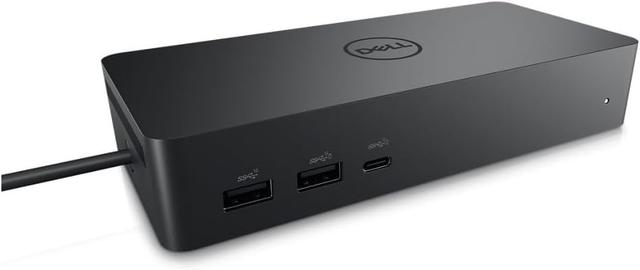
Dell Universal Dock UD22
Expert rating7 / 10
- Connection Type:
- USB-C (non-Thunderbolt, universal)
- Total Ports:
- 10
- Max Display Support:
- Triple display
- Power Delivery:
- 90W
Consumercarts is reader-supported. Learn more
Disclaimer: The price and specification of the given product may differ from the actual product. Please confirm on the retailer's website before buying.
Manufacturer: Dell Last updated: September 12, 2026
Where to buy
- AmazonGo to store
- NeweggGo to store
Dell Universal Dock UD22 Review
The Dell Universal Dock UD22 is a non-Thunderbolt USB-C dock built for cross-vendor compatibility, offering triple 4K@60Hz display support and 90W charging across Windows, Mac, and Chrome OS laptops.
Dell calls this a “universal” dock because, unlike the WD-series docks that lean on Dell-specific firmware tricks, the UD22 is designed to work well on any brand of USB-C laptop. That makes it a good fit for mixed-fleet offices running a blend of Dell, Mac, and Chromebook hardware off the same docking hardware standard, rather than needing a different dock SKU per laptop brand.
Comparison to Alternatives
Against the Dell WD22TB4, the WD22TB4 uses Thunderbolt 4 for higher bandwidth and is tuned specifically for Dell systems, while the UD22 trades some speed for broader cross-platform compatibility, including Mac and Chrome OS. Against the Kensington SD5700T, the Kensington offers single-8K display output for Thunderbolt-equipped machines, but the UD22's triple-display support at 4K@60Hz outperforms it for multi-monitor productivity setups on non-Thunderbolt hardware.
Our verdict
Reviewed by Burooj Alam. Rated by us, not by users.
Expert rating7 / 10
The pragmatic choice for offices mixing Dell, Mac, and Chromebook hardware on one dock standard.
Best for
- Mixed-vendor offices running Dell, Mac, and Chromebook laptops
- Triple-monitor productivity setups without needing Thunderbolt
- IT teams wanting one dock SKU across multiple laptop brands
Not for
- Users who specifically want Thunderbolt-level bandwidth
- Single-display minimalist desk setups, since it's overbuilt for that
- Dell-only fleets that could use the tighter WD22TB4 integration instead
Specifications
What these specs meanIdentity
| Brand | Dell |
|---|---|
| Model Number | Universal Dock UD22 |
| Connection Type | USB-C (USB 3.2 Gen 2, DP 1.4 Alt Mode, non-Thunderbolt) |
| Port Configuration | 1x USB-C upstream, 4x USB-A 10Gbps, 2x USB-C 10Gbps (one with DP 1.4 Alt Mode), 1x HDMI 2.0, 2x DisplayPort 1.2, 1x GbE |
| Max Display Support | Quad 4K@60Hz (with DisplayLink driver); dual 4K@60Hz native |
Host connection
| Host Interface | USB-C 3.2 Gen 2 |
|---|---|
| Thunderbolt Version | None |
| Host Cable Length | 0.8 m |
Ports & Power
| Max Display Resolution | 5K@60Hz single (DSC); 4K@60Hz multi-display |
|---|---|
| Total Ports | 10 |
| Ethernet | Yes |
Host power
| Host Power Delivery | 96 W |
|---|---|
| External PSU Wattage | 130 W |
| Bus Powered | No |
Display engine
| Video Path | Native Plus DisplayLink |
|---|---|
| Max Displays Windows | 4 |
Display output
| Max Single Display Resolution | 5K |
|---|---|
| Max Single Display Refresh | 60 Hz |
| Max Dual Display Resolution | 4K |
| Max Dual Display Refresh | 60 Hz |
Video ports
| HDMI Port Count | 1 |
|---|---|
| HDMI Version | 2.0 |
| DisplayPort Port Count | 2 |
| DisplayPort Version | 1.2 |
| USB-C Video Output Count | 1 |
Data ports
| Downstream Thunderbolt Port Count | 0 |
|---|---|
| USB-A Port Count | 4 |
| USB-C Data Port Count | 2 |
| Max USB Data Rate | 10Gbps |
Network and storage
| Ethernet Speed | 1GbE |
|---|
Audio and control
| Security Lock Slot | Yes |
|---|
Compatibility and physical
| macOS Supported | Yes |
|---|---|
| Windows Supported | Yes |
| ChromeOS Supported | Yes |
| Weight | 416 g |
FAQs
What are the key specifications of the Dell Universal Dock UD22 (USB-C / 10 Ports / 90W Host Charging / Triple 4K@60Hz / Windows/Mac/Chrome / ~$220)?
Key specs for the Dell Universal Dock UD22: Power Delivery 96 W, Host Power Delivery 96 W, Ethernet Yes, Ethernet Speed 1GbE, Connection Type USB-C (USB 3.2 Gen 2, DP 1.4 Alt Mode, non-Thunderbolt), Port Configuration 1x USB-C upstream, 4x USB-A 10Gbps, 2x USB-C 10Gbps (one with DP 1.4 Alt Mode), 1x HDMI 2.0, 2x DisplayPort 1.2, 1x GbE.
Who is the Dell Universal Dock UD22 (USB-C / 10 Ports / 90W Host Charging / Triple 4K@60Hz / Windows/Mac/Chrome / ~$220) best suited to?
Best suited to: Mixed-vendor offices running Dell, Mac, and Chromebook laptops; Triple-monitor productivity setups without needing Thunderbolt; IT teams wanting one dock SKU across multiple laptop brands.
What are the drawbacks of the Dell Universal Dock UD22 (USB-C / 10 Ports / 90W Host Charging / Triple 4K@60Hz / Windows/Mac/Chrome / ~$220)?
Not the best fit for: Users who specifically want Thunderbolt-level bandwidth; Single-display minimalist desk setups, since it's overbuilt for that; Dell-only fleets that could use the tighter WD22TB4 integration instead.
Compare and read more
- Anker 575 USB-C Docking Station (13-in-1, 85W Pass-Through, Dual Display) vs Dell Universal Dock UD22 (USB-C / 10 Ports / 90W Host Charging / Triple 4K@60Hz / Windows/Mac/Chrome)
- Dell Universal Dock UD22 (USB-C / 10 Ports / 90W Host Charging / Triple 4K@60Hz / Windows/Mac/Chrome) vs j5create JCD388 Thunderbolt 4 Dock (Thunderbolt 4 / 9 Ports / 96W Host Charging / Dual 4K@60Hz / Mac/Windows)
- Dell Universal Dock UD22 (USB-C / 10 Ports / 90W Host Charging / Triple 4K@60Hz / Windows/Mac/Chrome) vs Microsoft Surface Dock 2 (USB4/USB-C / 6 Ports / 100W Host Charging / Dual 4K@60Hz / Windows)
- ATEN UH3238 USB-C Dual Monitor Dock (USB-C / 7 Ports / 90W Host Charging / Dual 4K@60Hz / Fanless with KVM Switching / Windows/Mac) vs Dell Universal Dock UD22 (USB-C / 10 Ports / 90W Host Charging / Triple 4K@60Hz / Windows/Mac/Chrome)
- Dell Universal Dock UD22 (USB-C / 10 Ports / 90W Host Charging / Triple 4K@60Hz / Windows/Mac/Chrome) vs HP Thunderbolt Dock G4 (Thunderbolt 4 / 120W Power Delivery / Up to 4 Displays / HDMI + DisplayPort / RJ-45 Ethernet)
- Docking Station Ethernet Speed: What 1GbE, 2.5GbE and 10GbE Actually Mean
- Docking Station Power Delivery Explained: What the Wattage Actually Means