
Consumercarts is reader-supported. Learn more
Disclaimer: The price and specification of the given product may differ from the actual product. Please confirm on the retailer's website before buying.
Manufacturer: Dell Last updated: September 11, 2026
Where to buy
- NeweggGo to store
Dell WD19TB Thunderbolt Dock Review
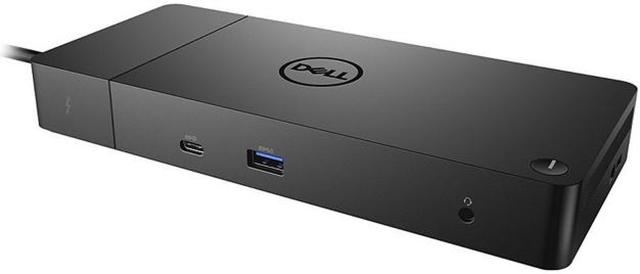
The Dell WD19TB is a Thunderbolt 3 dock with 12 total ports, 130W host charging, dual 4K@60Hz display support, and a business-grade design built for Dell Latitude and Precision laptops for ~$250.
The WD19TB predates the newer WD22TB4 in Dell's lineup but remains widely deployed across existing corporate fleets, and its 130W charging output is specifically higher than most Thunderbolt 4 docks, sized for Dell's power-hungry Precision mobile workstations rather than thin-and-light ultrabooks. Thunderbolt 3 connectivity means it lacks Thunderbolt 4's guaranteed minimum bandwidth and dual-4K certification, so results on non-Dell laptops can vary more than on a Thunderbolt 4-certified dock. Versus the Dell WD22TB4, that upgrades to full Thunderbolt 4 certification for a similar price, worth it for anyone not specifically needing 130W charging. Versus the HP Thunderbolt Dock G4, that's built for HP fleets instead, worth it for HP-standardized offices over a Dell-specific dock.
Higher Charging for Mobile Workstations
The WD19TB predates the newer WD22TB4 in Dell's lineup but remains widely deployed across existing corporate fleets, and its 130W charging output is specifically higher than most Thunderbolt 4 docks, sized for Dell's power-hungry Precision mobile workstations rather than thin-and-light ultrabooks.
Thunderbolt 3, Not Thunderbolt 4
Thunderbolt 3 connectivity means it lacks Thunderbolt 4's guaranteed minimum bandwidth and dual-4K certification, so results on non-Dell laptops can vary more than on a Thunderbolt 4-certified dock.
Comparison to Alternatives
Versus the Dell WD22TB4, that upgrades to full Thunderbolt 4 certification for a similar price, worth it for anyone not specifically needing 130W charging. Versus the HP Thunderbolt Dock G4, that's built for HP fleets instead, worth it for HP-standardized offices over a Dell-specific dock.
Our verdict
Reviewed by Burooj Alam. Rated by us, not by users.
Expert rating7 / 10
A high-charging-wattage Dell dock built for Precision mobile workstations, though it's a generation behind on Thunderbolt.
Best for
- Dell Precision mobile workstation owners who need charging wattage above what most Thunderbolt 4 docks offer.
Not for
- Non-Dell laptop owners wanting guaranteed Thunderbolt 4 certification and bandwidth.
Specifications
What these specs meanIdentity
| Brand | Dell |
|---|---|
| Model Number | WD19TB |
| Connection Type | Thunderbolt 3 |
| Port Configuration | 1x TB3 downstream, 2x DisplayPort++ 1.4, 1x HDMI 2.0, 1x rear USB-C with DP 1.4, 1x front USB-C, 3x USB-A 5Gbps, GbE, front headset jack, rear line out |
| Max Display Support | Dual 4K |
Host connection
| Host Interface | Thunderbolt 3 |
|---|---|
| Thunderbolt Version | 3 |
| Host Cable Length | 0.8 m |
Ports & Power
| Max Display Resolution | Dual 4K@60Hz |
|---|---|
| Total Ports | 12 |
| Ethernet | Yes |
Host power
| Host Power Delivery | 90 W |
|---|---|
| Host Power Delivery Alt | 130 W |
| External PSU Wattage | 180 W |
| Bus Powered | No |
Video ports
| HDMI Port Count | 1 |
|---|---|
| HDMI Version | 2.0 |
| DisplayPort Port Count | 2 |
| DisplayPort Version | 1.4 |
| USB-C Video Output Count | 1 |
Data ports
| Downstream Thunderbolt Port Count | 1 |
|---|---|
| USB-A Port Count | 3 |
| USB-C Data Port Count | 1 |
Network and storage
| Ethernet Speed | 1GbE |
|---|
Compatibility and physical
| Weight | 620 g |
|---|
FAQs
What are the key specifications of the Dell WD19TB Thunderbolt Dock (Thunderbolt 3 / 12 Ports / 130W Host Charging / Dual 4K@60Hz / Windows / ~$250)?
Key specs for the Dell WD19TB Thunderbolt Dock: Power Delivery 90 W, Host Power Delivery 90 W, Host Power Delivery Alt 130 W, Ethernet Yes, Ethernet Speed 1GbE, Connection Type Thunderbolt 3.
Who is the Dell WD19TB Thunderbolt Dock (Thunderbolt 3 / 12 Ports / 130W Host Charging / Dual 4K@60Hz / Windows / ~$250) best suited to?
Best suited to: Dell Precision mobile workstation owners who need charging wattage above what most Thunderbolt 4 docks offer.
What are the drawbacks of the Dell WD19TB Thunderbolt Dock (Thunderbolt 3 / 12 Ports / 130W Host Charging / Dual 4K@60Hz / Windows / ~$250)?
Not the best fit for: Non-Dell laptop owners wanting guaranteed Thunderbolt 4 certification and bandwidth.
Compare and read more
- Dell WD19TB Thunderbolt Dock (Thunderbolt 3 / 12 Ports / 130W Host Charging / Dual 4K@60Hz / Windows) vs Satechi USB4 Pro Hub (USB4 / 8 Ports / 96W Pass-Through Charging / Dual 4K@60Hz / Mac/Windows)
- Dell WD19TB Thunderbolt Dock (Thunderbolt 3 / 12 Ports / 130W Host Charging / Dual 4K@60Hz / Windows) vs Twelve South StayGo mini (USB-C / 6 Ports / 85W Pass-Through / Single 4K@60Hz / Magnetic MacBook Dongle / Mac)
- Anker 575 USB-C Docking Station (13-in-1, 85W Pass-Through, Dual Display) vs Dell WD19TB Thunderbolt Dock (Thunderbolt 3 / 12 Ports / 130W Host Charging / Dual 4K@60Hz / Windows)
- ATEN UH3238 USB-C Dual Monitor Dock (USB-C / 7 Ports / 90W Host Charging / Dual 4K@60Hz / Fanless with KVM Switching / Windows/Mac) vs Dell WD19TB Thunderbolt Dock (Thunderbolt 3 / 12 Ports / 130W Host Charging / Dual 4K@60Hz / Windows)
- Dell WD19TB Thunderbolt Dock (Thunderbolt 3 / 12 Ports / 130W Host Charging / Dual 4K@60Hz / Windows) vs HP Thunderbolt Dock G4 (Thunderbolt 4 / 120W Power Delivery / Up to 4 Displays / HDMI + DisplayPort / RJ-45 Ethernet)
- Why Your Docking Station Only Shows One External Display on a MacBook
- Why "Total Ports" on a Docking Station Doesn't Tell You Anything