
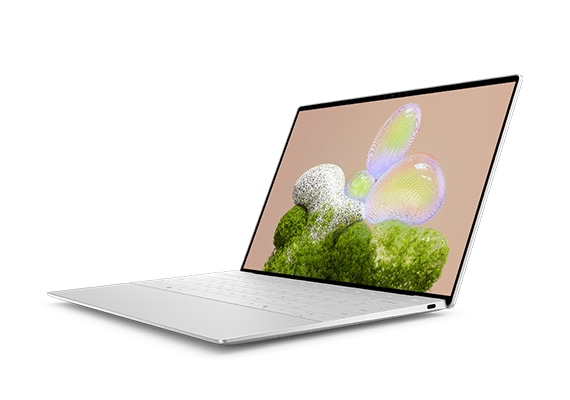
Dell XPS 13 9350
Expert rating7.8 / 10
- CPU:
- Intel Core Ultra 7 256V
- RAM:
- 16GB LPDDR5X, soldered
- Storage:
- 512GB NVMe SSD
- Display:
- 13.4" FHD+ IPS 60Hz
- Weight:
- 1.24kg
Upgrade and repair this laptop
Consumercarts is reader-supported. Learn more
Disclaimer: The price and specification of the given product may differ from the actual product. Please confirm on the retailer's website before buying.
Manufacturer: Dell Last updated: 2026-10-10
Dell XPS 13 9350 Review
The Dell XPS 13 9350 in this configuration ships with an Intel Core Ultra 7 256V, 16GB of soldered LPDDR5X-8533 memory, a 512GB NVMe SSD and a 13.4-inch FHD+ IPS display.
This is Dell's Lunar Lake refresh of the XPS 13, and the redesign brought the same trade-off as the ThinkPad and MacBook Air in this class: a genuinely compact, light chassis in exchange for zero upgrade path. What you order is what you keep.
Performance
The Core Ultra 7 256V prioritises battery efficiency over sustained throughput, the same trade-off every Lunar Lake ultrabook makes. Dell has not published a sustained wattage figure for this chassis, so expect strong short-burst performance and throttling under prolonged heavy load.
Upgradability
RAM: no. All 16GB of LPDDR5X-8533 is soldered. Storage: no free slot. A single M.2 2230 PCIe 4.0 x4 slot holds the 512GB drive; the small 2230 form factor also limits which replacement drives fit if you ever do open the chassis.
Battery life
The 55Wh battery paired with a 60Hz FHD+ panel and an efficiency-focused chip should deliver solid all-day light-load use, though Dell has not published a specific runtime figure we could independently verify for this exact configuration.
Display
The 13.4-inch FHD+ IPS panel at 500 nits is bright enough for outdoor use and covers full sRGB, making it a capable general-purpose panel without the OLED option's HDR contrast.
Design and ports
At 1.24kg this sits in the same weight class as the ThinkPad X1 Carbon and MacBook Air 13. Thunderbolt 4 and WiFi 7 are both present, and the 60W adapter reflects the low-power Lunar Lake platform.
Our verdict
Reviewed by Burooj Alam. Rated by us, not by users.
Expert rating7.8 / 10
The XPS 13 9350 is a compact 13.4-inch ultrabook with a Core Ultra 7 256V, 16GB of LPDDR5X and a 1920 x 1200 IPS panel rated at 500 nits. It weighs 1.24 kg and offers WiFi 7, Thunderbolt 4 and a 55Wh battery, which suits general productivity and web use where efficiency matters.
The 16GB of memory is soldered and the single small SSD slot is full, so you cannot upgrade later. Graphics are integrated, which rules out gaming and GPU compute. Choose the capacity you need at purchase.
Best for
- Buyers who want a compact 13-inch Windows ultrabook
- General productivity and web use with strong battery efficiency
- Anyone who values a bright, colour-accurate panel over 4K resolution
Not for
- Anyone who wants to upgrade RAM or storage later
- Buyers who need a discrete GPU for gaming or GPU compute
- Users who need more than a single small-form-factor SSD
Specifications
What these specs meanIdentity and variant
| Brand | Dell |
|---|---|
| Series | XPS 13 |
| Series ID | xps-13-9350 |
| SKU Name | 9350 / Ultra 7 256V / 16GB / FHD+ |
| Chassis Code | 9350 |
| Region Sold | North America |
Class and platform
| Laptop Class | Thin and Light |
|---|---|
| Release Year | 2024 |
| Operating System | Windows 11 Home |
| Weight | 1.24 kg |
Processor
| CPU Brand | Intel |
|---|---|
| CPU Model | Core Ultra 7 256V |
| CPU Cores | 8 |
Sustained power
| Sustained Power Source | Not Measured |
|---|---|
| Power Adapter Wattage | 60 W |
Graphics
| GPU Brand | Intel |
|---|---|
| GPU Model | Intel Arc Graphics 140V |
| VRAM | 0 GB |
| Graphics Switching | Integrated Only |
Memory
| RAM Capacity | 16 GB |
|---|---|
| RAM Type | LPDDR5X |
| RAM Speed | 8533 MT/s |
| Memory Form Factor | Soldered |
| Memory Soldered | Yes |
| Max RAM Supported | 32 GB |
Upgradability
| RAM Slots | 0 |
|---|---|
| RAM Slots Free | 0 |
| Storage Slots | 1 |
| Storage Slots Free | 0 |
| Storage Form Factor | M.2 2230 |
| Storage Interface | PCIe 4.0 x4 |
| SATA Bay Present | No |
Storage as shipped
| Storage Capacity | 512 GB |
|---|---|
| Storage Type | NVMe SSD |
Display
| Display Size | 13.4 inches |
|---|---|
| Resolution Width | 1920 px |
| Resolution Height | 1200 px |
| Refresh Rate | 60 Hz |
| Panel Type | IPS |
| Brightness | 500 nits |
| Brightness Condition | SDR Typical |
| sRGB Coverage | 100 % |
| Touchscreen | No |
Battery and ports
| Battery Capacity | 55 Wh |
|---|---|
| Thunderbolt Support | Thunderbolt 4 |
| WiFi Standard | WiFi 7 |
FAQs
Can you upgrade the RAM in the Dell XPS 13 9350?
No. The memory (16 GB of LPDDR5X) is soldered to the motherboard and there are no memory slots, so it cannot be upgraded after purchase. Choose the capacity you need when you buy.
Can you upgrade the SSD in the Dell XPS 13 9350?
Yes. It has 1 M.2 2230 slot (PCIe 4.0 x4). As shipped the slot is in use, so upgrading means replacing the existing drive. It ships with 512 GB NVMe SSD.
What display does the Dell XPS 13 9350 have?
The Dell XPS 13 9350 has a 13.4-inch, 1920x1200, IPS, 60 Hz non-touch display.
Does the Dell XPS 13 9350 have Thunderbolt?
Yes. It supports Thunderbolt 4.
How big is the battery in the Dell XPS 13 9350?
The Dell XPS 13 9350 has a 55 Wh battery.
Compare and read more
- Apple MacBook Air 13-inch (M4, 16GB, 256GB) vs Dell XPS 13 9350 (Core Ultra 7 256V, 16GB, 512GB)
- Dell XPS 13 9350 (Core Ultra 7 256V, 16GB, 512GB) vs Framework Laptop 13 DIY Edition (Ryzen AI 7 350, 32GB, 1TB)
- Dell XPS 13 9350 (Core Ultra 7 256V, 16GB, 512GB) vs HP Pavilion Aero 13 (Ryzen 7 8840U, 16GB)
- Dell XPS 13 9350 (Core Ultra 7 256V, 16GB, 512GB) vs MSI Prestige 13 Evo A13M (Core i7-1360P, 16GB, 512GB)
- Dell XPS 13 9350 (Core Ultra 7 256V, 16GB, 512GB) vs Xiaomi Book Air 13 2024 (Core Ultra 5 125H, 16GB, 512GB)
- 2-in-1 vs Touchscreen Laptops: What's the Real Difference?
- Best Capture Card for Streaming: Internal vs External and What Specs Matter