
Consumercarts is reader-supported. Learn more
Disclaimer: The price and specification of the given product may differ from the actual product. Please confirm on the retailer's website before buying.
Manufacturer: Elgato Last updated: September 11, 2026
Elgato Thunderbolt Dock Review
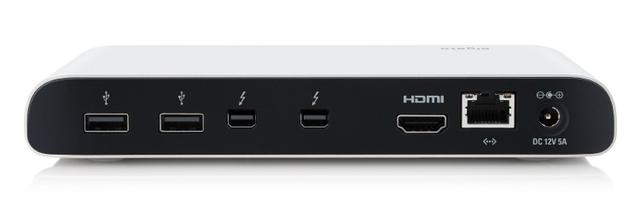
The Elgato Thunderbolt Dock is a Thunderbolt 4 dock with 8 total ports, 96W host charging, dual 4K@60Hz display support, and a compact design built specifically around streaming and content-creation workflows for ~$300.
Elgato designed this dock as the hub of a streaming desk rather than a generalist office dock, with port placement and cable routing specifically laid out to keep capture cards, USB microphones, and stream decks tidy. 96W of charging keeps a 14-inch MacBook Pro or streaming laptop powered through long broadcast sessions without a separate charger cluttering the desk. Versus the CalDigit TS4, that offers more total ports for a similar price, worth it for buyers who need more simultaneous peripherals than a streaming-focused layout provides. Versus the Anker 777 Thunderbolt Docking Station, that adds a built-in SSD bay, worth it for creators who want local scratch storage built into the dock itself.
Built for Streaming Desks
Elgato designed this dock as the hub of a streaming desk rather than a generalist office dock, with port placement and cable routing specifically laid out to keep capture cards, USB microphones, and stream decks tidy.
Reliable Sustained Power
96W of charging keeps a 14-inch MacBook Pro or streaming laptop powered through long broadcast sessions without a separate charger cluttering the desk.
Comparison to Alternatives
Versus the CalDigit TS4, that offers more total ports for a similar price, worth it for buyers who need more simultaneous peripherals than a streaming-focused layout provides. Versus the Anker 777 Thunderbolt Docking Station, that adds a built-in SSD bay, worth it for creators who want local scratch storage built into the dock itself.
Our verdict
Reviewed by Burooj Alam. Rated by us, not by users.
Expert rating8 / 10
A streaming-oriented Thunderbolt 4 dock that trades some port count for a layout built around creator workflows.
Best for
- Streamers and content creators organizing capture cards, mics, and stream decks around one dock.
Not for
- Buyers needing wired Ethernet, since this dock has no LAN port.
Specifications
What these specs meanIdentity
| Brand | Elgato |
|---|---|
| Model Number | Thunderbolt Dock |
| Connection Type | Thunderbolt 4 |
| Port Configuration | 2x TB4 40Gbps, 3x USB-A 10Gbps, 1x USB-C 10Gbps, 3.5mm audio |
| Max Display Support | Dual 4K |
Ports & Power
| Max Display Resolution | Dual 4K@60Hz |
|---|---|
| Total Ports | 8 |
| Ethernet | No |
Host power
| Host Power Delivery | 96W host charging |
|---|
FAQs
What are the key specifications of the Elgato Thunderbolt Dock (Thunderbolt 4 / 8 Ports / 96W Host Charging / Dual 4K@60Hz / Mac/Windows / ~$300)?
Key specs for the Elgato Thunderbolt Dock: Power Delivery 96W host charging, Ethernet No, Connection Type Thunderbolt 4, Port Configuration 2x TB4 40Gbps, 3x USB-A 10Gbps, 1x USB-C 10Gbps, 3.5mm audio, Max Display Support Dual 4K, Max Display Resolution Dual 4K@60Hz.
Who is the Elgato Thunderbolt Dock (Thunderbolt 4 / 8 Ports / 96W Host Charging / Dual 4K@60Hz / Mac/Windows / ~$300) best suited to?
Best suited to: Streamers and content creators organizing capture cards, mics, and stream decks around one dock.
What are the drawbacks of the Elgato Thunderbolt Dock (Thunderbolt 4 / 8 Ports / 96W Host Charging / Dual 4K@60Hz / Mac/Windows / ~$300)?
Not the best fit for: Buyers needing wired Ethernet, since this dock has no LAN port.
Compare and read more
- Elgato Thunderbolt Dock (Thunderbolt 4 / 8 Ports / 96W Host Charging / Dual 4K@60Hz / Mac/Windows) vs Lenovo Legion Gen 2 USB-C Gaming Dock (USB4 / 9 Ports / 135W Host Charging / Dual 4K@144Hz / Windows)
- Elgato Thunderbolt Dock (Thunderbolt 4 / 8 Ports / 96W Host Charging / Dual 4K@60Hz / Mac/Windows) vs StarTech.com Thunderbolt 4 Dock (Thunderbolt 4 / 11 Ports / 90W Host Charging / Dual 4K@60Hz / Mac/Windows)
- Anker Prime 14-in-2 Docking Station (Thunderbolt 4/USB4 / 14 Ports + Built-In Charger / 140W Host Charging / Dual 4K@60Hz / Mac/Windows) vs Elgato Thunderbolt Dock (Thunderbolt 4 / 8 Ports / 96W Host Charging / Dual 4K@60Hz / Mac/Windows)
- Elgato Thunderbolt Dock (Thunderbolt 4 / 8 Ports / 96W Host Charging / Dual 4K@60Hz / Mac/Windows) vs Kensington SD5700T Thunderbolt 4 Dock (Thunderbolt 4 / 12 Ports / 96W Host Charging / Dual 4K@60Hz or Single 8K@30Hz / Mac/Windows)
- Anker 777 Thunderbolt Docking Station (Apex, 12-in-1 / Triple 4K / Single 8K / Dual HDMI) vs Elgato Thunderbolt Dock (Thunderbolt 4 / 8 Ports / 96W Host Charging / Dual 4K@60Hz / Mac/Windows)
- Why Your Docking Station Only Shows One External Display on a MacBook
- Why "Total Ports" on a Docking Station Doesn't Tell You Anything