
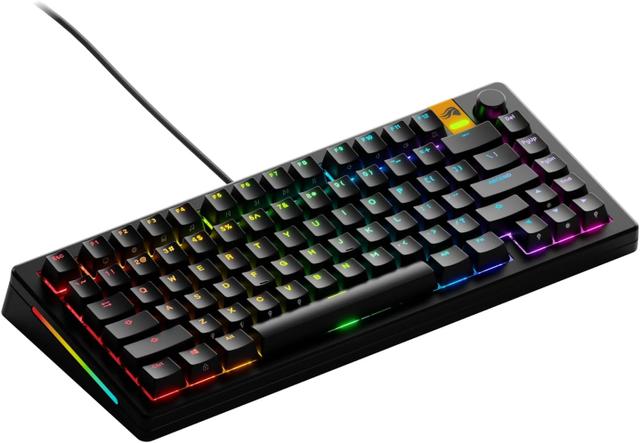
Glorious GMMK 3 TKL
Expert rating8 / 10
- Layout:
- TKL
- Switch Type:
- Mechanical
- Connectivity:
- Bluetooth / 2.4GHz / Wired
- Hot-Swappable:
- Yes
Consumercarts is reader-supported. Learn more
Disclaimer: The price and specification of the given product may differ from the actual product. Please confirm on the retailer's website before buying.
Manufacturer: Glorious Last updated: 2026-10-08
Glorious GMMK 3 TKL Review
The Glorious GMMK 3 TKL is a tenkeyless hot-swap mechanical keyboard with pre-lubed switches, tri-mode Bluetooth, 2.4GHz and wired USB-C, double-shot PBT keycaps and south-facing per-key RGB.
A TKL keyboard that connects by Bluetooth, 2.4GHz wireless or wired USB-C. Hot-swap sockets let you change switches without soldering, and it ships with pre-lubed switches, Glorious Panda or Lynx, or a user-selected set. The keycaps are double-shot PBT, and south-facing RGB is set behind each key. Wired polling reaches up to 8000 Hz, which matters mostly to competitive players. The tenkeyless layout has no number pad but is wider than a 75% board.
What's New Over the GMMK Pro
The GMMK 3 adds tri-mode wireless, screw-in stabilizers from the factory, and pre-lubed switches out of the box, all fixes for common complaints about the original GMMK Pro's stock stabilizers.
A Bigger, More Practical Layout
Moving to TKL keeps the number pad's absence but adds back the arrow cluster and navigation keys some buyers missed on the compact 75% GMMK Pro.
Comparison to Alternatives
Against Glorious's own GMMK Pro, the GMMK 3 TKL fixes the stock stabilizer complaints and adds wireless, at the cost of a slightly larger footprint, a clear upgrade for anyone not attached to the 75% size. Against the Drop CTRL, both are TKL hot-swap boards, the GMMK 3 wins on wireless connectivity, while the CTRL has a longer track record in the DIY keyboard community.
Our verdict
Reviewed by Burooj Alam. Rated by us, not by users.
Expert rating8 / 10
A meaningful upgrade over the GMMK Pro that fixes its most common complaints and adds wireless without raising the price much.
Best for
- GMMK Pro fans who want wireless and a bigger layout.
- Buyers who want pre-lubed switches and stabilizers out of the box.
- Anyone building their first hot-swap TKL board.
Not for
- Buyers who specifically want the compact 75% footprint.
- Minimalists who don't need wireless.
- Anyone on a tight budget.
Specifications
What these specs meanIdentity
| Brand | Glorious |
|---|---|
| Model | GMMK 3 TKL |
Design
| Layout | TKL |
|---|---|
| Switch Type | Glorious Panda/Lynx or user-selected hot-swap, pre-lubed |
| Connectivity | Bluetooth / 2.4GHz / Wired USB-C |
| Keycap Material | Double-shot PBT |
Features
| Backlighting | South-facing per-key RGB |
|---|---|
| Polling Rate | Up to 8000 Hz wired |
FAQs
What are the key specifications of the Glorious GMMK 3 TKL (TKL/Pre-Lubed Hot-Swap Mechanical/Tri-Mode Wireless + Wired/South-Facing RGB)?
Key specs for the Glorious GMMK 3 TKL: Layout TKL, Switch Type Glorious Panda/Lynx or user-selected hot-swap, pre-lubed, Connectivity Bluetooth / 2.4GHz / Wired USB-C, Backlighting South-facing per-key RGB, Polling Rate Up to 8000 Hz wired, Keycap Material Double-shot PBT.
Will the Glorious GMMK 3 TKL (TKL/Pre-Lubed Hot-Swap Mechanical/Tri-Mode Wireless + Wired/South-Facing RGB) work with my current setup?
The Glorious GMMK 3 TKL (TKL/Pre-Lubed Hot-Swap Mechanical/Tri-Mode Wireless + Wired/South-Facing RGB) lists Switch Type is Glorious Panda/Lynx or user-selected hot-swap, pre-lubed. Check that against the hardware you already own before buying, since this is the field that most often decides whether a part fits.
Who is the Glorious GMMK 3 TKL (TKL/Pre-Lubed Hot-Swap Mechanical/Tri-Mode Wireless + Wired/South-Facing RGB) best suited to?
Best suited to: GMMK Pro fans who want wireless and a bigger layout; Buyers who want pre-lubed switches and stabilizers out of the box; Anyone building their first hot-swap TKL board.
What are the drawbacks of the Glorious GMMK 3 TKL (TKL/Pre-Lubed Hot-Swap Mechanical/Tri-Mode Wireless + Wired/South-Facing RGB)?
Not the best fit for: Buyers who specifically want the compact 75% footprint; Minimalists who don't need wireless; Anyone on a tight budget.
Compare and read more
- Corsair K100 RGB (Full-Size/Cherry MX Speed or Corsair OPX Optical-Mechanical/Wired USB/144 Zone RGB/8000Hz Polling) vs Glorious GMMK 3 TKL (TKL/Pre-Lubed Hot-Swap Mechanical/Tri-Mode Wireless + Wired/South-Facing RGB)
- Corsair K65 RGB Mini (60%/Cherry MX Speed/Wired USB-C/Hot-Swappable/Per-Key RGB) vs Glorious GMMK 3 TKL (TKL/Pre-Lubed Hot-Swap Mechanical/Tri-Mode Wireless + Wired/South-Facing RGB)
- ASUS ROG Strix Scope II 96 (96%/ROG NX Snow Mechanical/Wired USB-C/Hot-Swappable/Per-Key RGB) vs Glorious GMMK 3 TKL (TKL/Pre-Lubed Hot-Swap Mechanical/Tri-Mode Wireless + Wired/South-Facing RGB)
- Endgame Gear KB65HE (65%/Hall Effect/Wired USB-C/Adjustable Actuation + Rapid Trigger/1000Hz Polling) vs Glorious GMMK 3 TKL (TKL/Pre-Lubed Hot-Swap Mechanical/Tri-Mode Wireless + Wired/South-Facing RGB)
- Glorious GMMK 3 TKL (TKL/Pre-Lubed Hot-Swap Mechanical/Tri-Mode Wireless + Wired/South-Facing RGB) vs HyperX Alloy Rise 75 (75%/HyperX Red or Aqua Mechanical/USB-C Wired/Hot-Swappable/Gasket-Mounted/Per-Key RGB)
- Hall Effect Keyboards: What "Adjustable Actuation" Numbers Actually Mean