
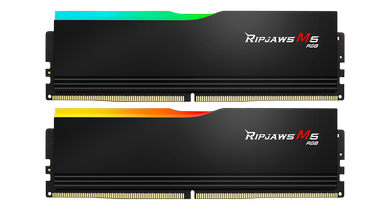
G.Skill Ripjaws M5 RGB F5-6000J3036F24GX2-RM5RK
- Model:
- G.Skill Ripjaws M5 RGB
- Capacity:
- 48GB
- DDR Generation:
- DDR5
- Speed:
- 6000MT/s
- Timings:
- CL30
- Voltage:
- 1.35V
- Overclocking:
- Intel XMP 3.0
- Color:
- Black, RGB
Consumercarts is reader-supported. Learn more
Disclaimer: The price and specification of the given product may differ from the actual product. Please confirm on the retailer's website before buying.
Manufacturer: G.Skill Last updated: 2026-09-29
G.Skill Ripjaws M5 RGB F5-6000J3036F24GX2-RM5RK Review
The G.Skill Ripjaws M5 RGB F5-6000J3036F24GX2-RM5RK is a 48GB (2x24GB) DDR5-6000 desktop memory kit rated CL30 at 1.35V, with full timings of 30-36-36-96, for a true latency of 10ns.
Speed and Latency
The number that matters is true latency, not CL alone. Here it is 30 / (6000 / 2) x 1000 = 10ns. That is tighter than 54% of the desktop DDR5 kits we list. The full timings are 30-36-36-96. tRCD and tRP sit 6 clocks above the CAS latency, so compare full timings, not just CL, against other kits at this speed.
Platform Fit
This is for DDR5 desktops: AMD AM5 on 600 or 800 series chipsets, and Intel 600, 700 or 800 series boards with DDR5 slots. It physically will not go into a DDR4 board. 6000MT/s is the sweet spot on AM5, where the memory controller runs 1:1 with the memory for the lowest latency. It has an Intel XMP 3.0 profile only. Most AM5 boards can still load XMP, but kits with EXPO are validated for AMD. Out of the box it runs at the JEDEC default of 5600MT/s and 1.1V. Enable the XMP 3.0 profile in the BIOS to reach 6000MT/s.
Capacity and Configuration
The two 24GB modules give you dual channel with two slots used. Four DDR5 sticks usually run well below their rated speed, so buy the total capacity you need as one two-stick kit rather than adding a second kit later. 48GB covers current games with a browser and Discord open, plus most photo and video work.
Build and Cooling
It has RGB lighting on a black heat spreader. At 41mm tall, check your air cooler's RAM clearance before buying. G.Skill does not say whose DRAM chips are inside, so manual tuning headroom is unknown. Warranty: limited lifetime.
Speed Score
It scores 8.3 out of 10 on our DDR5 Speed Score, which weighs transfer rate and true latency against every other DDR5 kit we list. Do not compare it with DDR4 scores.
Our verdict
Reviewed by Burooj Alam. Rated by us, not by users.
Best for
- AM5 builds that want the 6000MT/s 1:1 sweet spot
- Builds that want RGB lighting
Not for
- Comparing on CL alone: full timings are 30-36-36-96
- Manual timing tuning: memory chips are not disclosed
- Adding a second kit later for four sticks
Specifications
What these specs meanHow fast this kit is among DDR5 kits, rated from its speed and latency.
Identity
| Peak Bandwidth | 96.0 GB/s |
|---|---|
| Brand | G.Skill |
| Part Number | F5-6000J3036F24GX2-RM5RK |
| Series | Ripjaws M5 RGB |
Memory
| DDR Generation | DDR5 |
|---|---|
| Capacity | 48 GB |
| Speed | 6000 MT/s |
| CAS Latency | 30 |
| Module Count | 2 |
| Voltage | 1.35 V |
Physical
| RGB Lighting | Yes |
|---|
Module and platform
| RAM Segment | Desktop DDR5 |
|---|---|
| Form Factor | Desktop DIMM |
Capacity
| Capacity Per Module | 24 GB |
|---|
Speed and timings
| JEDEC Base Speed | 5600 MT/s |
|---|---|
| Timing String | 30-36-36-96 |
| True Latency | 10.0 ns |
Overclocking profile
| XMP Support | Yes |
|---|---|
| XMP Version | XMP 3.0 |
| EXPO Support | No |
| JEDEC Voltage | 1.1 V |
Silicon
| Memory IC | Undisclosed |
|---|---|
| ECC | No |
Physical and lighting
| Module Height | 41 mm |
|---|---|
| Colour | Black |
Commercial
| Warranty | Limited Lifetime |
|---|
FAQs
Is the G.Skill Ripjaws M5 RGB F5-6000J3036F24GX2-RM5RK compatible with my motherboard?
It fits DDR5 desktop boards (AMD AM5, Intel 600, 700 and 800 series with DDR5 slots). It does not fit DDR4 boards.
Is 6000MT/s CL30 a good combination?
It works out to 10ns true latency. That is tighter than 54% of the desktop DDR5 kits we list. Full timings: 30-36-36-96.
Why does it run at 5600MT/s instead of 6000MT/s?
5600MT/s is the JEDEC default. Enable the XMP 3.0 profile in the BIOS to run at 6000MT/s.
Can I add a second kit later for four sticks?
It is not recommended. Four DDR5 sticks usually run well below their rated speed. Buy the total capacity you need as one two-stick kit.
Is 6000MT/s good for AMD Ryzen 7000 and 9000?
Yes. 6000MT/s lets the memory controller run 1:1 with the memory on AM5, the best balance of speed and latency.