
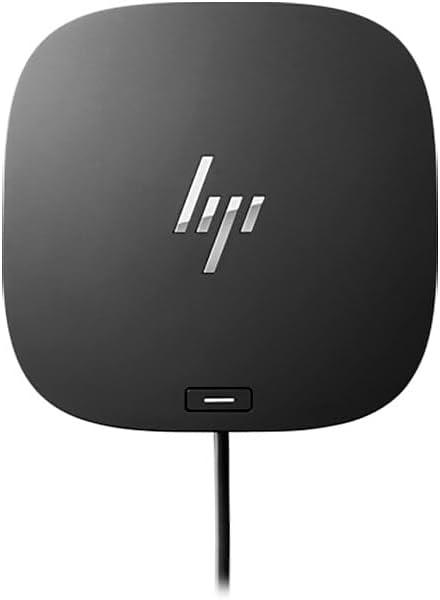
HP USB-C Dock G5
Expert rating6 / 10
- Connection Type:
- USB-C (non-Thunderbolt)
- Total Ports:
- 8
- Max Display Support:
- Dual display
- Power Delivery:
- 65W
Consumercarts is reader-supported. Learn more
Disclaimer: The price and specification of the given product may differ from the actual product. Please confirm on the retailer's website before buying.
Manufacturer: HP Last updated: September 12, 2026
Where to buy
- NeweggGo to store
HP USB-C Dock G5 Review
The HP USB-C Dock G5 is a budget enterprise USB-C dock with 8 ports, dual DisplayPort plus HDMI outputs, and 65W charging, built for large Windows fleet deployments rather than Thunderbolt speed.
HP sells this dock in volume to IT departments outfitting hundreds of desks at once, so it prioritizes predictable driver support and a low per-unit cost over Thunderbolt bandwidth. The dual DisplayPort output covers most corporate monitor setups, and 65W charging is plenty for the thin-and-light business laptops HP itself sells alongside it. It's not exciting hardware, but it's exactly what a procurement spreadsheet wants.
Comparison to Alternatives
Against the catalog's HP Thunderbolt Dock G4, the G4 is HP's premium sibling with full Thunderbolt 4 bandwidth and 120W charging for power users, while the G5 undercuts it on price for standard office laptops that don't need that headroom. Against the Lenovo ThinkPad Universal Thunderbolt 4 Dock, Lenovo's dock is brand-locked to ThinkPad ergonomics and Thunderbolt speed, whereas the HP G5 works across any USB-C Windows laptop at a lower fleet cost.
Our verdict
Reviewed by Burooj Alam. Rated by us, not by users.
Expert rating6 / 10
A practical, low-cost dock for standard office fleets that don't need Thunderbolt speed.
Best for
- IT departments equipping large Windows office fleets on a budget
- Standard business laptops that don't need Thunderbolt bandwidth
- Dual-monitor office setups using DisplayPort
Not for
- Mac users, since it targets Windows enterprise deployments
- Power users who want Thunderbolt-level throughput
- Creative workflows needing more than dual 4K@30Hz
Specifications
What these specs meanIdentity
| Brand | HP |
|---|---|
| Model Number | USB-C Dock G5 |
| Connection Type | USB-C (DisplayPort Alt Mode, non-Thunderbolt) |
| Port Configuration | 1x USB-C host cable, 1x USB-C data (15W), 4x USB-A 5Gbps, 2x DisplayPort, 1x HDMI 2.0, 1x RJ45, 1x combo audio |
| Max Display Support | Up to 3 displays |
Host connection
| Thunderbolt Version | None |
|---|---|
| Host Cable Captive | Yes |
Ports & Power
| Max Display Resolution | Dual 4K@30Hz or Single 4K@60Hz |
|---|---|
| Total Ports | 10 |
| Ethernet | Yes |
Host power
| Host Power Delivery | 100 W |
|---|---|
| Bus Powered | No |
Display engine
| Max Displays Windows | 3 |
|---|
Video ports
| HDMI Port Count | 1 |
|---|---|
| HDMI Version | 2.0 |
| DisplayPort Port Count | 2 |
Data ports
| Downstream Thunderbolt Port Count | 0 |
|---|---|
| USB-A Port Count | 4 |
| USB-C Data Port Count | 1 |
| Max USB Data Rate | 5Gbps |
Downstream power
| Max Downstream USB-C Power | 15 W |
|---|
Audio and control
| Audio Jack Configuration | Single Combo |
|---|---|
| Security Lock Slot | Yes |
Compatibility and physical
| macOS Supported | Yes |
|---|---|
| Windows Supported | Yes |
| ChromeOS Supported | Yes |
| Weight | 748 g |
FAQs
What are the key specifications of the HP USB-C Dock G5 (USB-C / 8 Ports / 65W Host Charging / Dual 4K@30Hz / Windows / ~$130)?
Key specs for the HP USB-C Dock G5: Power Delivery 100 W, Host Power Delivery 100 W, Ethernet Yes, Connection Type USB-C (DisplayPort Alt Mode, non-Thunderbolt), Port Configuration 1x USB-C host cable, 1x USB-C data (15W), 4x USB-A 5Gbps, 2x DisplayPort, 1x HDMI 2.0, 1x RJ45, 1x combo audio, Max Display Support Up to 3 displays.
Who is the HP USB-C Dock G5 (USB-C / 8 Ports / 65W Host Charging / Dual 4K@30Hz / Windows / ~$130) best suited to?
Best suited to: IT departments equipping large Windows office fleets on a budget; Standard business laptops that don't need Thunderbolt bandwidth; Dual-monitor office setups using DisplayPort.
What are the drawbacks of the HP USB-C Dock G5 (USB-C / 8 Ports / 65W Host Charging / Dual 4K@30Hz / Windows / ~$130)?
Not the best fit for: Mac users, since it targets Windows enterprise deployments; Power users who want Thunderbolt-level throughput; Creative workflows needing more than dual 4K@30Hz.
Compare and read more
- ASUS DC5 Universal Dock (USB-C / 5 Ports / 100W Pass-Through Charging / Single 4K@60Hz / Windows/Mac/Chrome) vs HP USB-C Dock G5 (USB-C / 8 Ports / 65W Host Charging / Dual 4K@30Hz / Windows)
- CalDigit Element Hub (Thunderbolt 4 / 4 Ports / 60W Host Charging / Data-Only / Mac/Windows) vs HP USB-C Dock G5 (USB-C / 8 Ports / 65W Host Charging / Dual 4K@30Hz / Windows)
- Dell WD19S (USB-C / 8 Ports / 65W Host Charging / Single 4K@60Hz / Windows) vs HP USB-C Dock G5 (USB-C / 8 Ports / 65W Host Charging / Dual 4K@30Hz / Windows)
- HP USB-C Dock G5 (USB-C / 8 Ports / 65W Host Charging / Dual 4K@30Hz / Windows) vs Wavlink Universal Docking Station (USB-A / 9 Ports / No Host Charging / Dual 4K@30Hz DisplayLink / Windows Only)
- HP USB-C Dock G5 (USB-C / 8 Ports / 65W Host Charging / Dual 4K@30Hz / Windows) vs Twelve South StayGo mini (USB-C / 6 Ports / 85W Pass-Through / Single 4K@60Hz / Magnetic MacBook Dongle / Mac)
- Best Docking Station for a Single-Cable Laptop Setup
- Docking Station Ethernet Speed: What 1GbE, 2.5GbE and 10GbE Actually Mean