
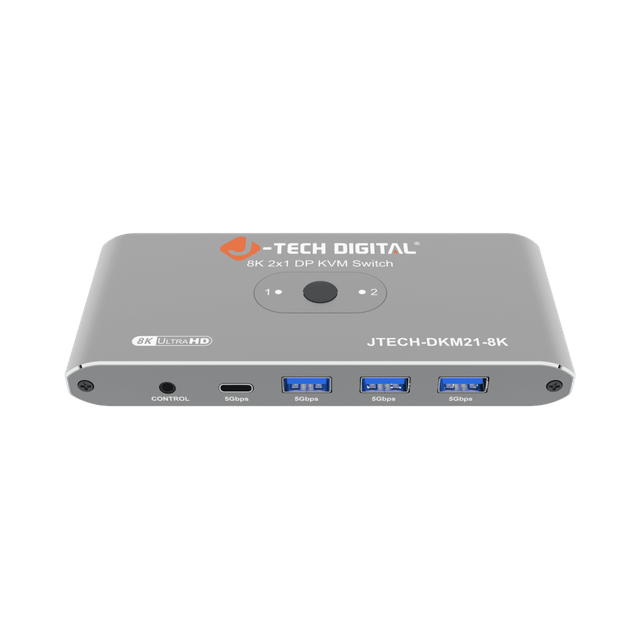
J-Tech Digital JTECH-DKM21-8K
Expert rating6.2 / 10
- Computers:
- 2
- Video Standard:
- DisplayPort 1.4
- Max Resolution:
- 8K@60Hz / 4K@240Hz
- USB Hub Ports:
- 4 (3x USB-A + 1x USB-C, 5Gbps)
Consumercarts is reader-supported. Learn more
Disclaimer: The price and specification of the given product may differ from the actual product. Please confirm on the retailer's website before buying.
Manufacturer: J-Tech Digital Last updated: 2026-09-15
Where to buy
- AmazonGo to store
- Best BuyGo to store
- NeweggGo to store
J-Tech Digital JTECH-DKM21-8K Review
J-Tech Digital JTECH-DKM21-8K 2x1 DisplayPort 1.4 KVM switch lets two computers share one monitor, keyboard and mouse with 8K@60Hz / 4K@240Hz output and a 4-port USB 3.0 (5Gbps) hub with 3 USB-A and 1 USB-C ports.
If you run two PCs off a single high-refresh or high-resolution monitor, the DKM21-8K is a straightforward way to stop swapping cables. It passes DisplayPort 1.4 through cleanly enough for 4K at 240Hz or full 8K at 60Hz, and the USB 3.0 hub (with a USB-C port included) switches your keyboard, mouse, and any other USB peripherals along with the display. Switching is done from the front panel or the included wired remote, so there's no software to install.
Overview
The JTECH-DKM21-8K is a 2-computer, 1-monitor DisplayPort 1.4 KVM switch built for desks running two machines against a single high-end display. It carries full 8K@60Hz / 4K@240Hz bandwidth and bundles a 4-port USB 3.0 hub (3x USB-A, 1x USB-C) so keyboard, mouse, and other peripherals switch along with the video signal.
Switching
Source selection is handled from a front-panel button or the included wired remote control, letting you flip between the two connected computers without reaching behind the desk.
Our verdict
Reviewed by Burooj Alam. Rated by us, not by users.
Expert rating6.2 / 10
An 8K DisplayPort 2-PC KVM from a smaller pro-AV integrator brand; specs are strong but independent review coverage is thinner than mainstream brands.
Best for
- Dual-PC desks sharing one high-refresh or high-resolution monitor
- Users who want DisplayPort 1.4 bandwidth for 4K@240Hz or 8K@60Hz
- Setups needing a USB-C peripheral port alongside USB-A
Not for
- Setups with more than 2 source computers
- HDMI-only computers or monitors (DisplayPort only)
- Multi-monitor KVM setups (single monitor output only)
Specifications
What these specs meanHow much this switch can do compared with other desk KVM switches, rated from its specifications.
Identity
| Switching Method | Button, Wired Remote |
|---|
Topology
| Computers Supported | 2 computers |
|---|---|
| Displays Per Computer | 1 displays |
| KVM Segment | Desk |
Video & Features
| Video Standard | DisplayPort |
|---|---|
| Max Resolution | 8K |
| USB Hub Ports | 4 |
Video interface
| Video Interface Version | DisplayPort 1.4 |
|---|
Per display capability
| Max Resolution Single Display | 7680x4320 |
|---|---|
| Max Refresh At Max Resolution | 240 (at 4K; 60Hz at 8K) |
Display continuity
| HDR Passthrough | Yes |
|---|
USB peripheral switching
| USB Switching Speed | USB 3.0 5Gbps |
|---|
In the box and price
| Price | 69.99 USD |
|---|---|
| Included Cables | DisplayPort cable, USB cable |
FAQs
What are the key specifications of the J-Tech Digital JTECH-DKM21-8K (DisplayPort / 2 Computers / 8K@60Hz / 4 USB 3.0 Ports)?
Key specs for the J-Tech Digital JTECH-DKM21-8K: USB Hub Ports 4 (3x USB-A + 1x USB-C), Max Resolution 8K, Max Resolution Per Display 7680x4320, USB Version USB 3.0 (5Gbps), Video Standard DisplayPort, Video Version DisplayPort 1.4.
Who is the J-Tech Digital JTECH-DKM21-8K (DisplayPort / 2 Computers / 8K@60Hz / 4 USB 3.0 Ports) best suited to?
Best suited to: Dual-PC desks sharing one high-refresh or high-resolution monitor; Users who want DisplayPort 1.4 bandwidth for 4K@240Hz or 8K@60Hz; Setups needing a USB-C peripheral port alongside USB-A.
What are the drawbacks of the J-Tech Digital JTECH-DKM21-8K (DisplayPort / 2 Computers / 8K@60Hz / 4 USB 3.0 Ports)?
Not the best fit for: Setups with more than 2 source computers; HDMI-only computers or monitors (DisplayPort only); Multi-monitor KVM setups (single monitor output only).
Compare and read more
- Adder ALIF1104T (HDMI KVM-over-IP Transmitter over 1GbE) vs J-Tech Digital JTECH-DKM21-8K (DisplayPort / 2 Computers / 8K@60Hz / 4 USB 3.0 Ports)
- Adder ADDERView PRO (AV4PRO-DVI) (4 Computers / DVI / Secure Desktop KVM) vs J-Tech Digital JTECH-DKM21-8K (DisplayPort / 2 Computers / 8K@60Hz / 4 USB 3.0 Ports)
- Adder AdderLink IPEPS (IPEPS) (1 Server / IP-Based Remote KVM over IP / Single-Port Extender) vs J-Tech Digital JTECH-DKM21-8K (DisplayPort / 2 Computers / 8K@60Hz / 4 USB 3.0 Ports)
- Adder AdderView PRO AV4PRO (4-8 Computers / 1-4 Monitors / DVI-VGA / Modular Multi-Head) vs J-Tech Digital JTECH-DKM21-8K (DisplayPort / 2 Computers / 8K@60Hz / 4 USB 3.0 Ports)
- Adder ALIF1002P (Network DVI Extender Transmitter & Receiver) vs J-Tech Digital JTECH-DKM21-8K (DisplayPort / 2 Computers / 8K@60Hz / 4 USB 3.0 Ports)
- Do KVM Switches Support 144Hz? What to Check Before You Buy
- EDID Emulation Explained: Why Your Monitor Resets When You Switch