
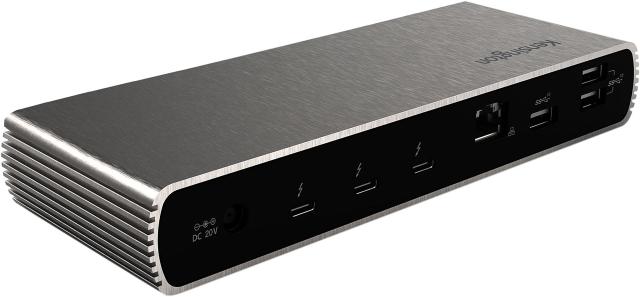
Kensington SD5700T Thunderbolt 4 Dock
Expert rating8 / 10
Consumercarts is reader-supported. Learn more
Disclaimer: The price and specification of the given product may differ from the actual product. Please confirm on the retailer's website before buying.
Manufacturer: Kensington Last updated: September 11, 2026
Where to buy
- AmazonGo to store
- NeweggGo to store
Kensington SD5700T Thunderbolt 4 Dock Review
The Kensington SD5700T is a Thunderbolt 4 dock with 12 total ports, 96W host charging, dual 4K@60Hz or single 8K@30Hz display support, and a compact horizontal footprint for ~$270.
Kensington leans on decades of accessory-making experience here, shipping a dock that passed its own extended thermal and drop-testing regimen rather than a rebadged reference design. 96W of charging plus a 2.5GbE port makes this a realistic single-cable replacement for a home-office Ethernet run, useful anywhere Wi-Fi is unreliable but a full server rack isn't warranted. Versus the Kensington SD5000T5 EQ, that steps up to Thunderbolt 5 with more ports for a real price premium, worth it for Thunderbolt 5-equipped laptops. Versus the CalDigit TS4, that matches port count and charging closely, worth it for buyers who prioritize CalDigit's longer standard warranty.
Tested Beyond Reference Design
Kensington leans on decades of accessory-making experience here, shipping a dock that passed its own extended thermal and drop-testing regimen rather than a rebadged reference design.
2.5GbE for Home Offices
96W of charging plus a 2.5GbE port makes this a realistic single-cable replacement for a home-office Ethernet run, useful anywhere Wi-Fi is unreliable but a full server rack isn't warranted.
Comparison to Alternatives
Versus the Kensington SD5000T5 EQ, that steps up to Thunderbolt 5 with more ports for a real price premium, worth it for Thunderbolt 5-equipped laptops. Versus the CalDigit TS4, that matches port count and charging closely, worth it for buyers who prioritize CalDigit's longer standard warranty.
Our verdict
Reviewed by Burooj Alam. Rated by us, not by users.
Expert rating8 / 10
A well-tested, reliable Thunderbolt 4 dock with 2.5GbE that undercuts CalDigit slightly on price.
Best for
- Home-office setups that want wired 2.5GbE without stepping up to Thunderbolt 5 pricing.
Not for
- Buyers already committed to a Thunderbolt 5 laptop wanting maximum bandwidth.
Specifications
What these specs meanIdentity
| Brand | Kensington |
|---|---|
| Model Number | SD5700T |
| Connection Type | Thunderbolt 4 |
| Port Configuration | 1x TB4 host, 3x TB4 downstream 40Gbps, 3x USB-A 10Gbps, 1x USB-A 2.0, GbE, SD UHS-II, 3.5mm combo audio |
| Max Display Support | Dual 4K |
Host connection
| Host Interface | Thunderbolt 4 |
|---|---|
| Thunderbolt Version | 4 |
| Host Bandwidth | 40 Gbps |
Ports & Power
| Max Display Resolution | Dual 4K@60Hz or single 8K@30Hz |
|---|---|
| Total Ports | 11 |
| Ethernet | Yes |
Host power
| Host Power Delivery | 90 W |
|---|---|
| Bus Powered | No |
Display engine
| Video Path | Thunderbolt Native |
|---|---|
| DisplayLink Driver Required | No |
| Max Displays Windows | 2 |
Display output
| Max Single Display Resolution | 8K |
|---|---|
| Max Single Display Refresh | 30 Hz |
| Max Dual Display Resolution | 4K |
| Max Dual Display Refresh | 60 Hz |
Video ports
| HDMI Port Count | 0 |
|---|---|
| HDMI Version | None |
| DisplayPort Port Count | 0 |
| DisplayPort Version | None |
Data ports
| Downstream Thunderbolt Port Count | 3 |
|---|---|
| USB-A Port Count | 4 |
| Max USB Data Rate | 10Gbps |
Network and storage
| Ethernet Speed | 1GbE |
|---|---|
| SD Card Slot | UHS-II |
Audio and control
| Audio Jack Configuration | Single Combo |
|---|---|
| Security Lock Slot | Yes |
Compatibility and physical
| macOS Supported | Yes |
|---|---|
| Windows Supported | Yes |
| ChromeOS Supported | Yes |
FAQs
What are the key specifications of the Kensington SD5700T Thunderbolt 4 Dock (Thunderbolt 4 / 12 Ports / 96W Host Charging / Dual 4K@60Hz or Single 8K@30Hz / Mac/Windows / ~$270)?
Key specs for the Kensington SD5700T Thunderbolt 4 Dock: Power Delivery 90 W, Host Power Delivery 90 W, Ethernet Yes, Ethernet Speed 1GbE, Connection Type Thunderbolt 4, Port Configuration 1x TB4 host, 3x TB4 downstream 40Gbps, 3x USB-A 10Gbps, 1x USB-A 2.0, GbE, SD UHS-II, 3.5mm combo audio.
Who is the Kensington SD5700T Thunderbolt 4 Dock (Thunderbolt 4 / 12 Ports / 96W Host Charging / Dual 4K@60Hz or Single 8K@30Hz / Mac/Windows / ~$270) best suited to?
Best suited to: Home-office setups that want wired 2.5GbE without stepping up to Thunderbolt 5 pricing.
What are the drawbacks of the Kensington SD5700T Thunderbolt 4 Dock (Thunderbolt 4 / 12 Ports / 96W Host Charging / Dual 4K@60Hz or Single 8K@30Hz / Mac/Windows / ~$270)?
Not the best fit for: Buyers already committed to a Thunderbolt 5 laptop wanting maximum bandwidth.
Featured in
Compare and read more
- Anker 555 8-in-1 Hub (USB-C / 8 Ports / Single External Monitor / Ethernet / Best Value) vs Kensington SD5700T Thunderbolt 4 Dock (Thunderbolt 4 / 12 Ports / 96W Host Charging / Dual 4K@60Hz or Single 8K@30Hz / Mac/Windows)
- Elgato Thunderbolt Dock (Thunderbolt 4 / 8 Ports / 96W Host Charging / Dual 4K@60Hz / Mac/Windows) vs Kensington SD5700T Thunderbolt 4 Dock (Thunderbolt 4 / 12 Ports / 96W Host Charging / Dual 4K@60Hz or Single 8K@30Hz / Mac/Windows)
- Kensington SD5700T Thunderbolt 4 Dock (Thunderbolt 4 / 12 Ports / 96W Host Charging / Dual 4K@60Hz or Single 8K@30Hz / Mac/Windows) vs Targus Thunderbolt 4 DOCK190 (Thunderbolt 4 / 14 Ports / 100W Host Charging / Dual 4K@60Hz / Mac/Windows)
- Anker 777 Thunderbolt Docking Station (Apex, 12-in-1 / Triple 4K / Single 8K / Dual HDMI) vs Kensington SD5700T Thunderbolt 4 Dock (Thunderbolt 4 / 12 Ports / 96W Host Charging / Dual 4K@60Hz or Single 8K@30Hz / Mac/Windows)
- Anker Prime 14-in-2 Docking Station (Thunderbolt 4/USB4 / 14 Ports + Built-In Charger / 140W Host Charging / Dual 4K@60Hz / Mac/Windows) vs Kensington SD5700T Thunderbolt 4 Dock (Thunderbolt 4 / 12 Ports / 96W Host Charging / Dual 4K@60Hz or Single 8K@30Hz / Mac/Windows)
- Docking Station Ethernet Speed: What 1GbE, 2.5GbE and 10GbE Actually Mean
- Docking Station Power Delivery Explained: What the Wattage Actually Means