
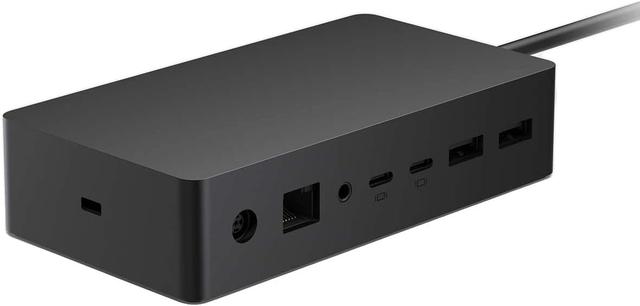
Microsoft Surface Dock 2
Expert rating7 / 10
- Connection Type:
- USB4 / Surface Connect
- Total Ports:
- 6
- Max Display Support:
- Dual 4K
- Power Delivery:
- 100W
Consumercarts is reader-supported. Learn more
Disclaimer: The price and specification of the given product may differ from the actual product. Please confirm on the retailer's website before buying.
Manufacturer: Microsoft Last updated: September 12, 2026
Where to buy
- NeweggGo to store
Microsoft Surface Dock 2 Review
The Microsoft Surface Dock 2 is a Surface-specific dock combining Surface Connect and USB4 upstream connections, dual 4K@60Hz output, and 100W host charging built for Surface Pro and Surface Laptop devices.
This is the dock Microsoft designed to snap onto Surface hardware, not a generic USB-C dongle. The magnetic Surface Connect port handles power and alignment the way a MagSafe charger does, while the pair of USB4 ports gives it modern bandwidth for external drives and displays. It's a narrower fit than most docks in this list since it only pairs with Surface devices, but for an IT department standardizing on Surface Pro or Surface Laptop fleets, that narrowness is the point: one dock, one cable, zero compatibility guesswork.
Comparison to Alternatives
Against the Lenovo ThinkPad Universal Thunderbolt 4 Dock, the Lenovo is the more flexible enterprise pick since it works across any Thunderbolt 4 laptop brand, while the Surface Dock 2 only mates with Surface Connect-equipped devices. Against the Dell WD19S, both target single-vendor fleets with similar simplicity, but the Surface Dock 2's magnetic connector and 100W charging edge out the Dell's plain USB-C plug for daily desk docking speed.
Our verdict
Reviewed by Burooj Alam. Rated by us, not by users.
Expert rating7 / 10
The right dock only if your fleet is already standardized on Surface hardware.
Best for
- Surface Pro and Surface Laptop fleets in Windows-only offices
- IT admins who want a single-SKU dock across a Surface deployment
- Desk setups that value the fast magnetic snap-on connection
Not for
- Any non-Surface laptop, since it has no generic USB-C or Thunderbolt host port
- Mac or Linux users
- Buyers who want more than two simultaneous external displays
Specifications
What these specs meanIdentity
| Brand | Microsoft |
|---|---|
| Model Number | Surface Dock 2 |
| Connection Type | Surface Connect |
| Port Configuration | 1x Surface Connect host cable, 2x front USB-C 10Gbps (15W), 2x rear USB-C 10Gbps with DP 1.4 Alt Mode, 2x USB-A 10Gbps, 1x GbE, 1x 3.5mm combo audio |
| Max Display Support | Dual 4K |
Host connection
| Thunderbolt Version | None |
|---|---|
| Host Cable Length | 0.8 m |
Ports & Power
| Max Display Resolution | Dual 4K@60Hz |
|---|---|
| Total Ports | 7 |
| Ethernet | Yes |
Host power
| Host Power Delivery | 120 W |
|---|---|
| External PSU Wattage | 199 W |
| Bus Powered | No |
Display engine
| Video Path | DisplayPort Alt Mode |
|---|---|
| DisplayLink Driver Required | No |
| Max Displays Windows | 2 |
Display output
| Max Dual Display Resolution | 4K |
|---|---|
| Max Dual Display Refresh | 60 Hz |
Video ports
| DisplayPort Port Count | 0 |
|---|---|
| USB-C Video Output Count | 2 |
Data ports
| Downstream Thunderbolt Port Count | 0 |
|---|---|
| USB-A Port Count | 2 |
| USB-C Data Port Count | 4 |
| Max USB Data Rate | 10Gbps |
Downstream power
| Max Downstream USB-C Power | 15 W |
|---|
Network and storage
| Ethernet Speed | 1GbE |
|---|
Audio and control
| Audio Jack Configuration | Single Combo |
|---|---|
| Security Lock Slot | Yes |
Compatibility and physical
| Windows Supported | Yes |
|---|
FAQs
What are the key specifications of the Microsoft Surface Dock 2 (USB4/USB-C / 6 Ports / 100W Host Charging / Dual 4K@60Hz / Windows / ~$220)?
Key specs for the Microsoft Surface Dock 2: Power Delivery 120 W, Host Power Delivery 120 W, Ethernet Yes, Ethernet Speed 1GbE, Connection Type Surface Connect, Port Configuration 1x Surface Connect host cable, 2x front USB-C 10Gbps (15W), 2x rear USB-C 10Gbps with DP 1.4 Alt Mode, 2x USB-A 10Gbps, 1x GbE, 1x 3.5mm combo audio.
Who is the Microsoft Surface Dock 2 (USB4/USB-C / 6 Ports / 100W Host Charging / Dual 4K@60Hz / Windows / ~$220) best suited to?
Best suited to: Surface Pro and Surface Laptop fleets in Windows-only offices; IT admins who want a single-SKU dock across a Surface deployment; Desk setups that value the fast magnetic snap-on connection.
What are the drawbacks of the Microsoft Surface Dock 2 (USB4/USB-C / 6 Ports / 100W Host Charging / Dual 4K@60Hz / Windows / ~$220)?
Not the best fit for: Any non-Surface laptop, since it has no generic USB-C or Thunderbolt host port; Mac or Linux users; Buyers who want more than two simultaneous external displays.
Compare and read more
- ATEN UH3238 USB-C Dual Monitor Dock (USB-C / 7 Ports / 90W Host Charging / Dual 4K@60Hz / Fanless with KVM Switching / Windows/Mac) vs Microsoft Surface Dock 2 (USB4/USB-C / 6 Ports / 100W Host Charging / Dual 4K@60Hz / Windows)
- Dell Universal Dock UD22 (USB-C / 10 Ports / 90W Host Charging / Triple 4K@60Hz / Windows/Mac/Chrome) vs Microsoft Surface Dock 2 (USB4/USB-C / 6 Ports / 100W Host Charging / Dual 4K@60Hz / Windows)
- Hyper HyperDrive Next 10-Port USB-C Hub (USB-C / 10 Ports / 100W Pass-Through / Single 4K@60Hz / Windows/Mac/iPad) vs Microsoft Surface Dock 2 (USB4/USB-C / 6 Ports / 100W Host Charging / Dual 4K@60Hz / Windows)
- Microsoft Surface Dock 2 (USB4/USB-C / 6 Ports / 100W Host Charging / Dual 4K@60Hz / Windows) vs Twelve South StayGo mini (USB-C / 6 Ports / 85W Pass-Through / Single 4K@60Hz / Magnetic MacBook Dongle / Mac)
- Anker 575 USB-C Docking Station (13-in-1, 85W Pass-Through, Dual Display) vs Microsoft Surface Dock 2 (USB4/USB-C / 6 Ports / 100W Host Charging / Dual 4K@60Hz / Windows)
- Best Docking Station for a Single-Cable Laptop Setup
- EDID Emulation Explained: Why Your Monitor Resets When You Switch