
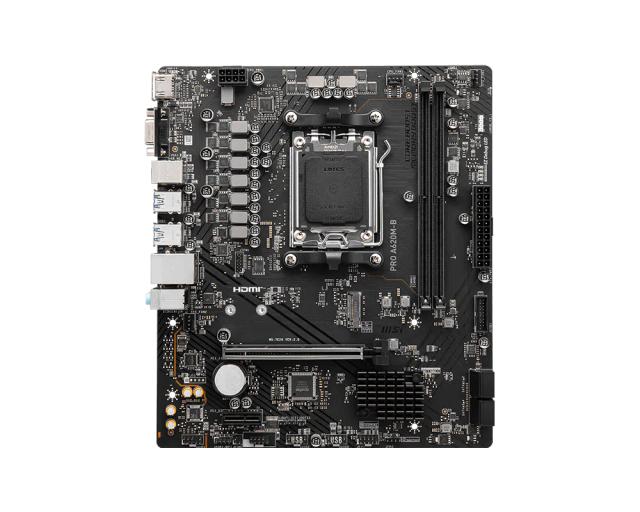
MSI PRO A620M-B
- Chipset:
- A620
- Socket:
- AM5
- Form Factor:
- Micro-ATX
- Memory:
- 2x DDR5-6800 (OC)
Consumercarts is reader-supported. Learn more
Disclaimer: The price and specification of the given product may differ from the actual product. Please confirm on the retailer's website before buying.
Manufacturer: MSI Last updated: September 11, 2026
MSI PRO A620M-B Review
The PRO A620M-B is MSI's updated entry-level AM5 board, extending official CPU support through Ryzen 9000-series chips and pushing memory overclock ceilings slightly higher than its A620M-E predecessor.
MSI does not officially disclose an exact phase count or amperage figure for this board's VRM; CPU overclocking remains unsupported on A620 regardless of the specific board revision. Two DDR5 DIMM slots run in dual-channel mode, with MSI's Memory Boost feature enabling overclocked speeds of 6800 MT/s and above, a modest improvement over the A620M-E's rated ceiling. A single PCIe 4.0 x16 slot handles the GPU, and one PCIe 4.0 M.2 slot covers primary storage, matching the A620M-E's storage configuration. Gigabit Ethernet handles wired networking without a factory Wi-Fi module. The exact audio codec model is not disclosed by MSI for this SKU. Against the MSI PRO A620M-E in this catalog, the A620M-B's primary advantages are its updated Ryzen 9000 CPU support list and a slightly higher memory OC ceiling, making it the more future-proof of MSI's two A620 boards.
Power Delivery and VRM Design
MSI does not officially disclose an exact phase count or amperage figure for this board's VRM; CPU overclocking remains unsupported on A620 regardless of the specific board revision.
Memory Support
Two DDR5 DIMM slots run in dual-channel mode, with MSI's Memory Boost feature enabling overclocked speeds of 6800 MT/s and above, a modest improvement over the A620M-E's rated ceiling.
Expansion and Storage
A single PCIe 4.0 x16 slot handles the GPU, and one PCIe 4.0 M.2 slot covers primary storage, matching the A620M-E's storage configuration.
Connectivity
Gigabit Ethernet handles wired networking without a factory Wi-Fi module. The exact audio codec model is not disclosed by MSI for this SKU.
Comparison to Alternatives
Against the MSI PRO A620M-E in this catalog, the A620M-B's primary advantages are its updated Ryzen 9000 CPU support list and a slightly higher memory OC ceiling, making it the more future-proof of MSI's two A620 boards.
Our verdict
Reviewed by Burooj Alam. Rated by us, not by users.
Best for
- New Ryzen 9000 builds wanting the most current A620 board in MSI's lineup
- Budget builders chasing the highest memory OC ceiling among entry-level A620 boards
Not for
- Buyers who already own the A620M-E and don't need the marginal CPU support update
- Anyone needing factory Wi-Fi or a second M.2 slot
Specifications
What these specs meanIdentity
| Model Number | PRO A620M-B |
|---|---|
| Form Factor | Micro-ATX |
Platform and CPU compatibility
| Platform | AMD |
|---|---|
| Socket | AM5 |
| Chipset | A620 |
| Newest CPU Family Supported | Ryzen 9000 |
| Oldest CPU Family Supported | Ryzen 7000 |
Memory
| Memory Type | DDR5 |
|---|---|
| Memory Slots | 2 |
| Max Memory | 128 GB |
| Memory Channels | 2 |
| Max Memory Capacity | 128 GB |
| Max Rated Memory Speed | 6800 MT/s |
| ECC Memory Support | None |
Expansion & Connectivity
| M.2 Slots | 1 |
|---|---|
| PCIe 5.0 Support | No |
| Wi-Fi Onboard | No |
Physical fit
| Board Width | 215 mm |
|---|
M.2 storage
| M.2 Slots Onboard | 1 |
|---|---|
| M.2 PCIe 4.0 Slots | 1 |
| M.2 CPU Attached Slots | 1 |
Other storage
| SATA Ports | 4 |
|---|
PCIe expansion
| PCIe x16 Slots | 1 |
|---|---|
| Primary Graphics Slot Gen | PCIe 4.0 |
Rear USB
| Rear USB 5Gbps Ports | 4 |
|---|---|
| Rear USB 2.0 Ports | 2 |
Internal headers
| Front USB-C Header Speed | None |
|---|---|
| Fan and Pump Headers | 3 |
| ARGB Headers | 1 |
Power delivery
| Vcore Power Stages | Not officially disclosed by MSI |
|---|
Builder features
| POST Code Display | No |
|---|
Network and audio
| Max Ethernet Speed | 2.5 Gbps |
|---|---|
| Ethernet Port Count | 1 |
| Wi-Fi Standard | None |
| Audio Codec | Realtek ALC897, 7.1-channel |
FAQs
What are the key specifications of the MSI PRO A620M-B (AM5/AMD A620/mATX/DDR5-6800+ OC/Updated CPU Support)?
Key specs for the MSI PRO A620M-B: Chipset A620, Socket AM5, Socket Type AM5, Max Memory 128 GB, Max Memory Capacity 128 GB, Form Factor Micro-ATX.
Will the MSI PRO A620M-B (AM5/AMD A620/mATX/DDR5-6800+ OC/Updated CPU Support) work with my current setup?
The MSI PRO A620M-B (AM5/AMD A620/mATX/DDR5-6800+ OC/Updated CPU Support) lists Socket is AM5. Check that against the hardware you already own before buying, since this is the field that most often decides whether a part fits.
Who is the MSI PRO A620M-B (AM5/AMD A620/mATX/DDR5-6800+ OC/Updated CPU Support) best suited to?
Best suited to: New Ryzen 9000 builds wanting the most current A620 board in MSI's lineup; Budget builders chasing the highest memory OC ceiling among entry-level A620 boards.
What are the drawbacks of the MSI PRO A620M-B (AM5/AMD A620/mATX/DDR5-6800+ OC/Updated CPU Support)?
Not the best fit for: Buyers who already own the A620M-E and don't need the marginal CPU support update; Anyone needing factory Wi-Fi or a second M.2 slot.
Compare and read more
- ASRock A520M-HDV (AM4/AMD A520/mATX/Budget/HDMI+DVI Display Outputs) vs MSI PRO A620M-B (AM5/AMD A620/mATX/DDR5-6800+ OC/Updated CPU Support)
- ASRock B850M Pro-A WiFi (AM5/AMD B850/mATX/8+2+1 Phase Dr.MOS VRM/Wi-Fi 6E) vs MSI PRO A620M-B (AM5/AMD A620/mATX/DDR5-6800+ OC/Updated CPU Support)
- ASRock A620M-HDV/M.2+ (AM5/AMD A620/mATX/Dual M.2/Entry-Level AM5) vs MSI PRO A620M-B (AM5/AMD A620/mATX/DDR5-6800+ OC/Updated CPU Support)
- ASRock B560M Pro4 (LGA1200/Intel B560/mATX/Budget/PCIe 4.0) vs MSI PRO A620M-B (AM5/AMD A620/mATX/DDR5-6800+ OC/Updated CPU Support)
- ASRock B650M Pro RS (AM5/AMD B650/mATX/8+2+1 Phase Dr.MOS VRM/Three M.2 Slots) vs MSI PRO A620M-B (AM5/AMD A620/mATX/DDR5-6800+ OC/Updated CPU Support)
- LGA1954 Explained: What Nova Lake Means for Your Next Motherboard
- Your Motherboard's M.2 Slot Count Doesn't Tell You Which Ones Run Full Speed