
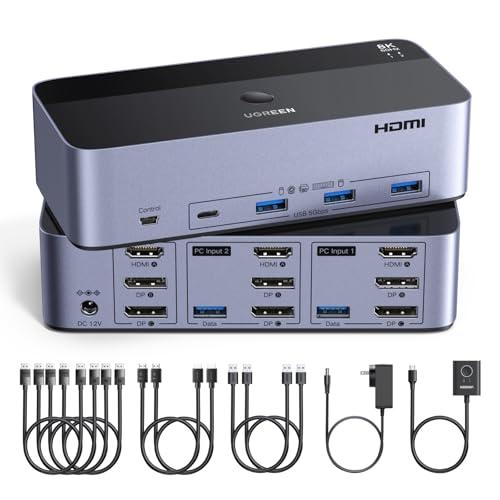
UGREEN 8K@60Hz HDMI+DisplayPort KVM Switch
Expert rating6 / 10
- Computers:
- 2
- Monitors:
- 3
- Video Standard:
- Mixed (2x DP + 1x HDMI)
- Max Resolution:
- 8K@60Hz
Consumercarts is reader-supported. Learn more
Disclaimer: The price and specification of the given product may differ from the actual product. Please confirm on the retailer's website before buying.
Manufacturer: UGREEN Last updated: September 16, 2026
Where to buy
- AmazonGo to store
UGREEN 8K@60Hz HDMI+DisplayPort KVM Switch Review
The UGREEN 8K@60Hz HDMI + DisplayPort KVM switch runs 3 monitors from 2 computers over 2x DisplayPort 1.4 and 1x HDMI 2.1, with a 4-port USB 3.0 hub, aluminium housing, a wired desk controller and all the PC-side cables in the box, at around 100 dollars.
At 100 dollars this is the only triple-monitor KVM on the market, full stop. Everything else that drives three screens starts at 247 refurbished and runs to 750.
You pay for that in two specific ways. There's no EDID emulation, so every time you switch, Windows sees three monitors unplug and your window layout gets shuffled. And there's no hotkey switching, so it's the button or the supplied remote.
The 8K@60Hz on the box also needs a footnote. That figure is only reachable with Display Stream Compression, which UGREEN never mentions anywhere.
Specifications
Computers: 2
Monitors: 3
Inputs: 4x DisplayPort 1.4, 2x HDMI 2.1
Outputs: 2x DisplayPort 1.4, 1x HDMI 2.1
Claimed max: 8K@60Hz per port, 4K@240Hz
VRR: FreeSync and G-Sync passthrough
HDCP: 2.3 and 1.4
EDID emulation: no
Hotkey switching: no
Switching: front button, wired desk controller
USB hub: 4 ports, USB 3.0 5Gbps
Housing: aluminium with ABS
Size: 6.18 x 2.83 x 1.57 in
Power: AC adapter included
Cable limit: 2m, 28AWG for 8K
In the box
The switch, 4x DP cables, 2x HDMI cables, 2x USB-A cables, the desk controller, a power adapter and a guide.
That covers both computers to the switch. It does not cover the switch to your monitors. You need three more cables and they aren't included.
Price four decent DP cables and two HDMI cables separately and you're most of the way to this switch's cost, so the bundle is genuinely most of the value here.
Design and build
Aluminium shell with plastic ends, 6.18 x 2.83 x 1.57 inches, external power brick.
Build quality is the one thing owners are unanimous about. Amazon's own tally is seven mentions of build quality, seven positive, zero negative.
No fan, which matters because the TESmart alternative has one and reviewers call it distracting.
The desk controller is the reason there's no hotkey, and it works. The only complaint we found was that it's overkill.
About that 8K@60Hz claim
8K at 60Hz is 7680 x 4320 x 60 x 24 bits, which is 47.78 Gbit/s before blanking.
DisplayPort 1.4 carries 32.4 Gbit/s raw and 25.92 Gbit/s usable after 8b/10b encoding.
The claim needs 1.84 times the entire link. It's only possible with Display Stream Compression, and UGREEN never mentions DSC anywhere on the listing. TESmart and Level1Techs both state it plainly.
Same arithmetic kills the 4K@240Hz claim. Identical 47.78 figure.
One owner reports not reaching 4K@75Hz through it. Treat 8K60 as a best case with short cables and perfect conditions.
No EDID emulation, and what that costs you
EDID is the block of data your monitor sends describing itself. A KVM with emulation keeps showing it to the idle computer, so that PC never notices the monitor left.
This one doesn't. Switch away and the DisplayPort link drops, Windows sees three monitors unplug, and your desktop collapses.
What you'll actually see: windows herded onto one screen, floating windows not coming back, monitor order occasionally swapping, a 3 to 5 second black flash on every switch.
Three screens makes it worse than one. Three links tear down instead of one.
UGREEN's own troubleshooting PDF tells you to expect the flicker.
Fixing the window shuffle
Windows 11: Settings, System, Display, Multiple Displays. Tick "Remember windows locations based on monitor connection" and untick "Minimize windows when a monitor is disconnected". Free, and the highest-value fix.
Windows 10: PersistentWindows on GitHub. Free, snapshots your layout per display configuration.
macOS: System Settings, Desktop and Dock, Mission Control, untick "Automatically rearrange Spaces based on most recent use".
Hardware EDID dongles work but you need one per display, and Level1Techs sells theirs at 99 dollars. Three of those costs more than the switch.
One practical tip: put the monitor whose layout you care about on the HDMI port. HDMI tolerates a dropped link better than DisplayPort does.
No hotkey switching
Button or the wired remote. That's it. UGREEN states it in the listing.
Honestly it matters less than enthusiasts assume. The remote puts a button next to your keyboard, which is most of what a hotkey gives you.
Where it does hurt: if the button or the remote cable fails you have no second way to switch, and there's no serial control for automation.
TESmart gives you four methods, hotkey plus button plus IR remote plus mouse wheel. CKL and ATEN both do hotkeys too. If you switch forty times a day, that's forty reaches.
Reliability
This is a bimodal product, not a mediocre one. 3.9 out of 5 from 371 US ratings, but 63 percent five star and 18 percent one star.
USB is the problem area. Amazon's own tally puts connectivity at two positive and five negative, the only attribute rated net negative. Several owners report USB ports dead out of the box, and one reports a replacement unit failing the same way inside a day.
No firmware update path, so nothing gets fixed in the field. TESmart, CKL and ATEN units are all upgradable.
When it works, owners love it. The risk is whether yours is one of the 18 percent.
Versus the competition
CKL DisplayPort dual-monitor KVM, 94.99 dollars: same money, and you get EDID emulation and hotkeys. Two monitors instead of three. Winner if you can live with two screens, and it's the comparison that matters most.
CKL-923HUA-5, 329 new or 246.75 refurbished: cheapest triple-monitor switch with EDID we could find. HDMI only. Winner if the window shuffle would drive you mad.
TESmart DKS203-M24, 429.90 dollars: EDID, hotkeys, four switching methods, and it states the DSC dependency honestly. Has a fan. Winner on everything but price.
Level1Techs triple DP, from 750 dollars: still no EDID emulation, and rates itself at 8K@30. Honest, expensive.
Price and availability
99.99 dollars on Amazon, down from 109.99. In stock, sold by UGREEN, over a thousand bought last month. Used like-new from 95.99.
There is nothing else at this price that drives three monitors. The next cheapest triple-monitor option is a refurbished CKL at 246.75.
So the real question isn't whether this is the best triple-monitor KVM. It isn't. The question is whether 147 dollars is worth EDID emulation and hotkeys to you.
If you switch a few times a day and mostly run full-screen apps, probably not. If you switch constantly with a complex layout, definitely yes.
FAQ: setup
Do I need three cables I don't have?
Yes. The box covers both PCs to the switch, not the switch to your monitors. Budget three more cables.
What does my PC need?
Both computers need 2x DisplayPort and 1x HDMI outputs, live at the same time. A laptop with one USB-C output can't do this, and UGREEN warns against adapters and docks.
Why do my windows move when I switch?
No EDID emulation. See the fix above, the Windows 11 display settings take two minutes.
How long does switching take?
Three to five seconds, and you'll see a black flash while the monitors re-detect.
FAQ: performance
Will it really do 8K at 60Hz?
Only with Display Stream Compression, which UGREEN never confirms it supports. One owner couldn't reach 4K@75Hz. Don't buy it for 8K.
What should I actually expect?
Three 4K60 screens comfortably. Three 1440p at 144 to 165Hz comfortably. 4K120 on a port is plausible. Past that, no promises.
Does driving three monitors reduce each one?
Each video path is a separate physical link, so in principle no. UGREEN publishes no block diagram, so we can't confirm it.
Does G-Sync work through it?
UGREEN says yes, VRR, FreeSync and G-Sync. That's rare at this price.
FAQ: buying
Is there anything cheaper with three monitors?
No. This is the floor. Next cheapest is a refurbished CKL at 246.75.
Should I pay more for EDID emulation?
If you switch often and run a complex window layout, yes. CKL-923HUA-5 refurbished at 246.75 is the cheapest way to get it with three screens.
Can I get EDID at this price?
Only by dropping to two monitors. The CKL DisplayPort dual at 94.99 has EDID and hotkeys.
What's the risk?
18 percent of US buyers left one star, mostly over USB. Buy somewhere with an easy return.
Our verdict
Reviewed by Burooj Alam. Rated by us, not by users.
Expert rating6 / 10
The only triple-monitor KVM at 100 dollars, and it earns that by leaving out the two things that make a KVM pleasant to live with. No EDID emulation means your window layout gets shuffled on every switch, and there's no hotkey, just a button and a desk remote. The 8K@60Hz on the box needs Display Stream Compression that UGREEN never confirms, and the arithmetic says it's otherwise impossible. Build quality is genuinely good and the cable bundle is most of the value, but 18 percent of US buyers left one star, mostly over USB. Buy it if three screens on a budget matters more than a stable desktop. Otherwise the CKL dual-monitor at the same money, or a refurbished CKL-923HUA-5 at 247, is the better machine.
Best for
- You need three monitors switched between two computers and 100 dollars is the budget
- You mostly run full-screen apps, so a reshuffled window layout doesn't cost you much
- You want VRR, FreeSync or G-Sync passthrough, which is rare in this price bracket
- You'd otherwise be buying six cables separately, which is most of this switch's price
Not for
- You run a complex multi-window layout and switch often. No EDID emulation will drive you mad
- You want keyboard hotkey switching, or serial control for automation
- You're buying for 8K@60Hz or 4K@240Hz. Those numbers need DSC that UGREEN never confirms
- Your computers can't both output 2x DisplayPort and 1x HDMI at once
- You're switching a laptop through a dock or adapter, which UGREEN explicitly warns against
Specifications
What these specs meanIdentity
| Brand | UGREEN |
|---|---|
| Model Number | 8K@60Hz HDMI Displayport KVM Switch 3 Monitors 2 Computers |
| Switching Method | Button, Wired Remote (desktop controller); hotkey switching not supported |
Topology
| Computers Supported | 2 computers |
|---|---|
| Displays Per Computer | 3 displays |
| KVM Segment | Desk |
Video & Features
| Video Standard | Mixed (DisplayPort + HDMI) |
|---|---|
| Max Resolution | 8K@60Hz per port (backward compatible to 8K@30Hz, 4K@240Hz/144Hz/120Hz/60Hz/30Hz) |
| USB Hub Ports | 4 |
Video interface
| Video Interface Version | DisplayPort 1.4 / HDMI 2.1 |
|---|
Per display capability
| Max Resolution Single Display | 7680x4320 |
|---|---|
| Max Refresh At Max Resolution | 60 Hz |
| Max Refresh At 4K | 240 Hz |
Display continuity
| EDID Emulation | No |
|---|---|
| HDCP Version | 2.3 |
| VRR Passthrough | Yes |
USB-C and power delivery
| Power Delivery Wattage | No |
|---|
Physical and power
| Housing Material | Aluminum (with ABS plastic elements) |
|---|---|
| External Power Required | Yes |
| Power Supply | AC power adapter (included) |
In the box and price
| Price | 97.89 USD |
|---|---|
| Included Cables | 4x DP cables, 2x HDMI cables, 2x USB-A cables, desktop controller, power adapter |
FAQs
What are the key specifications of the UGREEN 8K@60Hz HDMI+DisplayPort KVM Switch (3 Monitors, 2 Computers, Aluminum)?
Key specs for the UGREEN 8K@60Hz HDMI+DisplayPort KVM Switch: Max Resolution 8K@60Hz per port (backward compatible to 8K@30Hz, 4K@240Hz/144Hz/120Hz/60Hz/30Hz), Max Refresh At Max Resolution 60 Hz, Max Resolution Per Display 7680x4320, USB Version USB 3.0 (5Gbps), Video Standard Mixed (DisplayPort + HDMI), Video Version DisplayPort 1.4 / HDMI 2.1.
Who is the UGREEN 8K@60Hz HDMI+DisplayPort KVM Switch (3 Monitors, 2 Computers, Aluminum) best suited to?
You need three monitors switched between two computers and 100 dollars is the budget. You mostly run full-screen apps, so a reshuffled window layout doesn't cost you much. You want VRR, FreeSync or G-Sync passthrough, which is rare in this price bracket. You'd otherwise be buying six cables separately, which is most of this switch's price.
What are the drawbacks of the UGREEN 8K@60Hz HDMI+DisplayPort KVM Switch (3 Monitors, 2 Computers, Aluminum)?
You run a complex multi-window layout and switch often. No EDID emulation will drive you mad. You want keyboard hotkey switching, or serial control for automation. You're buying for 8K@60Hz or 4K@240Hz. Those numbers need DSC that UGREEN never confirms. Your computers can't both output 2x DisplayPort and 1x HDMI at once. You're switching a laptop through a dock or adapter, which UGREEN explicitly warns against.
Compare and read more
- Adder AdderLink IPEPS (IPEPS) (1 Server / IP-Based Remote KVM over IP / Single-Port Extender) vs UGREEN 8K@60Hz HDMI+DisplayPort KVM Switch (3 Monitors, 2 Computers, Aluminum)
- Adder ADDERView PRO (AV4PRO-DVI) (4 Computers / DVI / Secure Desktop KVM) vs UGREEN 8K@60Hz HDMI+DisplayPort KVM Switch (3 Monitors, 2 Computers, Aluminum)
- Adder ALIF1002P (Network DVI Extender Transmitter & Receiver) vs UGREEN 8K@60Hz HDMI+DisplayPort KVM Switch (3 Monitors, 2 Computers, Aluminum)
- Adder AdderView PRO AV4PRO (4-8 Computers / 1-4 Monitors / DVI-VGA / Modular Multi-Head) vs UGREEN 8K@60Hz HDMI+DisplayPort KVM Switch (3 Monitors, 2 Computers, Aluminum)
- Adder ALIF1104T (HDMI KVM-over-IP Transmitter over 1GbE) vs UGREEN 8K@60Hz HDMI+DisplayPort KVM Switch (3 Monitors, 2 Computers, Aluminum)
- EDID Emulation Explained: Why Your Monitor Resets When You Switch
- Does a KVM Switch Work With Two Different Monitors?