
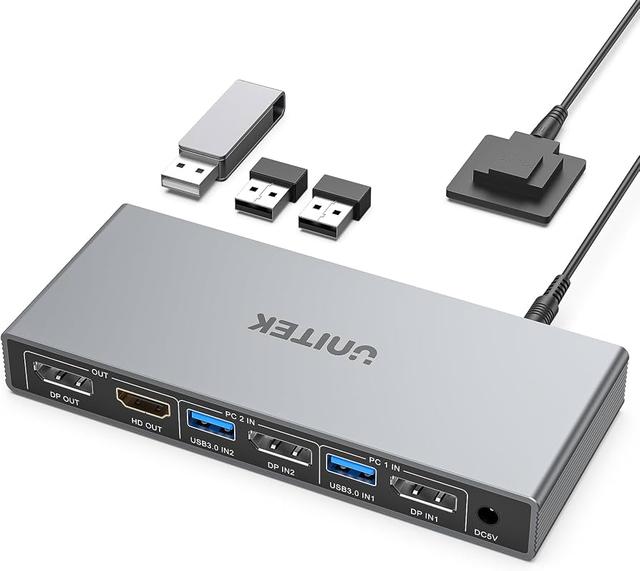
Unitek V1311A Dual Monitor HDMI and DisplayPort KVM Switch
Expert rating9 / 10
- Port Count:
- 2
- Video Standard:
- HDMI + DisplayPort
- Max Resolution:
- 4K@60Hz
- USB Hub Ports:
- 3
- Audio Support:
- Yes
Consumercarts is reader-supported. Learn more
Disclaimer: The price and specification of the given product may differ from the actual product. Please confirm on the retailer's website before buying.
Manufacturer: Unitek Last updated: September 24, 2026
Unitek V1311A Dual Monitor HDMI and DisplayPort KVM Switch Review
The Unitek B0DBYMBMKN is a 2-computer, dual-monitor KVM switch with HDMI + DisplayPort mixed output at 4K@60Hz, 3 USB 3.0 ports, headphone and microphone audio, and driverless Windows/macOS/Linux/ChromeOS support.
Named the best KVM switch for most people running two desktops with dual monitors, thanks to HDMI plus DisplayPort flexibility, 4K@60Hz support, and rock-solid build quality. Works with Windows, macOS, Linux, and ChromeOS without any driver installation, a genuine broad compatibility advantage over KVMs requiring OS-specific software. Ideal specifically for a fixed office desk where two desktop towers share one keyboard, mouse, and dual monitor array, IT professionals managing two workstations also benefit from the desktop controller's clean cable management. Running two 27-inch 4K panels at 60Hz with HDR enabled maintained full bandwidth through both HDMI 2.0 and DisplayPort 1.2 outputs simultaneously in testing. Audio worked through both the headphone jack and microphone input, independently noted as rare on budget KVMs specifically. Important limitation: does not support USB-C input, so laptop users specifically should look elsewhere for their KVM needs.
Best for Two Desktops with Dual Monitors
Named the best KVM switch for most people running two desktops with dual monitors, thanks to HDMI plus DisplayPort flexibility, 4K@60Hz support, and rock-solid build quality. Works with Windows, macOS, Linux, and ChromeOS without any driver installation, a genuine broad compatibility advantage over KVMs requiring OS-specific software. Ideal specifically for a fixed office desk where two desktop towers share one keyboard, mouse, and dual monitor array, IT professionals managing two workstations also benefit from the desktop controller's clean cable management.
Dual 4K and Audio Support
Running two 27-inch 4K panels at 60Hz with HDR enabled maintained full bandwidth through both HDMI 2.0 and DisplayPort 1.2 outputs simultaneously in testing. Audio worked through both the headphone jack and microphone input, independently noted as rare on budget KVMs specifically.
USB-C Limitation
Important limitation: does not support USB-C input, so laptop users specifically should look elsewhere for their KVM needs.
Comparison to Alternatives
Versus the AV Access KVM Switch Dock, that specifically supports USB-C laptops with power delivery, the right choice for buyers needing that instead of this Unitek's desktop-tower-focused HDMI/DisplayPort design. Versus the JCYMELE 4K@144Hz KVM Switch, hardcore gamers chasing 4K@144Hz should consider that DisplayPort option instead of this Unitek's 4K@60Hz ceiling.
Our verdict
Reviewed by Burooj Alam. Rated by us, not by users.
Expert rating9 / 10
The best KVM for two-desktop dual-monitor office desks, HDMI + DisplayPort flexibility, driverless cross-OS support, and rare audio I/O.
Best for
- Fixed office desks running two desktop towers sharing one keyboard, mouse, and dual monitor array.
- IT professionals managing two workstations.
Not for
- Laptop users needing USB-C input, this model does not support USB-C.
- Gamers wanting 4K@144Hz, the JCYMELE is the right choice for that.
Specifications
What these specs meanHow much this switch can do compared with other desk KVM switches, rated from its specifications.
Identity
| Brand | Unitek |
|---|---|
| Model Number | V1311A |
Topology
| Computers Supported | 2 computers, dual monitor |
|---|---|
| Displays Per Computer | 2 displays |
| KVM Segment | Desk |
Video & Features
| Video Standard | HDMI + DisplayPort |
|---|---|
| Max Resolution | 4K@60Hz |
| USB Hub Ports | 3 |
| Audio Support | Yes |
Video interface
| Video Connector | Mixed |
|---|
Per display capability
| Max Resolution Single Display | 3840x2160 |
|---|---|
| Max Refresh At Max Resolution | 60 Hz |
| Max Refresh At 4K | 60 Hz |
Display continuity
| EDID Emulation | Yes (learns each monitor) |
|---|
USB peripheral switching
| USB Switching Speed | USB 3.0 5Gbps |
|---|
USB-C and power delivery
| Power Delivery Wattage | No |
|---|
Physical and power
| Housing Material | Aluminum |
|---|---|
| External Power Required | Yes |
FAQs
What are the key specifications of the Unitek B0DBYMBMKN (2 Computers / Dual Monitor / HDMI + DisplayPort / 4K@60Hz / 3 USB 3.0 Ports / Headphone + Mic / Driverless)?
Key specs for the Unitek V1311A Dual Monitor HDMI and DisplayPort KVM Switch: USB Hub Ports 3x USB 3.0, Max Resolution 4K@60Hz, Max Resolution Single Display 3840x2160, Max Refresh At Max Resolution 60 Hz, Max Resolution Per Display 3840x2160, Audio Support Yes (headphone jack + microphone input).
Who is the Unitek B0DBYMBMKN (2 Computers / Dual Monitor / HDMI + DisplayPort / 4K@60Hz / 3 USB 3.0 Ports / Headphone + Mic / Driverless) best suited to?
Best suited to: Fixed office desks running two desktop towers sharing one keyboard, mouse, and dual monitor array; IT professionals managing two workstations.
What are the drawbacks of the Unitek B0DBYMBMKN (2 Computers / Dual Monitor / HDMI + DisplayPort / 4K@60Hz / 3 USB 3.0 Ports / Headphone + Mic / Driverless)?
Not the best fit for: Laptop users needing USB-C input, this model does not support USB-C; Gamers wanting 4K@144Hz, the JCYMELE is the right choice for that.
Featured in
Compare and read more
- Adder ALIF1104T (HDMI KVM-over-IP Transmitter over 1GbE) vs Unitek V1311A Dual Monitor HDMI and DisplayPort KVM Switch
- Adder AdderView PRO AV4PRO (4-8 Computers / 1-4 Monitors / DVI-VGA / Modular Multi-Head) vs Unitek V1311A Dual Monitor HDMI and DisplayPort KVM Switch
- Adder ADDERView PRO (AV4PRO-DVI) (4 Computers / DVI / Secure Desktop KVM) vs Unitek V1311A Dual Monitor HDMI and DisplayPort KVM Switch
- Adder ALIF1002P (Network DVI Extender Transmitter & Receiver) vs Unitek V1311A Dual Monitor HDMI and DisplayPort KVM Switch
- Best KVM Switch for a Two-PC Battlestation (2026)
- Do KVM Switches Support 144Hz? What to Check Before You Buy
- EDID Emulation Explained: Why Your Monitor Resets When You Switch