
Consumercarts is reader-supported. Learn more
ATEN UH3238 USB-C Dual Monitor Dock vs HP Thunderbolt Dock G4: Comparison
ATEN UH3238 USB-C Dual Monitor Dock vs HP Thunderbolt Dock G4: the host power delivery difference
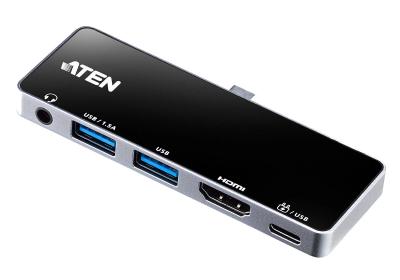
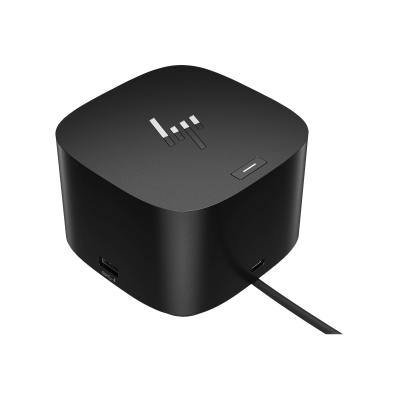
The first real difference is host power delivery: ATEN UH3238 USB-C Dual Monitor Dock 90W host charging against HP Thunderbolt Dock G4 100 W. They differ on connection type too, USB-C on the ATEN UH3238 USB-C Dual Monitor Dock versus Thunderbolt 4 on the HP Thunderbolt Dock G4. They differ on port configuration too, 1x USB-C upstream, 2x DisplayPort, 3x USB-A, 1x GbE,... on the ATEN UH3238 USB-C Dual Monitor Dock versus 1x TB4 downstream, 2x DisplayPort 1.4, 1x HDMI 2.0,... on the HP Thunderbolt Dock G4.
Which should you buy, ATEN UH3238 USB-C Dual Monitor Dock or HP Thunderbolt Dock G4?
Buy the ATEN UH3238 USB-C Dual Monitor Dock for quiet home offices wanting fully fanless operation, though it is the wrong buy for single-computer desks with no need for source switching and users needing more than dual display output. It is equally the pick for desks that switch between two computers using the same monitors, keyboard, and mouse. Take the HP Thunderbolt Dock G4 for home offices standardizing on the same dock as a company-issued HP fleet laptop. It also earns its place with buyers who found one through a business surplus/refurb channel at a discount. Avoid it for anyone wanting the widest possible port selection, dedicated consumer docks often pack in more. Our rating of the ATEN UH3238 USB-C Dual Monitor Dock (7/10): A distinctive pick for anyone who regularly switches one monitor setup between two computers. Our rating of the HP Thunderbolt Dock G4 (7/10): A stable, fleet-grade Thunderbolt 4 dock that's a bargain if you find one through business channels.
Where the two are identical
The common ground is wider than the gap: ethernet are identical here.
Specs and benchmarks
Brand
- ATEN UH3238 USB-C Dual Monitor Dock
- ATEN
- HP Thunderbolt Dock G4
- HP
Connection Type
- ATEN UH3238 USB-C Dual Monitor Dock
- USB-C (fanless, with KVM-style input switching)
- HP Thunderbolt Dock G4
- Thunderbolt 4
Model Number
- ATEN UH3238 USB-C Dual Monitor Dock
- UH3238
- HP Thunderbolt Dock G4
- Thunderbolt Dock G4
Port Configuration
- ATEN UH3238 USB-C Dual Monitor Dock
- 1x USB-C upstream, 2x DisplayPort, 3x USB-A, 1x GbE, physical KVM switch button
- HP Thunderbolt Dock G4
- 1x TB4 downstream, 2x DisplayPort 1.4, 1x HDMI 2.0, 1x rear USB-C DisplayPort, 1x front USB-C 10Gbps (15W), 2x USB-A 10Gbps, 2x USB-A 5Gbps, 2.5GbE RJ45
Host Power Delivery
- ATEN UH3238 USB-C Dual Monitor Dock
- 90W host charging
- HP Thunderbolt Dock G4
- 100 W
Ethernet
- ATEN UH3238 USB-C Dual Monitor Dock
- Yes
- HP Thunderbolt Dock G4
- Yes


Which one should you pick?
Choose ATEN UH3238 USB-C Dual Monitor Dock if you already have it on hand or find it at a lower price.
Choose HP Thunderbolt Dock G4 if you already have it on hand or find it at a lower price.
Price comparison
| Retailer | ATEN UH3238 USB-C Dual Monitor Dock | HP Thunderbolt Dock G4 |
|---|---|---|
| Consumercarts listing | $180.00 View on Consumercarts listing | |
| Newegg | View on Newegg |
Disclaimer: The price and specification of the given product may differ from the actual product. Please confirm on the retailer's website before buying.
Verdict
ATEN UH3238 USB-C Dual Monitor Dock
7 / 10 Expert Rating
A distinctive pick for anyone who regularly switches one monitor setup between two computers.
HP Thunderbolt Dock G4
7 / 10 Expert Rating
A stable, fleet-grade Thunderbolt 4 dock that's a bargain if you find one through business channels.