
Consumercarts is reader-supported. Learn more
Belkin Thunderbolt 4 Dock Pro vs Dell WD22TB4: Comparison
Belkin Thunderbolt 4 Dock Pro vs Dell WD22TB4 host power delivery compared
The first real difference is host power delivery: Belkin Thunderbolt 4 Dock Pro 90W against Dell WD22TB4 90 W. They differ on displayport port count too, 0 on the Belkin Thunderbolt 4 Dock Pro versus 2 on the Dell WD22TB4. Displayport version is not the same on both, None on the Belkin Thunderbolt 4 Dock Pro versus 1.4 on the Dell WD22TB4.
Who each one is for
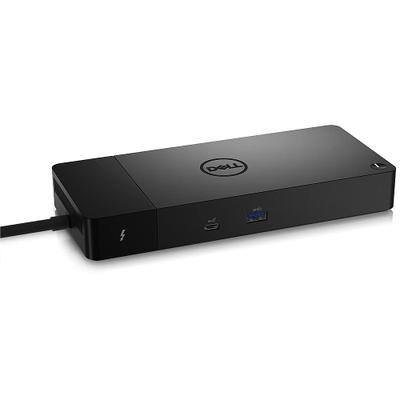
Take the Belkin Thunderbolt 4 Dock Pro for anyone running two Thunderbolt peripherals who wants a second true TB4 port on the dock itself. It also earns its place with dual 4K or single 8K monitor setups on a consumer budget. It is not the one for buyers who only need one external display, cheaper single-HDMI docks cover that. Take the Dell WD22TB4 for IT fleet deployments across mixed Dell and non-Dell laptops needing four-display support. It is the wrong buy for users on Thunderbolt 5 hardware wanting to use its full bandwidth, this tops out at Thunderbolt 4 speeds. Our rating of the Belkin Thunderbolt 4 Dock Pro (8/10): the second true Thunderbolt 4 port and dual HDMI make this the flexible pick for multi-peripheral desks. Our rating of the Dell WD22TB4 (8/10): A fleet-focused Thunderbolt 4 dock whose four-display support outruns most single-user alternatives.
Where the two are identical
The common ground is wider than the gap: ethernet, ethernet speed, host interface, thunderbolt version and host cable length are identical here. They match on 4 further specifications as well.
Frequently asked questions
Do the Belkin Thunderbolt 4 Dock Pro and Dell WD22TB4 differ on connection type?
Yes. Connection Type reads Thunderbolt 4 on the Belkin Thunderbolt 4 Dock Pro versus Thunderbolt 4 / USB-C DisplayPort Alt Mode on the Dell WD22TB4.
Is the Bus Powered the same on the Belkin Thunderbolt 4 Dock Pro and Dell WD22TB4?
It is. Both are listed at No, so it is not a reason to pick one over the other.

Specs and benchmarks
Brand
- Belkin Thunderbolt 4 Dock Pro
- Belkin
- Dell WD22TB4
- Dell
Connection Type
- Belkin Thunderbolt 4 Dock Pro
- Thunderbolt 4
- Dell WD22TB4
- Thunderbolt 4 / USB-C DisplayPort Alt Mode
Host Interface
- Belkin Thunderbolt 4 Dock Pro
- Thunderbolt 4
- Dell WD22TB4
- Thunderbolt 4
Model Number
- Belkin Thunderbolt 4 Dock Pro
- Thunderbolt 4 Dock Pro
- Dell WD22TB4
- WD22TB4
Port Configuration
- Belkin Thunderbolt 4 Dock Pro
- 1x TB4 host, 1x TB4 downstream 40Gbps, 2x HDMI 2.0, 1x USB-C 10Gbps, 2x USB-A 3.1, 2x USB-A 2.0, 1GbE, SD 4.0, 3.5mm combo audio
- Dell WD22TB4
- 2x Thunderbolt 4 downstream, 2x DisplayPort 1.4, 1x HDMI 2.0, 1x USB-C 10Gbps with DP 1.4 Alt Mode, 1x USB-C 10Gbps, 3x USB-A 5Gbps, Gigabit Ethernet
Thunderbolt Version
- Belkin Thunderbolt 4 Dock Pro
- 4
- Dell WD22TB4
- 4
Max Display Support
- Belkin Thunderbolt 4 Dock Pro
- 1x 8K@30Hz or 2x 4K@60Hz
- Dell WD22TB4
- Up to 4 external displays
Host Cable Length
- Belkin Thunderbolt 4 Dock Pro
- 0.8 m
- Dell WD22TB4
- 0.8 m
Host Power Delivery
- Belkin Thunderbolt 4 Dock Pro
- 90W (Thunderbolt 4)
- Dell WD22TB4
- 90 W
Ethernet
- Belkin Thunderbolt 4 Dock Pro
- Yes
- Dell WD22TB4
- Yes
External PSU Wattage
- Belkin Thunderbolt 4 Dock Pro
- 120 W
- Dell WD22TB4
- 180 WBest
Bus Powered
- Belkin Thunderbolt 4 Dock Pro
- No
- Dell WD22TB4
- No
Max Displays Windows
- Belkin Thunderbolt 4 Dock Pro
- 3
- Dell WD22TB4
- 4
HDMI Port Count
- Belkin Thunderbolt 4 Dock Pro
- 2
- Dell WD22TB4
- 1
HDMI Version
- Belkin Thunderbolt 4 Dock Pro
- 2.0
- Dell WD22TB4
- 2.0
DisplayPort Port Count
- Belkin Thunderbolt 4 Dock Pro
- 0
- Dell WD22TB4
- 2
DisplayPort Version
- Belkin Thunderbolt 4 Dock Pro
- None
- Dell WD22TB4
- 1.4
Downstream Thunderbolt Port Count
- Belkin Thunderbolt 4 Dock Pro
- 1
- Dell WD22TB4
- 2
USB-A Port Count
- Belkin Thunderbolt 4 Dock Pro
- 4
- Dell WD22TB4
- 3
USB-C Data Port Count
- Belkin Thunderbolt 4 Dock Pro
- 1
- Dell WD22TB4
- 2
Max USB Data Rate
- Belkin Thunderbolt 4 Dock Pro
- 10Gbps
- Dell WD22TB4
- 10Gbps
Ethernet Speed
- Belkin Thunderbolt 4 Dock Pro
- 1GbE
- Dell WD22TB4
- 1GbE
Windows Supported
- Belkin Thunderbolt 4 Dock Pro
- Yes
- Dell WD22TB4
- Yes


Which one should you pick?
Choose Belkin Thunderbolt 4 Dock Pro if you already have it on hand or find it at a lower price.
Choose Dell WD22TB4 if you already have it on hand or find it at a lower price.
Price comparison
| Retailer | Belkin Thunderbolt 4 Dock Pro | Dell WD22TB4 |
|---|---|---|
| Best Buy | $349.99 View on Best Buy | |
| Newegg | View on Newegg |
Disclaimer: The price and specification of the given product may differ from the actual product. Please confirm on the retailer's website before buying.
Verdict
Belkin Thunderbolt 4 Dock Pro
8 / 10 Expert Rating
The second true Thunderbolt 4 port and dual HDMI make this the flexible pick for multi-peripheral desks.
Dell WD22TB4
8 / 10 Expert Rating
A fleet-focused Thunderbolt 4 dock whose four-display support outruns most single-user alternatives.