
Consumercarts is reader-supported. Learn more
Dell Universal Dock UD22 vs Twelve South StayGo mini: Comparison
Dell Universal Dock UD22 vs Twelve South StayGo mini host power delivery compared
Start with host power delivery, because it is the widest measured gap between them: Dell Universal Dock UD22 96 W against Twelve South StayGo mini 85 W, 11% in favour of Dell Universal Dock UD22. Dell Universal Dock UD22 also leads on total ports, 10 on the Dell Universal Dock UD22 versus 4 on the Twelve South StayGo mini.
Dell Universal Dock UD22 vs Twelve South StayGo mini: which one fits your build
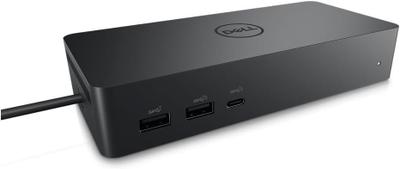
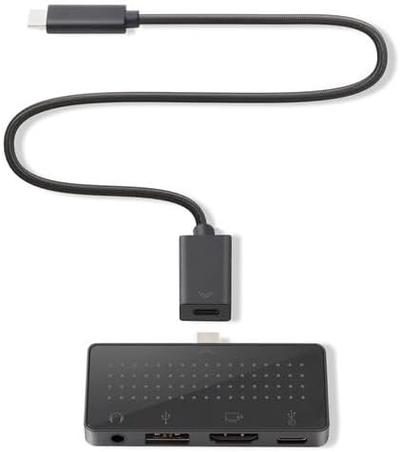
The Dell Universal Dock UD22 is the one to take for mixed-vendor offices running Dell, Mac, and Chromebook laptops and triple-monitor productivity setups without needing Thunderbolt, though it is not built for users who specifically want Thunderbolt-level bandwidth and single-display minimalist desk setups, since it's overbuilt for that. Buy the Twelve South StayGo mini for frequent travelers who want a single-display, single-card-slot setup, though it is the wrong buy for Windows or Linux laptop users, since it's Mac-specific hardware and multi-display desk setups needing more than one external monitor. It also earns its place with MacBook owners who want ports permanently attached rather than a loose dongle. Our rating of the Dell Universal Dock UD22 (7/10): the pragmatic choice for offices mixing Dell, Mac, and Chromebook hardware on one dock standard. Our rating of the Twelve South StayGo mini (7/10): A clever, MacBook-specific alternative to a loose dongle for people who hate managing a separate hub cable.
Dell Universal Dock UD22 vs Twelve South StayGo mini price
The Dell Universal Dock UD22 asks 120% more, $220 against $100 for the Twelve South StayGo mini.
Frequently asked questions
Do the Dell Universal Dock UD22 and Twelve South StayGo mini differ on ethernet?
Yes. Ethernet reads Yes on the Dell Universal Dock UD22 versus No on the Twelve South StayGo mini.
Is the Thunderbolt Version the same on the Dell Universal Dock UD22 and Twelve South StayGo mini?
It is. Both are listed at None, so it is not a reason to pick one over the other.
Which is cheaper, Dell Universal Dock UD22 or Twelve South StayGo mini?
The Dell Universal Dock UD22 asks 120% more, $220 against $100 for the Twelve South StayGo mini.
Specs and benchmarks
Brand
- Dell Universal Dock UD22
- Dell
- Twelve South StayGo mini
- Twelve South
Connection Type
- Dell Universal Dock UD22
- USB-C (USB 3.2 Gen 2, DP 1.4 Alt Mode, non-Thunderbolt)
- Twelve South StayGo mini
- USB-C (plug-in mini hub with 0.5 m extension cable)
Model Number
- Dell Universal Dock UD22
- Universal Dock UD22
- Twelve South StayGo mini
- StayGo mini
Port Configuration
- Dell Universal Dock UD22
- 1x USB-C upstream, 4x USB-A 10Gbps, 2x USB-C 10Gbps (one with DP 1.4 Alt Mode), 1x HDMI 2.0, 2x DisplayPort 1.2, 1x GbE
- Twelve South StayGo mini
- 1x USB-C PD input (85W pass-through), 1x HDMI (4K@30Hz), 1x USB-A 2.0 (7.5W), 1x 3.5mm audio
Thunderbolt Version
- Dell Universal Dock UD22
- None
- Twelve South StayGo mini
- None
Max Display Support
- Dell Universal Dock UD22
- Quad 4K@60Hz (with DisplayLink driver); dual 4K@60Hz native
- Twelve South StayGo mini
- Single display
Max Display Resolution
- Dell Universal Dock UD22
- 5K@60Hz single (DSC); 4K@60Hz multi-display
- Twelve South StayGo mini
- Single 4K@30Hz
Host Cable Length
- Dell Universal Dock UD22
- 0.8 m
- Twelve South StayGo mini
- 0.5 m
Total Ports
- Dell Universal Dock UD22
- 10Best
- Twelve South StayGo mini
- 4-60%
Host Power Delivery
- Dell Universal Dock UD22
- 96 W
- Twelve South StayGo mini
- 85 W-11%
Ethernet
- Dell Universal Dock UD22
- Yes
- Twelve South StayGo mini
- No
Max Displays Windows
- Dell Universal Dock UD22
- 4
- Twelve South StayGo mini
- 1
Max Single Display Resolution
- Dell Universal Dock UD22
- 5K
- Twelve South StayGo mini
- 4K
Max Single Display Refresh
- Dell Universal Dock UD22
- 60 Hz
- Twelve South StayGo mini
- 30 Hz
HDMI Port Count
- Dell Universal Dock UD22
- 1
- Twelve South StayGo mini
- 1
DisplayPort Port Count
- Dell Universal Dock UD22
- 2
- Twelve South StayGo mini
- 0
DisplayPort Version
- Dell Universal Dock UD22
- 1.2
- Twelve South StayGo mini
- None
Downstream Thunderbolt Port Count
- Dell Universal Dock UD22
- 0
- Twelve South StayGo mini
- 0
USB-A Port Count
- Dell Universal Dock UD22
- 4
- Twelve South StayGo mini
- 1
USB-C Data Port Count
- Dell Universal Dock UD22
- 2
- Twelve South StayGo mini
- 0
Ethernet Speed
- Dell Universal Dock UD22
- 1GbE
- Twelve South StayGo mini
- None
Weight
- Dell Universal Dock UD22
- 416 g
- Twelve South StayGo mini
- 100 gBest
OS Compatibility
- Dell Universal Dock UD22
- Windows 10/11, macOS 12.2.1+, ChromeOS R100+, Ubuntu 20.04+
- Twelve South StayGo mini
- Mac, iPad Pro
Price
- Dell Universal Dock UD22
- ~$220
- Twelve South StayGo mini
- ~$100


Which one should you pick?
Choose Dell Universal Dock UD22 if you want the higher total ports (10 vs 4) and the higher host power delivery (96 W vs 85 W).
Choose Twelve South StayGo mini if you already have it on hand or find it at a lower price.
Price comparison
| Retailer | Dell Universal Dock UD22 | Twelve South StayGo mini |
|---|---|---|
| Amazon | $220.00 View on Amazon | $100.00 View on Amazon |
| Newegg | View on Newegg |
Disclaimer: The price and specification of the given product may differ from the actual product. Please confirm on the retailer's website before buying.
Verdict
Dell Universal Dock UD22
7 / 10 Expert Rating
The pragmatic choice for offices mixing Dell, Mac, and Chromebook hardware on one dock standard.
Twelve South StayGo mini
7 / 10 Expert Rating
A clever, MacBook-specific alternative to a loose dongle for people who hate managing a separate hub cable.