
Consumercarts is reader-supported. Learn more
Alienware Graphics Amplifier vs Lenovo ThinkPad Thunderbolt 3 Graphics Dock: Comparison
What is the difference between Alienware Graphics Amplifier and Lenovo ThinkPad Thunderbolt 3 Graphics?
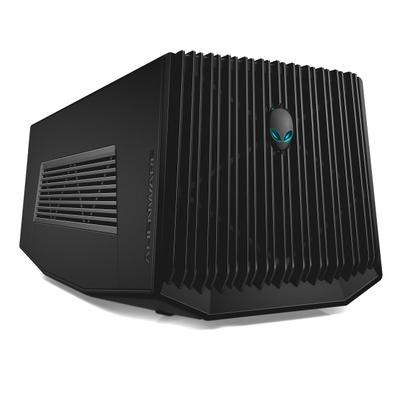
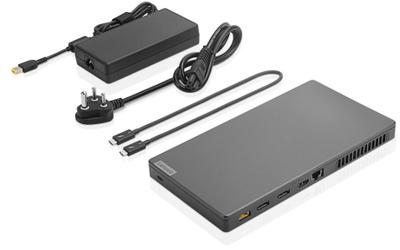
The gap that matters here is psu wattage: Alienware Graphics Amplifier 460 W against Lenovo ThinkPad Thunderbolt 3 Graphics 580 W, which puts Lenovo ThinkPad Thunderbolt 3 Graphics 21% ahead. Connection standard is not the same on both, Proprietary on the Alienware Graphics Amplifier versus Thunderbolt 3 on the Lenovo ThinkPad Thunderbolt 3 Graphics. They differ on extra ports too, 4 on the Alienware Graphics Amplifier versus USB-A/C, Gigabit Ethernet, DisplayPort, HDMI, audio, full docking-station I/O on the Lenovo ThinkPad Thunderbolt 3 Graphics.
Who each one is for
it is not the pick for anyone wanting USB-C laptop charging through the eGPU cable. It is equally the pick for owners of a compatible older Alienware or Dell G-Series laptop with the Amplifier Port. It is not the one for any laptop without the specific Alienware Graphics Amplifier Port, since the connector is proprietary. The Lenovo ThinkPad Thunderbolt 3 Graphics is the one to take for ThinkPad X1 Carbon/Yoga owners in fully validated firmware configurations and IT-managed business fleets needing dock plus light GPU boost, though it is the wrong buy for anyone wanting a trouble-free out-of-box experience and Non-ThinkPad laptop owners. Our rating of the Alienware Graphics Amplifier (6/10): strong bandwidth for its era, but locked to a short list of older Alienware and Dell G-Series laptops. Our rating of the Lenovo ThinkPad Thunderbolt 3 Graphics (4.5/10): A promising idea, dock plus eGPU in one, undermined by well-documented compatibility and reliability issues at launch.
Which is cheaper, Alienware Graphics Amplifier or Lenovo ThinkPad Thunderbolt 3 Graphics?
At the last price check the Alienware Graphics Amplifier was $299 and the Lenovo ThinkPad Thunderbolt 3 Graphics $550, a 84% premium.
Where the two are identical
The common ground is wider than the gap: cooling type are identical here.
Specs and benchmarks
Brand
- Alienware Graphics Amplifier
- Alienware
- Lenovo ThinkPad Thunderbolt 3 Graphics Dock
- Lenovo
Connection Standard
- Alienware Graphics Amplifier
- Proprietary
- Lenovo ThinkPad Thunderbolt 3 Graphics Dock
- Thunderbolt 3
Model Number
- Alienware Graphics Amplifier
- Graphics Amplifier
- Lenovo ThinkPad Thunderbolt 3 Graphics Dock
- 40AF0135US (also sold as G0A10170UL)
Extra Ports
- Alienware Graphics Amplifier
- 4
- Lenovo ThinkPad Thunderbolt 3 Graphics Dock
- USB-A/C, Gigabit Ethernet, DisplayPort, HDMI, audio, full docking-station I/O
PSU Wattage
- Alienware Graphics Amplifier
- 460 W-21%
- Lenovo ThinkPad Thunderbolt 3 Graphics Dock
- 580 WBest
Cooling Type
- Alienware Graphics Amplifier
- Active Fan
- Lenovo ThinkPad Thunderbolt 3 Graphics Dock
- Active Fan
Price
- Alienware Graphics Amplifier
- Launched around $299 (2015)
- Lenovo ThinkPad Thunderbolt 3 Graphics Dock
- Launched around $549.99 (2017)


Which one should you pick?
Choose Alienware Graphics Amplifier if you already have it on hand or find it at a lower price.
Choose Lenovo ThinkPad Thunderbolt 3 Graphics Dock if you want the higher PSU wattage (580 W vs 460 W).
Price comparison
| Retailer | Alienware Graphics Amplifier | Lenovo ThinkPad Thunderbolt 3 Graphics Dock |
|---|---|---|
| Amazon | $299.00 View on Amazon | |
| Consumercarts listing | $549.99 View on Consumercarts listing |
Disclaimer: The price and specification of the given product may differ from the actual product. Please confirm on the retailer's website before buying.
Verdict
Alienware Graphics Amplifier
6 / 10 Expert Rating
Strong bandwidth for its era, but locked to a short list of older Alienware and Dell G-Series laptops.
Lenovo ThinkPad Thunderbolt 3 Graphics Dock
4.5 / 10 Expert Rating
A promising idea, dock plus eGPU in one, undermined by well-documented compatibility and reliability issues at launch.