
Consumercarts is reader-supported. Learn more
Cooler Master MM711 vs Glorious Model O 2 Pro: Comparison
What is the difference between Cooler Master MM711 and Glorious Model O 2 Pro?
They are built to different briefs, and sensor model shows it, Cooler Master MM711 PixArt PMW3389 against Glorious Model O 2 Pro BAMF 2.0, up to 32,000 DPI. They differ on shape too, Ergonomic on the Cooler Master MM711 versus Symmetrical, honeycomb on the Glorious Model O 2 Pro. They differ on switch type too, Mechanical on the Cooler Master MM711 versus Glorious Optical Gen-2 on the Glorious Model O 2 Pro.
Which should you buy, Cooler Master MM711 or Glorious Model O 2 Pro?
The Cooler Master MM711 is the one to take for right-handed palm and claw grip players wanting low weight and buyers who want a flagship sensor at a mid-range price, though it is not built for ambidextrous or left-handed users and anyone who wants a wireless connection. The same goes for anyone upgrading from a heavier ergonomic mouse without changing grip style. Avoid it for players bothered by a perforated shell letting in dust and debris. Buy the Glorious Model O 2 Pro for fans of honeycomb/vented shells and competitive players wanting 8000Hz wireless polling, though it is the wrong buy for anyone who dislikes cutout/honeycomb shells collecting dust and palm grip users wanting a fully enclosed shell. Our rating of the Cooler Master MM711 (8/10): A genuinely light ergonomic mouse with flagship internals, and one of the best value picks for palm grip players who want low weight. Our rating of the Glorious Model O 2 Pro (9/10): Glorious's most complete flagship yet, the honeycomb shell finally comes with sensor and polling specs to match.
Frequently asked questions
Do the Cooler Master MM711 and Glorious Model O 2 Pro differ on connectivity?
Yes. Connectivity reads Wired on the Cooler Master MM711 versus Wireless on the Glorious Model O 2 Pro.
Is the Sensor Tier the same on the Cooler Master MM711 and Glorious Model O 2 Pro?
It is. Both are listed at Flagship, so it is not a reason to pick one over the other.
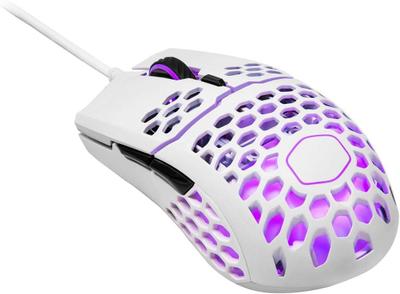

Specs and benchmarks
Brand
- Cooler Master MM711
- Cooler Master
- Glorious Model O 2 Pro
- Glorious
Connectivity
- Cooler Master MM711
- Wired
- Glorious Model O 2 Pro
- Wireless (2.4GHz)
Grip Type
- Cooler Master MM711
- Right-Handed
- Glorious Model O 2 Pro
- Ambidextrous
Model
- Cooler Master MM711
- MM711
- Glorious Model O 2 Pro
- Model O 2 Pro
Shape
- Cooler Master MM711
- Ergonomic
- Glorious Model O 2 Pro
- Symmetrical, honeycomb
Sensor Model
- Cooler Master MM711
- PixArt PMW3389
- Glorious Model O 2 Pro
- BAMF 2.0, up to 32,000 DPI
Sensor Tier
- Cooler Master MM711
- Flagship
- Glorious Model O 2 Pro
- Flagship
Buttons
- Cooler Master MM711
- 6
- Glorious Model O 2 Pro
- 6
Polling Rate
- Cooler Master MM711
- 1000 Hz
- Glorious Model O 2 Pro
- Up to 8000HzBest
Weight
- Cooler Master MM711
- 53 gBest
- Glorious Model O 2 Pro
- 55 g-4%
Switch Type
- Cooler Master MM711
- Mechanical
- Glorious Model O 2 Pro
- Glorious Optical Gen-2


Which one should you pick?
Choose Cooler Master MM711 if you want the higher buttons (6 vs 6) and the lower weight (53 g vs 55 g).
Choose Glorious Model O 2 Pro if you want the higher polling rate (Up to 8000Hz vs 1000 Hz).
Price comparison
| Retailer | Cooler Master MM711 | Glorious Model O 2 Pro |
|---|---|---|
| Amazon | View on Amazon | View on Amazon |
Disclaimer: The price and specification of the given product may differ from the actual product. Please confirm on the retailer's website before buying.
Verdict
Cooler Master MM711
8 / 10 Expert Rating
A genuinely light ergonomic mouse with flagship internals, and one of the best value picks for palm grip players who want low weight.
Glorious Model O 2 Pro
9 / 10 Expert Rating
Glorious's most complete flagship yet, the honeycomb shell finally comes with sensor and polling specs to match.