
Consumercarts is reader-supported. Learn more
Cooler Master MM731 vs Razer DeathAdder V2: Comparison
Cooler Master MM731 vs Razer DeathAdder V2: the weight difference
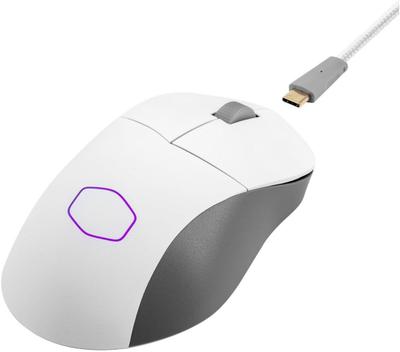
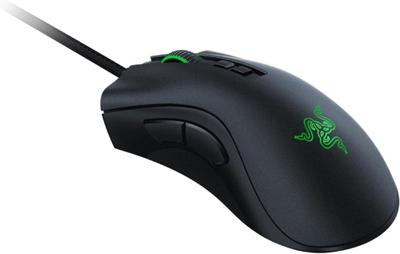
The gap that matters here is weight: Cooler Master MM731 49 g against Razer DeathAdder V2 82 g, which puts Cooler Master MM731 67% ahead. Buttons runs the same way, 6 on the Cooler Master MM731 versus 8 on the Razer DeathAdder V2, another win for Razer DeathAdder V2. They differ on grip type too, Ambidextrous on the Cooler Master MM731 versus Right-Handed on the Razer DeathAdder V2. There is a split on shape as well, Symmetrical, honeycomb on the Cooler Master MM731 versus Ergonomic on the Razer DeathAdder V2.
Cooler Master MM731 vs Razer DeathAdder V2: which one fits your build
Buy the Cooler Master MM731 for budget shoppers chasing sub-50g wireless weight and ambidextrous claw and fingertip grip users, though it is not the pick for buyers who dislike honeycomb/vented shells and palm grip users wanting a fuller shell. The Razer DeathAdder V2 is the one to take for FPS players who want optical switches for lower click latency, though it is the wrong buy for left-handed or ambidextrous grip users and players who want a wireless connection. It also earns its place with right-handed palm and claw grip users who want a proven ergonomic fit. Our rating of the Cooler Master MM731 (8/10): one of the best value-for-weight wireless mice available; it just lacks the sensor polish of pricier flagships. Our rating of the Razer DeathAdder V2 (9/10): the benchmark ergonomic wired mouse most other ergonomic shapes get compared against.
Frequently asked questions
Do the Cooler Master MM731 and Razer DeathAdder V2 differ on sensor model?
Yes. Sensor Model reads PixArt PAW3370, up to 19,000 DPI on the Cooler Master MM731 versus Focus+ Optical on the Razer DeathAdder V2.
Is the Polling Rate the same on the Cooler Master MM731 and Razer DeathAdder V2?
It is. Both are listed at 1000 Hz, so it is not a reason to pick one over the other.
Specs and benchmarks
Brand
- Cooler Master MM731
- Cooler Master
- Razer DeathAdder V2
- Razer
Connectivity
- Cooler Master MM731
- Wireless (2.4GHz), Bluetooth
- Razer DeathAdder V2
- Wired
Grip Type
- Cooler Master MM731
- Ambidextrous
- Razer DeathAdder V2
- Right-Handed
Model
- Cooler Master MM731
- MM731
- Razer DeathAdder V2
- DeathAdder V2
Shape
- Cooler Master MM731
- Symmetrical, honeycomb
- Razer DeathAdder V2
- Ergonomic
Sensor Model
- Cooler Master MM731
- PixArt PAW3370, up to 19,000 DPI
- Razer DeathAdder V2
- Focus+ Optical
Sensor Tier
- Cooler Master MM731
- High
- Razer DeathAdder V2
- Flagship
Buttons
- Cooler Master MM731
- 6-25%
- Razer DeathAdder V2
- 8Best
Polling Rate
- Cooler Master MM731
- 1000 Hz
- Razer DeathAdder V2
- 1000 Hz
Weight
- Cooler Master MM731
- 49 gBest
- Razer DeathAdder V2
- 82 g-67%
Switch Type
- Cooler Master MM731
- Optical
- Razer DeathAdder V2
- Optical


Which one should you pick?
Choose Cooler Master MM731 if you want the higher polling rate (1000 Hz vs 1000 Hz) and the lower weight (49 g vs 82 g).
Choose Razer DeathAdder V2 if you want the higher buttons (8 vs 6).
Price comparison
| Retailer | Cooler Master MM731 | Razer DeathAdder V2 |
|---|---|---|
| Amazon | View on Amazon |
Disclaimer: The price and specification of the given product may differ from the actual product. Please confirm on the retailer's website before buying.
Verdict
Cooler Master MM731
8 / 10 Expert Rating
One of the best value-for-weight wireless mice available; it just lacks the sensor polish of pricier flagships.
Razer DeathAdder V2
9 / 10 Expert Rating
The benchmark ergonomic wired mouse most other ergonomic shapes get compared against.