
Consumercarts is reader-supported. Learn more
Corsair Ironclaw RGB Wireless vs Razer Viper V3 Pro: Comparison
Corsair Ironclaw RGB Wireless vs Razer Viper V3 Pro: the weight difference
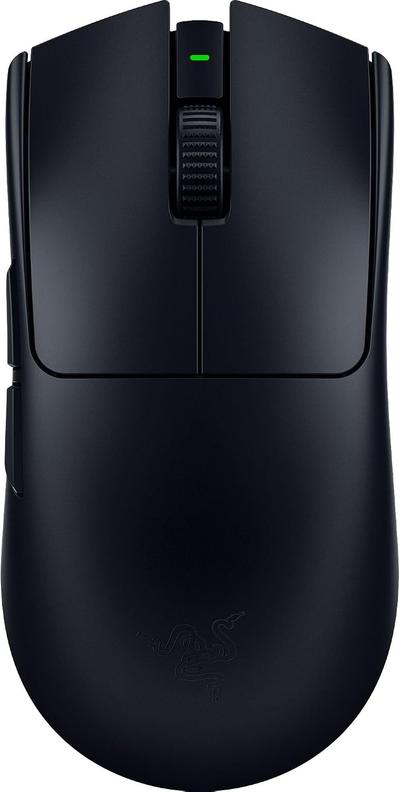
On weight the spread is 94%, Corsair Ironclaw RGB Wireless 105 g against Razer Viper V3 Pro 54 g, so Razer Viper V3 Pro takes it. Corsair Ironclaw RGB Wireless also leads on buttons, 7 on the Corsair Ironclaw RGB Wireless versus 5 on the Razer Viper V3 Pro. They differ on grip type too, Right-Handed on the Corsair Ironclaw RGB Wireless versus Ambidextrous on the Razer Viper V3 Pro. They differ on shape too, Ergonomic on the Corsair Ironclaw RGB Wireless versus Symmetrical, low profile on the Razer Viper V3 Pro.
Who each one is for
The Corsair Ironclaw RGB Wireless suits right-handed palm grip players with large hands and buyers wanting Bluetooth as a wireless fallback, though it is not the pick for left-handed users and players chasing sub-70g weight. Buy the Razer Viper V3 Pro for competitive FPS and battle royale players and claw and fingertip grip users wanting sub-55g weight, though it is the wrong buy for palm grip users wanting a filled-out ergonomic shape and buyers who want RGB lighting. Our rating of the Corsair Ironclaw RGB Wireless (7/10): A comfortable large-hand ergonomic mouse, though its weight and 24-hour battery trail newer ultralight flagships. Our rating of the Razer Viper V3 Pro (9/10): one of the best pure esports wireless mice on the market; the lack of RGB and side-grip texture are the only real trade-offs for the weight and latency it delivers.
Frequently asked questions
Do the Corsair Ironclaw RGB Wireless and Razer Viper V3 Pro differ on sensor model?
Yes. Sensor Model reads PixArt PMW3391 Optical, up to 18,000 DPI on the Corsair Ironclaw RGB Wireless versus Focus Pro 35K Optical Gen-2, up to 35,000 DPI on the Razer Viper V3 Pro.

Specs and benchmarks
Brand
- Corsair Ironclaw RGB Wireless
- Corsair
- Razer Viper V3 Pro
- Razer
Connectivity
- Corsair Ironclaw RGB Wireless
- Wireless (2.4GHz SLIPSTREAM), Bluetooth
- Razer Viper V3 Pro
- Wireless (2.4GHz HyperSpeed)
Grip Type
- Corsair Ironclaw RGB Wireless
- Right-Handed
- Razer Viper V3 Pro
- Ambidextrous
Model
- Corsair Ironclaw RGB Wireless
- Ironclaw RGB Wireless
- Razer Viper V3 Pro
- Viper V3 Pro
Shape
- Corsair Ironclaw RGB Wireless
- Ergonomic
- Razer Viper V3 Pro
- Symmetrical, low profile
Sensor Model
- Corsair Ironclaw RGB Wireless
- PixArt PMW3391 Optical, up to 18,000 DPI
- Razer Viper V3 Pro
- Focus Pro 35K Optical Gen-2, up to 35,000 DPI
Sensor Tier
- Corsair Ironclaw RGB Wireless
- Mid-High
- Razer Viper V3 Pro
- Flagship
Buttons
- Corsair Ironclaw RGB Wireless
- 7Best
- Razer Viper V3 Pro
- 5-29%
Polling Rate
- Corsair Ironclaw RGB Wireless
- 1000 Hz
- Razer Viper V3 Pro
- 8000Hz (HyperPolling dongle)Best
Weight
- Corsair Ironclaw RGB Wireless
- 105 g-94%
- Razer Viper V3 Pro
- 54 gBest
Battery Life
- Corsair Ironclaw RGB Wireless
- Up to 24 hours
- Razer Viper V3 Pro
- Up to 95 hoursBest
Switch Type
- Corsair Ironclaw RGB Wireless
- Omron
- Razer Viper V3 Pro
- Optical Gen-3, rated 90 million clicks

Which one should you pick?
Choose Corsair Ironclaw RGB Wireless if you want the higher buttons (7 vs 5).
Choose Razer Viper V3 Pro if you want the higher polling rate (8000Hz (HyperPolling dongle) vs 1000 Hz) and the lower weight (54 g vs 105 g).
Price comparison
| Retailer | Corsair Ironclaw RGB Wireless | Razer Viper V3 Pro |
|---|---|---|
| Amazon | View on Amazon |
Disclaimer: The price and specification of the given product may differ from the actual product. Please confirm on the retailer's website before buying.
Verdict
Corsair Ironclaw RGB Wireless
7 / 10 Expert Rating
A comfortable large-hand ergonomic mouse, though its weight and 24-hour battery trail newer ultralight flagships.
Razer Viper V3 Pro
9 / 10 Expert Rating
One of the best pure esports wireless mice on the market; the lack of RGB and side-grip texture are the only real trade-offs for the weight and latency it delivers.