
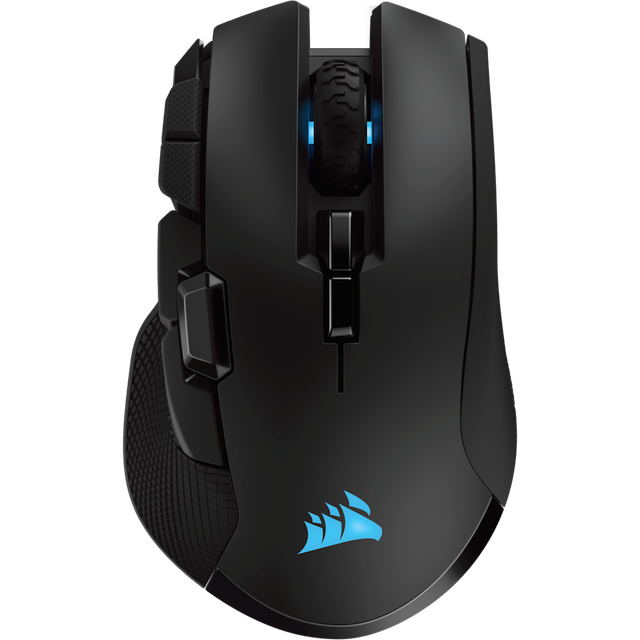
Corsair Ironclaw RGB Wireless
Expert rating7 / 10
- Connectivity:
- Wireless
- Weight:
- 105g
- Max DPI:
- 18
- Polling Rate:
- 1000Hz
Consumercarts is reader-supported. Learn more
Disclaimer: The price and specification of the given product may differ from the actual product. Please confirm on the retailer's website before buying.
Manufacturer: Corsair Last updated: 2026-09-12
Corsair Ironclaw RGB Wireless (Wireless/Right-Handed Ergonomic/105g/PMW3391 Optical up to 18,000 DPI/1000Hz/24hr Battery/Omron Switches/RGB) Review
The Ironclaw RGB Wireless is Corsair's larger ergonomic mouse designed in collaboration with pro player input for palm-grip comfort, offering dual 2.4GHz and Bluetooth wireless with a full-size shell.
Corsair developed the Ironclaw shape with input from professional players who wanted a bigger, more filled-in ergonomic shell than most esports mice offer, and the RGB Wireless version keeps that shape while adding SLIPSTREAM low-latency wireless and Bluetooth as a fallback. At 105g it's on the heavier side of this catalog, trading weight for palm coverage.
Who It's Built For
Right-handed palm grip players with larger hands who prioritize shell coverage and comfort over ultralight weight.
Comparison to Alternatives
Against the Corsair M75 Air in this catalog, the Ironclaw RGB Wireless is roughly 45g heavier in exchange for a fuller, more contoured palm-grip shape. It's a closer weight match to the Razer Naga V2 Pro, though the Ironclaw carries far fewer side buttons.
Specifications
Identity
| Brand | Corsair |
|---|---|
| Model | Ironclaw RGB Wireless |
Design
| Connectivity | Wireless (2.4GHz SLIPSTREAM), Bluetooth |
|---|---|
| Grip Type | Right-Handed |
| Shape | Ergonomic |
Performance
| Sensor Tier | Mid-High |
|---|---|
| Buttons | 7 |
| Polling Rate | 1000 Hz |
| RGB Lighting | Yes |
Weight and size
| Weight | 105 g |
|---|
| Sensor | PixArt PMW3391 Optical, up to 18,000 DPI |
|---|---|
| Switches | Omron |
| Battery | Up to 24 hours |
Expert Review
Reviewed by Burooj Alam. Rated by us, not by users.
Expert rating7 / 10
A comfortable large-hand ergonomic mouse, though its weight and 24-hour battery trail newer ultralight flagships.
Best for
- Right-handed palm grip players with large hands
- Buyers wanting Bluetooth as a wireless fallback
- Fans of a fuller, more contoured ergonomic shell
Not for
- Left-handed users
- Players chasing sub-70g weight
- Anyone wanting multi-day battery life
FAQs
What are the key specifications of the Corsair Ironclaw RGB Wireless (Wireless/Right-Handed Ergonomic/105g/PMW3391 Optical up to 18,000 DPI/1000Hz/24hr Battery/Omron Switches/RGB)?
The Corsair Ironclaw RGB Wireless (Wireless/Right-Handed Ergonomic/105g/PMW3391 Optical up to 18,000 DPI/1000Hz/24hr Battery/Omron Switches/RGB) is a gaming mouse from Corsair. Key specs: Connectivity Wireless (2.4GHz SLIPSTREAM), Bluetooth, Grip Type Right-Handed, Shape Ergonomic, Weight 105, Sensor Tier Mid-High.
Will the Corsair Ironclaw RGB Wireless (Wireless/Right-Handed Ergonomic/105g/PMW3391 Optical up to 18,000 DPI/1000Hz/24hr Battery/Omron Switches/RGB) work with my current setup?
The Corsair Ironclaw RGB Wireless (Wireless/Right-Handed Ergonomic/105g/PMW3391 Optical up to 18,000 DPI/1000Hz/24hr Battery/Omron Switches/RGB) lists Sensor is PixArt PMW3391 Optical, up to 18,000 DPI. Check that against the hardware you already own before buying, since this is the field that most often decides whether a part fits.
Who is the Corsair Ironclaw RGB Wireless (Wireless/Right-Handed Ergonomic/105g/PMW3391 Optical up to 18,000 DPI/1000Hz/24hr Battery/Omron Switches/RGB) best suited to?
It suits right-handed palm grip players with large hands, buyers wanting bluetooth as a wireless fallback, fans of a fuller, more contoured ergonomic shell.
What are the drawbacks of the Corsair Ironclaw RGB Wireless (Wireless/Right-Handed Ergonomic/105g/PMW3391 Optical up to 18,000 DPI/1000Hz/24hr Battery/Omron Switches/RGB)?
It is a poor fit for left-handed users, players chasing sub-70g weight, anyone wanting multi-day battery life.
Compare and read more
- Corsair Ironclaw RGB Wireless (Wireless/Right-Handed Ergonomic/105g/PMW3391 Optical up to 18,000 DPI/1000Hz/24hr Battery/Omron Switches/RGB) vs Razer Naga Trinity (Wired/Right-Handed Ergonomic MMO/120g/Razer 5G Optical up to 16,000 DPI/1000Hz/Swappable 2/7/12-Button Side Plates/Mechanical Switches/Chroma RGB)
- Corsair Ironclaw RGB Wireless (Wireless/Right-Handed Ergonomic/105g/PMW3391 Optical up to 18,000 DPI/1000Hz/24hr Battery/Omron Switches/RGB) vs Xtrfy M8 (Wireless/Ambidextrous Symmetrical/66g/PAW3370 Sensor up to 19,000 DPI/1000Hz/70hr Battery/Kailh GM 8.0 Switches/RGB)
- Corsair Ironclaw RGB Wireless (Wireless/Right-Handed Ergonomic/105g/PMW3391 Optical up to 18,000 DPI/1000Hz/24hr Battery/Omron Switches/RGB) vs Fantech Aria XD7
- Corsair Ironclaw RGB Wireless (Wireless/Right-Handed Ergonomic/105g/PMW3391 Optical up to 18,000 DPI/1000Hz/24hr Battery/Omron Switches/RGB) vs Razer Basilisk X HyperSpeed
- Corsair Ironclaw RGB Wireless (Wireless/Right-Handed Ergonomic/105g/PMW3391 Optical up to 18,000 DPI/1000Hz/24hr Battery/Omron Switches/RGB) vs Razer Orochi V2