
Consumercarts is reader-supported. Learn more
Corsair K100 RGB vs SteelSeries Apex Pro Mini: Comparison
What is the difference between Corsair K100 RGB and SteelSeries Apex Pro Mini?
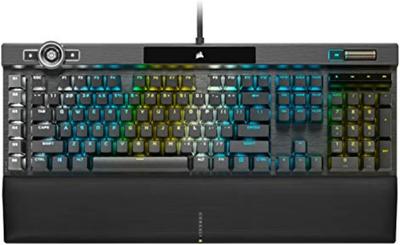
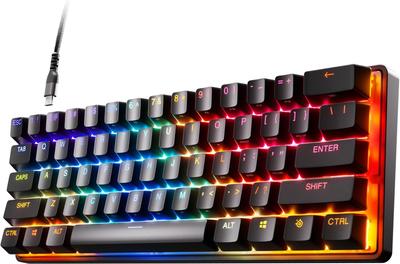
Layout is the dividing line, Corsair K100 RGB Full-Size against SteelSeries Apex Pro Mini 60%. Connectivity is not the same on both, Wired USB on the Corsair K100 RGB versus Wired on the SteelSeries Apex Pro Mini. They differ on backlighting too, 144-Zone Per-Key RGB with iCUE on the Corsair K100 RGB versus Per-key RGB, OLED smart display on the SteelSeries Apex Pro Mini. There is a split on keycap material as well, PBT Double-Shot on the Corsair K100 RGB versus Doubleshot PBT on the SteelSeries Apex Pro Mini.
Corsair K100 RGB vs SteelSeries Apex Pro Mini: which one fits your build
The Corsair K100 RGB suits full-size layout gamers wanting macro keys and iCUE ecosystem users, though it is the wrong buy for compact-desk users and hot-swap enthusiasts. Buy the SteelSeries Apex Pro Mini for competitive gamers who want per-key actuation control and buyers who trust SteelSeries' software ecosystem, though it is not built for budget buyers; OmniPoint switches carry a real premium. The same goes for players who want a small OLED display for quick profile switching. It is not the one for hobbyists who want to swap switches later, this board isn't hot-swappable. Our rating of the Corsair K100 RGB (8/10): A feature-loaded full-size flagship for players who want a control wheel and macro keys alongside serious polling speed. Our rating of the SteelSeries Apex Pro Mini (9/10): per-key actuation tuning in the smallest layout SteelSeries makes, one of the most genuinely useful implementations of Hall Effect switching on the market.
Frequently asked questions
Do the Corsair K100 RGB and SteelSeries Apex Pro Mini differ on switch type?
Yes. Switch Type reads Cherry MX Speed Silver or Corsair OPX Optical-Mechanical on the Corsair K100 RGB versus OmniPoint Adjustable Hall Effect on the SteelSeries Apex Pro Mini.
Specs and benchmarks
Brand
- Corsair K100 RGB
- Corsair
- SteelSeries Apex Pro Mini
- SteelSeries
Layout
- Corsair K100 RGB
- Full-Size
- SteelSeries Apex Pro Mini
- 60%
Model
- Corsair K100 RGB
- K100 RGB
- SteelSeries Apex Pro Mini
- Apex Pro Mini
Switch Type
- Corsair K100 RGB
- Cherry MX Speed Silver or Corsair OPX Optical-Mechanical
- SteelSeries Apex Pro Mini
- OmniPoint Adjustable Hall Effect
Connectivity
- Corsair K100 RGB
- Wired USB (USB passthrough included)
- SteelSeries Apex Pro Mini
- Wired (detachable USB-C)
Keycap Material
- Corsair K100 RGB
- PBT Double-Shot
- SteelSeries Apex Pro Mini
- Doubleshot PBT
Hot-Swappable
- Corsair K100 RGB
- No
- SteelSeries Apex Pro Mini
- No
Backlighting
- Corsair K100 RGB
- 144-Zone Per-Key RGB with iCUE
- SteelSeries Apex Pro Mini
- Per-key RGB, OLED smart display
Polling Rate
- Corsair K100 RGB
- Up to 8000 Hz (Axon)Best
- SteelSeries Apex Pro Mini
- 1000 Hz


Which one should you pick?
Choose Corsair K100 RGB if you want the higher polling rate (Up to 8000 Hz (Axon) vs 1000 Hz).
Choose SteelSeries Apex Pro Mini if you already have it on hand or find it at a lower price.
Price comparison
| Retailer | Corsair K100 RGB | SteelSeries Apex Pro Mini |
|---|---|---|
| Corsair Store | View on Corsair Store |
Disclaimer: The price and specification of the given product may differ from the actual product. Please confirm on the retailer's website before buying.
Verdict
Corsair K100 RGB
8 / 10 Expert Rating
A feature-loaded full-size flagship for players who want a control wheel and macro keys alongside serious polling speed.
SteelSeries Apex Pro Mini
9 / 10 Expert Rating
Per-key actuation tuning in the smallest layout SteelSeries makes, one of the most genuinely useful implementations of Hall Effect switching on the market.