
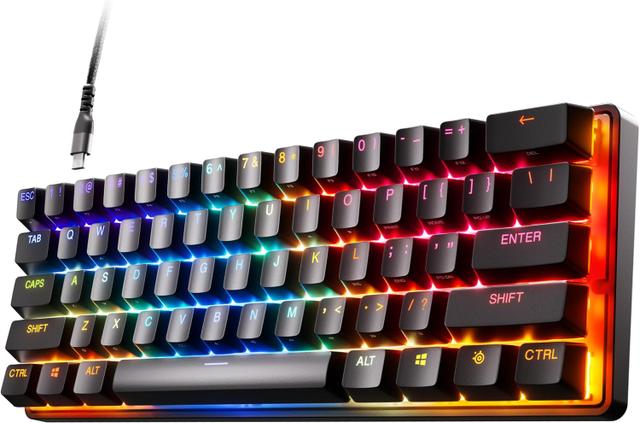
SteelSeries Apex Pro Mini
Expert rating9 / 10
- Layout:
- 60%
- Switch Type:
- Hall Effect
- Connectivity:
- Wired
- Hot-Swappable:
- No
Consumercarts is reader-supported. Learn more
Disclaimer: The price and specification of the given product may differ from the actual product. Please confirm on the retailer's website before buying.
Manufacturer: SteelSeries Last updated: September 12, 2026
SteelSeries Apex Pro Mini (60%/OmniPoint Hall Effect/Wired/Adjustable Actuation/OLED Display) Review
Compact Hall Effect boards get compared directly against the SteelSeries Apex Pro Mini, the 60% version of SteelSeries' adjustable-actuation flagship.
We'd point competitive players here specifically for the per-key actuation tuning — every key gets its own trigger point, not just a global setting, which matters when your pinky and index finger want different sensitivities.
Per-Key Actuation Tuning
OmniPoint switches let you set actuation distance individually per key rather than globally, so WASD can sit at a hair-trigger 0.4mm while the rest of the board stays at a more typing-friendly 2.0mm.
A Genuinely Useful OLED Display
The smart display shows actuation profiles, media info, or a system clock at a glance, a small but real convenience most competitors skip entirely.
Comparison to Alternatives
Against SteelSeries' own Apex Pro TKL Gen 3, the Mini drops the number pad, arrows, and function row for a smaller footprint, keeping the same OmniPoint 3.0 switches — a straightforward size trade with no feature loss. Against the Wooting 60HE+, that board is hot-swappable while the Apex Pro Mini's switches are fixed — pick Wooting if you want to experiment with different magnetic switches later.
Specifications
Identity
| Brand | SteelSeries |
|---|---|
| Model | Apex Pro Mini |
Design
| Layout | 60% |
|---|---|
| Switch Type | OmniPoint Adjustable Hall Effect |
| Connectivity | Wired (detachable USB-C) |
| Keycap Material | Doubleshot PBT |
Features
| Hot-Swappable | No |
|---|---|
| Backlighting | Per-key RGB, OLED smart display |
| Polling Rate | 1000 Hz |
Expert Review
Reviewed by Burooj Alam. Rated by us, not by users.
Expert rating9 / 10
Per-key actuation tuning in the smallest layout SteelSeries makes — one of the most genuinely useful implementations of Hall Effect switching on the market.
Best for
- Competitive gamers who want per-key actuation control.
- Players who want a small OLED display for quick profile switching.
- Buyers who trust SteelSeries' software ecosystem.
Not for
- Hobbyists who want to swap switches later — this board isn't hot-swappable.
- Anyone who needs a number pad or full arrow cluster without a Fn layer.
- Budget buyers; OmniPoint switches carry a real premium.
FAQs
What are the key specifications of the SteelSeries Apex Pro Mini (60%/OmniPoint Hall Effect/Wired/Adjustable Actuation/OLED Display)?
The SteelSeries Apex Pro Mini (60%/OmniPoint Hall Effect/Wired/Adjustable Actuation/OLED Display) is a mechanical keyboard from SteelSeries. Key specs: Layout 60%, Switch Type OmniPoint Adjustable Hall Effect, Connectivity Wired (detachable USB-C), Hot-Swappable false, Keycap Material Doubleshot PBT.
Will the SteelSeries Apex Pro Mini (60%/OmniPoint Hall Effect/Wired/Adjustable Actuation/OLED Display) work with my current setup?
The SteelSeries Apex Pro Mini (60%/OmniPoint Hall Effect/Wired/Adjustable Actuation/OLED Display) lists Switch Type is OmniPoint Adjustable Hall Effect. Check that against the hardware you already own before buying, since this is the field that most often decides whether a part fits.
Who is the SteelSeries Apex Pro Mini (60%/OmniPoint Hall Effect/Wired/Adjustable Actuation/OLED Display) best suited to?
It suits competitive gamers who want per-key actuation control., players who want a small oled display for quick profile switching., buyers who trust steelseries' software ecosystem..
What are the drawbacks of the SteelSeries Apex Pro Mini (60%/OmniPoint Hall Effect/Wired/Adjustable Actuation/OLED Display)?
It is a poor fit for hobbyists who want to swap switches later — this board isn't hot-swappable., anyone who needs a number pad or full arrow cluster without a fn layer., budget buyers; omnipoint switches carry a real premium..
Compare and read more
- Keychron Q3 Max (TKL/Aluminum/QMK-VIA/Bluetooth 5.1 + 2.4GHz + USB-C/Hot-Swappable/Gasket-Mounted) vs SteelSeries Apex Pro Mini (60%/OmniPoint Hall Effect/Wired/Adjustable Actuation/OLED Display)
- Corsair K65 RGB Mini (60%/Cherry MX Speed/Wired USB-C/Hot-Swappable/Per-Key RGB) vs SteelSeries Apex Pro Mini (60%/OmniPoint Hall Effect/Wired/Adjustable Actuation/OLED Display)
- Corsair K100 RGB (Full-Size/Cherry MX Speed or Corsair OPX Optical-Mechanical/Wired USB/144 Zone RGB/8000Hz Polling) vs SteelSeries Apex Pro Mini (60%/OmniPoint Hall Effect/Wired/Adjustable Actuation/OLED Display)
- Keydous NJ80 (75%/Hot-Swap/Tri-Mode Wireless/Gasket-Mounted/QMK-VIA/South-Facing RGB) vs SteelSeries Apex Pro Mini (60%/OmniPoint Hall Effect/Wired/Adjustable Actuation/OLED Display)
- ASUS ROG Strix Scope II 96 (96%/ROG NX Snow Mechanical/Wired USB-C/Hot-Swappable/Per-Key RGB) vs SteelSeries Apex Pro Mini (60%/OmniPoint Hall Effect/Wired/Adjustable Actuation/OLED Display)