
Consumercarts is reader-supported. Learn more
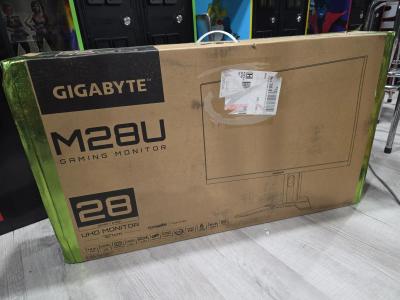
Acer Predator XB273U GX vs Gigabyte M28U: Comparison
Acer Predator XB273U GX vs Gigabyte M28U: the refresh rate difference
Refresh rate is where these two genuinely part company, Acer Predator XB273U GX 240 Hz against Gigabyte M28U 144 Hz, a 40% lead for Acer Predator XB273U GX. They differ on adaptive sync too, NVIDIA G-Sync Compatible on the Acer Predator XB273U GX versus AMD FreeSync Premium Pro, G-Sync Compatible on the Gigabyte M28U. They differ on color depth too, 8-bit + FRC on the Acer Predator XB273U GX versus 8-bit on the Gigabyte M28U.
Acer Predator XB273U GX vs Gigabyte M28U: which one fits your build
The Acer Predator XB273U GX suits competitive players wanting to measure and tune system latency and NVIDIA Reflex-compatible GPU and peripheral owners, though it is the wrong buy for content creators needing wide color gamut and AMD GPU users who can't use Reflex Latency Analyzer. The Gigabyte M28U is the one to take for console gamers wanting native 4K/120Hz with VRR and dual PC or PC/console desk setups needing KVM, though it is not the pick for budget or mid-range GPU owners and buyers wanting deep local-dimming HDR. Our rating of the Acer Predator XB273U GX (8.3/10): A speed-focused esports monitor whose latency analyzer tooling stands out in a crowded 1440p gaming segment. Our rating of the Gigabyte M28U (8.3/10): A well-connected 4K gaming monitor whose HDMI 2.1 bandwidth and built-in KVM make it a strong console-and-PC hybrid pick.
What Acer Predator XB273U GX and Gigabyte M28U have in common
Everything else lines up. Hdr support, panel technology, aspect ratio, vesa mount pattern and built-in speakers read the same on both, so those are not worth weighing.
Frequently asked questions
Do the Acer Predator XB273U GX and Gigabyte M28U differ on resolution?
Yes. Resolution reads 2560 x 1440 on the Acer Predator XB273U GX versus 3840 x 2160 on the Gigabyte M28U.

Specs and benchmarks
Panel Type
- Acer Predator XB273U GX
- IPS
- Gigabyte M28U
- SS IPS
Brand
- Acer Predator XB273U GX
- Acer
- Gigabyte M28U
- Gigabyte
Model Number
- Acer Predator XB273U GX
- XB273U GX
- Gigabyte M28U
- M28U
Screen Size
- Acer Predator XB273U GX
- 27 in-4%
- Gigabyte M28U
- 28 inBest
Resolution
- Acer Predator XB273U GX
- 2560 x 1440 (QHD)
- Gigabyte M28U
- 3840 x 2160 (4K UHD)
Panel Technology
- Acer Predator XB273U GX
- IPS
- Gigabyte M28U
- IPS
Aspect Ratio
- Acer Predator XB273U GX
- 16:9
- Gigabyte M28U
- 16:9
Refresh Rate
- Acer Predator XB273U GX
- 240 HzBest
- Gigabyte M28U
- 144 Hz-40%
Response Time
- Acer Predator XB273U GX
- 1 ms
- Gigabyte M28U
- 1ms (GtG)
Adaptive Sync
- Acer Predator XB273U GX
- NVIDIA G-Sync Compatible
- Gigabyte M28U
- AMD FreeSync Premium Pro, G-Sync Compatible
HDR Support
- Acer Predator XB273U GX
- Yes
- Gigabyte M28U
- Yes
Native Resolution
- Acer Predator XB273U GX
- 2560x1440
- Gigabyte M28U
- 3840x2160
Color Depth
- Acer Predator XB273U GX
- 8-bit + FRC
- Gigabyte M28U
- 8-bit
VESA Mount Pattern
- Acer Predator XB273U GX
- 100x100
- Gigabyte M28U
- 100x100
Built-in Speakers
- Acer Predator XB273U GX
- Yes
- Gigabyte M28U
- Yes
Series
- Acer Predator XB273U GX
- Predator
- Gigabyte M28U
- Gigabyte Gaming M28U
HDR Formats
- Acer Predator XB273U GX
- HDR10
- Gigabyte M28U
- VESA DisplayHDR 400


Which one should you pick?
Choose Acer Predator XB273U GX if you want the higher refresh rate (240 Hz vs 144 Hz).
Choose Gigabyte M28U if you want the higher screen size (28 in vs 27 in).
Verdict
Acer Predator XB273U GX
8.3 / 10 Expert Rating
A speed-focused esports monitor whose latency analyzer tooling stands out in a crowded 1440p gaming segment.
Gigabyte M28U
8.3 / 10 Expert Rating
A well-connected 4K gaming monitor whose HDMI 2.1 bandwidth and built-in KVM make it a strong console-and-PC hybrid pick.