
Consumercarts is reader-supported. Learn more
AOC 16T3 vs ASUS ZenScreen Go MB16AWP: Comparison
AOC 16T3 vs ASUS ZenScreen Go MB16AWP panel type compared
Response time is not the same on both, 5ms on the AOC 16T3 versus 5 ms on the ASUS ZenScreen Go MB16AWP. Connectivity is not the same on both, USB-C x2 , micro-HDMI on the AOC 16T3 versus USB-C , mini-HDMI, Wi-Fi wireless projection on the ASUS ZenScreen Go MB16AWP. The weight figures are near enough to ignore, Approx. 0.79 kg on the AOC 16T3 versus 1.09 kg on the ASUS ZenScreen Go MB16AWP.
Which should you buy, AOC 16T3 or ASUS ZenScreen Go MB16AWP?
Buy the AOC 16T3 for budget buyers wanting basic touch functionality and casual presenters navigating slides by tap, though it is not the pick for precision touch or drawing use and buyers wanting the lightest possible touch monitor. The ASUS ZenScreen Go MB16AWP suits content creators needing a tripod-mountable secondary display and ASUS loyalists who want extra flexibility over the base ZenScreen, though it is not built for gamers or anyone latency-sensitive who'll just use it wired anyway and iPhone users, since Miracast doesn't work with iOS. It is equally the pick for presenters who want to cast from a phone or laptop wirelessly. Our rating of the AOC 16T3 (6.9/10): A budget-friendly way into touchscreen portable monitors, with the expected trade-offs in refinement. Our rating of the ASUS ZenScreen Go MB16AWP (7.1/10): A solid pick if wireless mirroring or tripod mounting actually matters to your workflow, otherwise the plain MB16AC is the better value.
What AOC 16T3 and ASUS ZenScreen Go MB16AWP have in common
The common ground is wider than the gap: resolution, refresh rate, screen size, hdr support and adaptive sync are identical here. They match on 3 further specifications as well.
Frequently asked questions
Is the Aspect Ratio the same on the AOC 16T3 and ASUS ZenScreen Go MB16AWP?
It is. Both are listed at 16:9, so it is not a reason to pick one over the other.
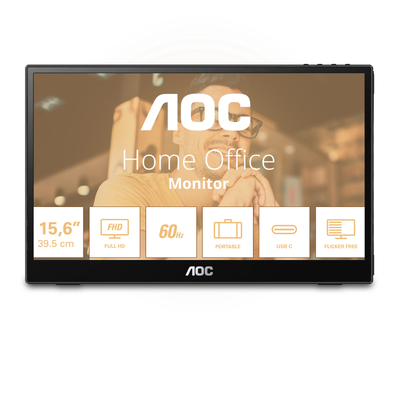

Specs and benchmarks
Panel Type
- AOC 16T3
- IPS (10-point touch)
- ASUS ZenScreen Go MB16AWP
- IPS
Brand
- AOC 16T3
- AOC
- ASUS ZenScreen Go MB16AWP
- ASUS
Model Number
- AOC 16T3
- 16T3
- ASUS ZenScreen Go MB16AWP
- MB16AWP
Screen Size
- AOC 16T3
- 15.6 in
- ASUS ZenScreen Go MB16AWP
- 15.6 in
Resolution
- AOC 16T3
- 1920 x 1080 (Full HD)
- ASUS ZenScreen Go MB16AWP
- 1920 x 1080 (Full HD)
Aspect Ratio
- AOC 16T3
- 16:9
- ASUS ZenScreen Go MB16AWP
- 16:9
Refresh Rate
- AOC 16T3
- 60 Hz
- ASUS ZenScreen Go MB16AWP
- 60 Hz
Response Time
- AOC 16T3
- 5ms (GtG)
- ASUS ZenScreen Go MB16AWP
- 5 ms
Adaptive Sync
- AOC 16T3
- None
- ASUS ZenScreen Go MB16AWP
- None
HDR Support
- AOC 16T3
- No
- ASUS ZenScreen Go MB16AWP
- No
Curved
- AOC 16T3
- No
- ASUS ZenScreen Go MB16AWP
- No
Built-in Speakers
- AOC 16T3
- Yes
- ASUS ZenScreen Go MB16AWP
- Yes
Series
- AOC 16T3
- 16T3
- ASUS ZenScreen Go MB16AWP
- ZenScreen Go MB16AWP
Connectivity
- AOC 16T3
- USB-C x2 (single cable, DP Alt Mode + power), micro-HDMI
- ASUS ZenScreen Go MB16AWP
- USB-C (DP Alt Mode), mini-HDMI, Wi-Fi wireless projection
Weight
- AOC 16T3
- Approx. 0.79 kgBest
- ASUS ZenScreen Go MB16AWP
- 1.09 kg


Which one should you pick?
Choose AOC 16T3 if you want the higher screen size (15.6 in vs 15.6 in) and the higher refresh rate (60 Hz vs 60 Hz).
Choose ASUS ZenScreen Go MB16AWP if you already have it on hand or find it at a lower price.
Verdict
AOC 16T3
6.9 / 10 Expert Rating
A budget-friendly way into touchscreen portable monitors, with the expected trade-offs in refinement.
ASUS ZenScreen Go MB16AWP
7.1 / 10 Expert Rating
A solid pick if wireless mirroring or tripod mounting actually matters to your workflow, otherwise the plain MB16AC is the better value.