
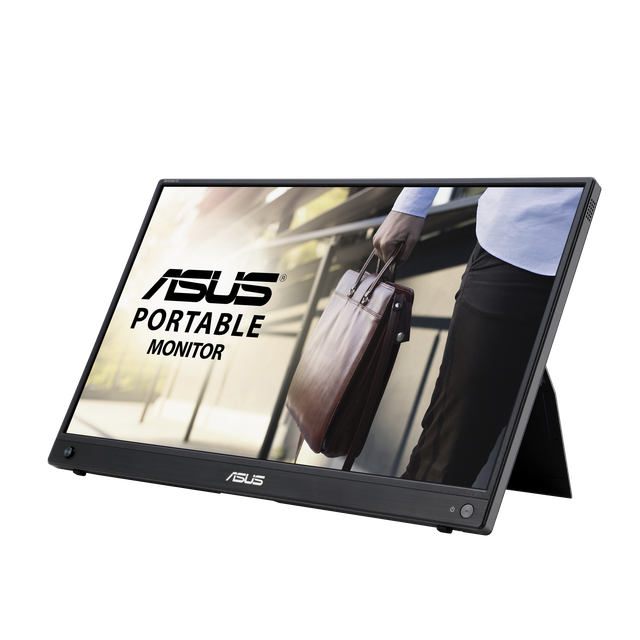
ASUS ZenScreen Go MB16AWP
Expert rating7.1 / 10
- Screen Size:
- 15.6 in
- Resolution:
- 1920x1080
- Panel Tech:
- IPS
- Battery:
- Built-in, wireless casting
Consumercarts is reader-supported. Learn more
Disclaimer: The price and specification of the given product may differ from the actual product. Please confirm on the retailer's website before buying.
Manufacturer: ASUS Last updated: 2026-09-12
ASUS ZenScreen Go MB16AWP Review
Searching for the ASUS ZenScreen Go MB16AWP means you probably want a portable monitor that can mirror a phone or laptop screen wirelessly instead of always needing a cable plugged in.
We like this one for a specific use case: presenting from a phone or tablet without digging out a dongle. The Miracast support lets Windows and Android devices cast to it directly, and it still has USB-C and micro-HDMI for a wired connection when you want zero latency. It's not the sharpest or brightest panel in this list, but the wireless flexibility is genuinely useful for quick pitches or classroom setups.
Wireless Mirroring in Practice
Miracast setup takes a few seconds on supported Windows laptops and most modern Android phones; iOS support is more limited since Apple doesn't support Miracast natively. When it works, there's a small but noticeable input lag versus a wired connection, so we'd still recommend USB-C for anything latency-sensitive like gaming or fast scrolling.
Build and Ergonomics
The tripod socket is the standout physical feature here, letting you mount the display on a tripod or a phone-style clamp for content creation or streaming overlays, something most portable monitors in this price range skip. The smart case again folds into a stand, and the built-in battery keeps it independent of outlets for a few hours.
Comparison to Alternatives
Versus the plain ASUS ZenScreen MB16AC, this one trades some brightness and adds wireless casting plus the tripod mount, a fair trade if you actually use either feature. Versus the KYY K3-2, the ASUS costs more but is meaningfully lighter and better built, and the wireless option has no equivalent in KYY's lineup at all.
Our verdict
Reviewed by Burooj Alam. Rated by us, not by users.
Expert rating7.1 / 10
A solid pick if wireless mirroring or tripod mounting actually matters to your workflow, otherwise the plain MB16AC is the better value.
Best for
- Presenters who want to cast from a phone or laptop wirelessly
- Content creators needing a tripod-mountable secondary display
- ASUS loyalists who want extra flexibility over the base ZenScreen
Not for
- Gamers or anyone latency-sensitive who'll just use it wired anyway
- iPhone users, since Miracast doesn't work with iOS
- Budget buyers who don't need wireless casting
Specifications
What these specs meanIdentity
| Brand | ASUS |
|---|---|
| Model Number | MB16AWP |
| Series | ZenScreen Go MB16AWP |
| Color Gamut | 100% sRGB |
Panel
| Panel Type | IPS |
|---|---|
| Screen Size | 15.6 in |
| Resolution | 1920 x 1080 (Full HD) |
| Aspect Ratio | 16:9 |
Performance
| Refresh Rate | 60 Hz |
|---|---|
| Response Time | 5 ms |
| Adaptive Sync | None |
Features
| HDR Support | No |
|---|---|
| Curved | No |
Panel technology
| Panel Technology | IPS |
|---|---|
| Panel Coating | Matte anti-glare |
Screen geometry
| Native Resolution | 1920x1080 |
|---|---|
| Screen Curvature | Flat |
Motion
| Max Refresh Rate | 60 Hz |
|---|---|
| Response Time GtG | 5 ms |
HDR and brightness
| SDR Brightness | 250 nits |
|---|---|
| Native Contrast Ratio | 1200:1 |
Connectivity
| USB-C DP Alt Mode | Yes |
|---|
Stand, mounting and form
| Built-in Speakers | Yes |
|---|---|
| Battery Powered | Yes |
FAQs
What are the key specifications of the ASUS ZenScreen Go MB16AWP (15.6-Inch 1080p Wireless Portable IPS/60Hz/5ms/Built-In Battery/Miracast)?
Key specs for the ASUS ZenScreen Go MB16AWP: Resolution 1920 x 1080 (Full HD), Refresh Rate 60 Hz, Panel Type IPS, Response Time 5 ms, Response Time GtG 5 ms, Screen Size 15.6 in.
Will the ASUS ZenScreen Go MB16AWP (15.6-Inch 1080p Wireless Portable IPS/60Hz/5ms/Built-In Battery/Miracast) work with my current setup?
The ASUS ZenScreen Go MB16AWP (15.6-Inch 1080p Wireless Portable IPS/60Hz/5ms/Built-In Battery/Miracast) lists Panel Type is IPS. Check that against the hardware you already own before buying, since this is the field that most often decides whether a part fits.
Who is the ASUS ZenScreen Go MB16AWP (15.6-Inch 1080p Wireless Portable IPS/60Hz/5ms/Built-In Battery/Miracast) best suited to?
Best suited to: Presenters who want to cast from a phone or laptop wirelessly; Content creators needing a tripod-mountable secondary display; ASUS loyalists who want extra flexibility over the base ZenScreen.
What are the drawbacks of the ASUS ZenScreen Go MB16AWP (15.6-Inch 1080p Wireless Portable IPS/60Hz/5ms/Built-In Battery/Miracast)?
Not the best fit for: Gamers or anyone latency-sensitive who'll just use it wired anyway; iPhone users, since Miracast doesn't work with iOS; Budget buyers who don't need wireless casting.
Compare and read more
- AOC 16T3 (15.6-Inch 1080p Portable Touchscreen IPS/60Hz/5ms/USB-C Single Cable) vs ASUS ZenScreen Go MB16AWP (15.6-Inch 1080p Wireless Portable IPS/60Hz/5ms/Built-In Battery/Miracast)
- AOC I1601FWUX (15.6-Inch 1080p Portable IPS/60Hz/5ms/USB-C Single Cable/Ultra-Slim) vs ASUS ZenScreen Go MB16AWP (15.6-Inch 1080p Wireless Portable IPS/60Hz/5ms/Built-In Battery/Miracast)
- Acer Nitro VG272U (27-Inch QHD IPS/180Hz/1ms VRB/90% DCI-P3/AMD FreeSync Premium Budget Pick) vs ASUS ZenScreen Go MB16AWP (15.6-Inch 1080p Wireless Portable IPS/60Hz/5ms/Built-In Battery/Miracast)
- AOC 27G4X (27-Inch QHD IPS/180Hz/1ms MPRT/Standard Gamut/HDR10/Budget High-Refresh Value) vs ASUS ZenScreen Go MB16AWP (15.6-Inch 1080p Wireless Portable IPS/60Hz/5ms/Built-In Battery/Miracast)
- Acer Nitro XV320QU (32-Inch QHD IPS/170Hz/1ms VRB/95%+ DCI-P3/HDR10/KVM Switch) vs ASUS ZenScreen Go MB16AWP (15.6-Inch 1080p Wireless Portable IPS/60Hz/5ms/Built-In Battery/Miracast)
- Best Monitor for Competitive Gaming (240Hz+) in 2026
- HDR400 vs HDR True Black 400: Why the Same Number Means Different Things