
Consumercarts is reader-supported. Learn more
ASRock TRX50 WS vs Gigabyte TRX50 AI TOP: Comparison
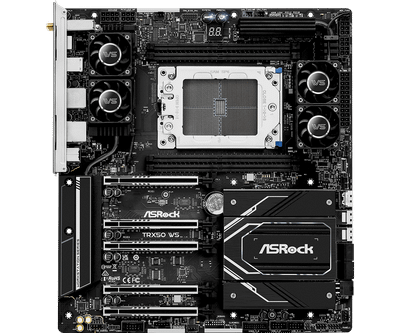
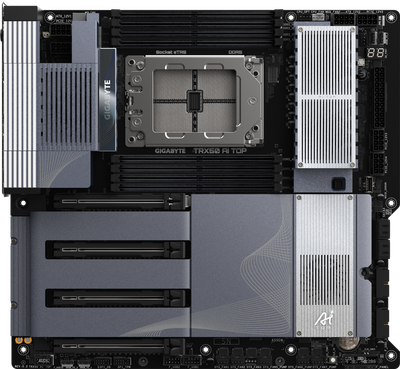
ASRock TRX50 WS vs Gigabyte TRX50 AI TOP memory slots compared
On memory slots the spread is 50%, ASRock TRX50 WS 4 against Gigabyte TRX50 AI TOP 8, so Gigabyte TRX50 AI TOP takes it. Add max memory to that, 1024 GB on the ASRock TRX50 WS versus 2048 GB on the Gigabyte TRX50 AI TOP, and the pattern holds. M.2 slots runs the same way, 2 on the ASRock TRX50 WS versus 4 on the Gigabyte TRX50 AI TOP, another win for Gigabyte TRX50 AI TOP. Add memory channels to that, 4 on the ASRock TRX50 WS versus 8 on the Gigabyte TRX50 AI TOP, and the pattern holds.
Which should you buy, ASRock TRX50 WS or Gigabyte TRX50 AI TOP?
it is not the pick for anyone wanting a manufacturer-disclosed exact VRM phase/amperage spec and builds that don't need workstation-class expansion or ECC memory. The same goes for workstation builders who want flexible storage expansion via SlimSAS/MCIO add-in cards. The Gigabyte TRX50 AI TOP is the one to take for workstation builds prioritizing 10GbE networking for large dataset transfers, though it is the wrong buy for buyers wanting a fully disclosed VRM spec sheet before purchasing and general workstation use where AI-specific tuning utilities add no value. It is equally the pick for local AI/LLM builders who want USB4 connectivity alongside Threadripper PRO horsepower.
Where the two are identical
Everything else lines up. Chipset, form factor, platform, oldest cpu family supported and pcie 5.0 support read the same on both, so those are not worth weighing. They match on 9 further specifications as well.
Frequently asked questions
Do the ASRock TRX50 WS and Gigabyte TRX50 AI TOP differ on socket?
Yes. Socket reads AMD Ryzen Threadripper PRO 9000/7000 WX-Series and Threadripper 9000/7000... on the ASRock TRX50 WS versus AMD Ryzen Threadripper PRO 9000 WX / 9000 /... on the Gigabyte TRX50 AI TOP.
Is the Wi-Fi Onboard the same on the ASRock TRX50 WS and Gigabyte TRX50 AI TOP?
It is. Both are listed at Yes, so it is not a reason to pick one over the other.
Specs and benchmarks
Platform
- ASRock TRX50 WS
- AMD
- Gigabyte TRX50 AI TOP
- AMD
Model Number
- ASRock TRX50 WS
- TRX50 WS
- Gigabyte TRX50 AI TOP
- TRX50 AI TOP
Socket
- ASRock TRX50 WS
- AMD Ryzen Threadripper PRO 9000/7000 WX-Series and Threadripper 9000/7000 Series
- Gigabyte TRX50 AI TOP
- AMD Ryzen Threadripper PRO 9000 WX / 9000 / PRO 7000 WX / 7000 series
Form Factor
- ASRock TRX50 WS
- E-ATX
- Gigabyte TRX50 AI TOP
- E-ATX
Chipset
- ASRock TRX50 WS
- TRX50
- Gigabyte TRX50 AI TOP
- TRX50
Memory Type
- ASRock TRX50 WS
- 4x DDR5 ECC R-DIMM/RDIMM-3DS, quad-channel, up to 1TB, up to 7600+ MT/s (OC)
- Gigabyte TRX50 AI TOP
- 8x DDR5 ECC RDIMM/RDIMM-3DS, up to 2 TB; 8-channel with Threadripper PRO WX, quad-channel with non-PRO ThreadripperBest
Oldest CPU Family Supported
- ASRock TRX50 WS
- Threadripper PRO 7000
- Gigabyte TRX50 AI TOP
- Threadripper PRO 7000
Memory Slots
- ASRock TRX50 WS
- 4-50%
- Gigabyte TRX50 AI TOP
- 8Best
Max Memory
- ASRock TRX50 WS
- 1024 GB-50%
- Gigabyte TRX50 AI TOP
- 2048 GBBest
Board Width
- ASRock TRX50 WS
- 277 mm
- Gigabyte TRX50 AI TOP
- 330 mm
M.2 Slots
- ASRock TRX50 WS
- 2-50%
- Gigabyte TRX50 AI TOP
- 4Best
PCIe 5.0 Support
- ASRock TRX50 WS
- Yes
- Gigabyte TRX50 AI TOP
- Yes
Wi-Fi Onboard
- ASRock TRX50 WS
- Yes
- Gigabyte TRX50 AI TOP
- Yes
Memory Channels
- ASRock TRX50 WS
- 4-50%
- Gigabyte TRX50 AI TOP
- 8Best
ECC Memory Support
- ASRock TRX50 WS
- Registered ECC
- Gigabyte TRX50 AI TOP
- Registered ECC
M.2 Slots Onboard
- ASRock TRX50 WS
- 2
- Gigabyte TRX50 AI TOP
- 4
M.2 PCIe 5.0 Slots
- ASRock TRX50 WS
- 1
- Gigabyte TRX50 AI TOP
- 4
M.2 PCIe 4.0 Slots
- ASRock TRX50 WS
- 1
- Gigabyte TRX50 AI TOP
- 0
M.2 CPU Attached Slots
- ASRock TRX50 WS
- 1
- Gigabyte TRX50 AI TOP
- 4
SATA Ports
- ASRock TRX50 WS
- 4
- Gigabyte TRX50 AI TOP
- 4
PCIe x16 Slots
- ASRock TRX50 WS
- 5
- Gigabyte TRX50 AI TOP
- 4
Primary Graphics Slot Gen
- ASRock TRX50 WS
- PCIe 5.0
- Gigabyte TRX50 AI TOP
- PCIe 5.0
Rear USB4 or TB Ports
- ASRock TRX50 WS
- 0
- Gigabyte TRX50 AI TOP
- 2
Rear USB 20Gbps Ports
- ASRock TRX50 WS
- 1
- Gigabyte TRX50 AI TOP
- 0
Rear USB 10Gbps Ports
- ASRock TRX50 WS
- 5
- Gigabyte TRX50 AI TOP
- 6
Rear USB 5Gbps Ports
- ASRock TRX50 WS
- 2
- Gigabyte TRX50 AI TOP
- 0
Rear USB 2.0 Ports
- ASRock TRX50 WS
- 0
- Gigabyte TRX50 AI TOP
- 0
Front USB-C Header Speed
- ASRock TRX50 WS
- 10Gbps
- Gigabyte TRX50 AI TOP
- 20GbpsBest
Fan and Pump Headers
- ASRock TRX50 WS
- 5
- Gigabyte TRX50 AI TOP
- 8
ARGB Headers
- ASRock TRX50 WS
- 2
- Gigabyte TRX50 AI TOP
- 3
Vcore Power Stages
- ASRock TRX50 WS
- 18
- Gigabyte TRX50 AI TOP
- 16
Power Stage Current Rating
- ASRock TRX50 WS
- 110 A
- Gigabyte TRX50 AI TOP
- 110 A
EPS 12V Configuration
- ASRock TRX50 WS
- Two 8-pin
- Gigabyte TRX50 AI TOP
- Two 8-pin
Max Ethernet Speed
- ASRock TRX50 WS
- 10 Gbps
- Gigabyte TRX50 AI TOP
- 10 Gbps
Ethernet Port Count
- ASRock TRX50 WS
- 2
- Gigabyte TRX50 AI TOP
- 2
Wi-Fi Standard
- ASRock TRX50 WS
- Wi-Fi 6E
- Gigabyte TRX50 AI TOP
- Wi-Fi 7
Bluetooth Version
- ASRock TRX50 WS
- 5.2
- Gigabyte TRX50 AI TOP
- 5.3
Audio Codec
- ASRock TRX50 WS
- Realtek ALC1220, 7.1-channel, Nahimic Audio 4
- Gigabyte TRX50 AI TOP
- Realtek ALC4080 (rear) + Realtek ALC897 (front panel)
Expansion
- ASRock TRX50 WS
- 3x PCIe 5.0 x16 (CPU) + 2x PCIe 4.0 (Chipset, x4/x8)
- Gigabyte TRX50 AI TOP
- 4x PCIe x16 slots (PCIe 5.0 x16; slot 4 runs PCIe 4.0 with Threadripper 7000 non-PRO)
Connectivity
- ASRock TRX50 WS
- SlimSAS/MCIO expansion ports
- Gigabyte TRX50 AI TOP
- 2x rear USB4 Type-C, 6x rear USB 3.2 Gen 2 Type-A, front USB-C 20Gbps header, DisplayPort In
Networking
- ASRock TRX50 WS
- 10GbE (Marvell AQC113) + 2.5GbE, Wi-Fi 6E
- Gigabyte TRX50 AI TOP
- 2x Marvell AQtion AQC113C 10GbE, Qualcomm Wi-Fi 7 QCNCM865, Bluetooth 5.3
Special Features
- ASRock TRX50 WS
- 2x PCIe 5.0 M.2 + SlimSAS/MCIO expansion
- Gigabyte TRX50 AI TOP
- AI/LLM workload tuning utilities


Which one should you pick?
Choose ASRock TRX50 WS if you already have it on hand or find it at a lower price.
Choose Gigabyte TRX50 AI TOP if you want the higher memory slots (8 vs 4), the higher max memory (2048 GB vs 1024 GB) and the higher M.2 slots (4 vs 2).
Price comparison
| Retailer | ASRock TRX50 WS | Gigabyte TRX50 AI TOP |
|---|---|---|
| Newegg | View on Newegg | |
| Amazon | View on Amazon |
Disclaimer: The price and specification of the given product may differ from the actual product. Please confirm on the retailer's website before buying.