
Consumercarts is reader-supported. Learn more
Disclaimer: The price and specification of the given product may differ from the actual product. Please confirm on the retailer's website before buying.
Manufacturer: Gigabyte Last updated: September 11, 2026
Gigabyte TRX50 AI TOP Review
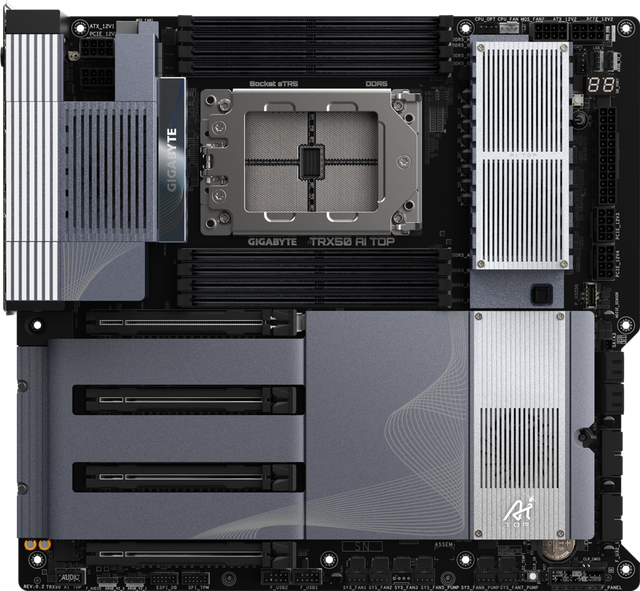
The TRX50 AI TOP targets a specific niche within the Threadripper PRO workstation market: builders running local AI and large language model workloads who need the memory capacity and PCIe bandwidth to pair a WX-series CPU with multiple accelerator cards.
Gigabyte does not officially disclose exact VRM phase or amperage specifications for this board, though the E-ATX form factor and workstation-class cooling are designed for sustained loads typical of AI training and inference workloads. DDR5 ECC R-DIMM memory runs in quad-channel mode, giving this board the memory bandwidth and capacity that AI/LLM workloads and large datasets require. Multiple PCIe 5.0 x16 slots support multi-GPU or accelerator card configurations common in AI workstation builds, and PCIe 5.0 M.2 slots provide fast local storage for model weights and datasets. A Marvell 10GbE controller handles high-throughput wired networking for large dataset transfers, paired with Wi-Fi 7 for wireless connectivity. Onboard USB4 Type-C support is a standout feature for connecting external AI accelerators or high-speed storage enclosures. Against the ASRock TRX50 WS in this catalog, the TRX50 AI TOP focuses on USB4 connectivity and AI-workload-oriented tuning utilities rather than SlimSAS storage expansion, reflecting Gigabyte's positioning of this board for AI/LLM builders specifically.
Power Delivery and VRM Design
Gigabyte does not officially disclose exact VRM phase or amperage specifications for this board, though the E-ATX form factor and workstation-class cooling are designed for sustained loads typical of AI training and inference workloads.
Memory Support
DDR5 ECC R-DIMM memory runs in quad-channel mode, giving this board the memory bandwidth and capacity that AI/LLM workloads and large datasets require.
Expansion and Storage
Multiple PCIe 5.0 x16 slots support multi-GPU or accelerator card configurations common in AI workstation builds, and PCIe 5.0 M.2 slots provide fast local storage for model weights and datasets.
Connectivity
A Marvell 10GbE controller handles high-throughput wired networking for large dataset transfers, paired with Wi-Fi 7 for wireless connectivity. Onboard USB4 Type-C support is a standout feature for connecting external AI accelerators or high-speed storage enclosures.
Comparison to Alternatives
Against the ASRock TRX50 WS in this catalog, the TRX50 AI TOP focuses on USB4 connectivity and AI-workload-oriented tuning utilities rather than SlimSAS storage expansion, reflecting Gigabyte's positioning of this board for AI/LLM builders specifically.
Our verdict
Reviewed by Burooj Alam. Rated by us, not by users.
Best for
- Local AI/LLM builders who want USB4 connectivity alongside Threadripper PRO horsepower
- Workstation builds prioritizing 10GbE networking for large dataset transfers
Not for
- Buyers wanting a fully disclosed VRM spec sheet before purchasing
- General workstation use where AI-specific tuning utilities add no value
Specifications
What these specs meanIdentity
| Model Number | TRX50 AI TOP |
|---|---|
| Form Factor | E-ATX |
Platform and CPU compatibility
| Platform | AMD |
|---|---|
| Socket | sTR5 |
| Chipset | TRX50 |
| Oldest CPU Family Supported | Threadripper PRO 7000 |
Memory
| Memory Type | DDR5 |
|---|---|
| Memory Slots | 8 |
| Max Memory | 2048 GB |
| Memory Channels | 8 |
| Max Memory Capacity | 2048 GB |
| ECC Memory Support | Registered ECC |
Expansion & Connectivity
| M.2 Slots | 4 |
|---|---|
| PCIe 5.0 Support | Yes |
| Wi-Fi Onboard | Yes |
Physical fit
| Board Width | 330 mm |
|---|
M.2 storage
| M.2 Slots Onboard | 4 |
|---|---|
| M.2 PCIe 5.0 Slots | 4 |
| M.2 PCIe 4.0 Slots | 0 |
| M.2 CPU Attached Slots | 4 |
Other storage
| SATA Ports | 4 |
|---|
PCIe expansion
| PCIe x16 Slots | 4 |
|---|---|
| Primary Graphics Slot Gen | PCIe 5.0 |
Rear USB
| Rear USB4 or TB Ports | 2 |
|---|---|
| Rear USB 20Gbps Ports | 0 |
| Rear USB 10Gbps Ports | 6 |
| Rear USB 5Gbps Ports | 0 |
| Rear USB 2.0 Ports | 0 |
Internal headers
| Front USB-C Header Speed | 20Gbps |
|---|---|
| Fan and Pump Headers | 8 |
| ARGB Headers | 3 |
Power delivery
| Vcore Power Stages | 16 |
|---|---|
| Power Stage Current Rating | 110 A |
| EPS 12V Configuration | Two 8-pin |
Builder features
| BIOS Flashback | Yes |
|---|---|
| Tool Free M.2 Retention | Yes |
Network and audio
| Max Ethernet Speed | 10 Gbps |
|---|---|
| Ethernet Port Count | 2 |
| Wi-Fi Standard | Wi-Fi 7 |
| Bluetooth Version | 5.3 |
| Audio Codec | ALC4080 |
FAQs
What are the key specifications of the Gigabyte TRX50 AI TOP (sTR5/AMD TRX50/E-ATX/USB4/AI Workload Tuning)?
Key specs for the Gigabyte TRX50 AI TOP: Chipset TRX50, Socket sTR5, Socket Type sTR5, Max Memory 2048 GB, Max Memory Capacity 2048 GB, Form Factor E-ATX.
Will the Gigabyte TRX50 AI TOP (sTR5/AMD TRX50/E-ATX/USB4/AI Workload Tuning) work with my current setup?
The Gigabyte TRX50 AI TOP (sTR5/AMD TRX50/E-ATX/USB4/AI Workload Tuning) lists Socket is sTR5. Check that against the hardware you already own before buying, since this is the field that most often decides whether a part fits.
Who is the Gigabyte TRX50 AI TOP (sTR5/AMD TRX50/E-ATX/USB4/AI Workload Tuning) best suited to?
Best suited to: Local AI/LLM builders who want USB4 connectivity alongside Threadripper PRO horsepower; Workstation builds prioritizing 10GbE networking for large dataset transfers.
What are the drawbacks of the Gigabyte TRX50 AI TOP (sTR5/AMD TRX50/E-ATX/USB4/AI Workload Tuning)?
Not the best fit for: Buyers wanting a fully disclosed VRM spec sheet before purchasing; General workstation use where AI-specific tuning utilities add no value.
Compare and read more
- ASRock WRX90 WS EVO (sTR5/AMD WRX90/EEB/24 Power Stages/7x PCIe 5.0 x16) vs Gigabyte TRX50 AI TOP (sTR5/AMD TRX50/E-ATX/USB4/AI Workload Tuning)
- ASRock TRX50 WS (sTR5/AMD TRX50/E-ATX/SlimSAS Expansion/5x PCIe 5.0 x16) vs Gigabyte TRX50 AI TOP (sTR5/AMD TRX50/E-ATX/USB4/AI Workload Tuning)
- B650 vs X670: Which AM5 Chipset Do You Actually Need
- Best AM5 Motherboard for Ryzen 9000 and X3D CPUs