
Consumercarts is reader-supported. Learn more
ASUS Tinker Board S vs Banana Pi BPI-M4 Zero: Comparison
ASUS Tinker Board S vs Banana Pi BPI-M4 Zero gpu model compared
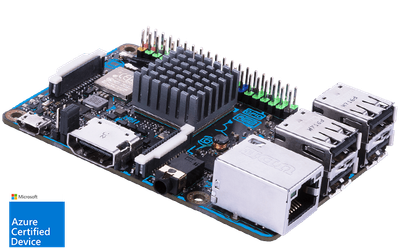
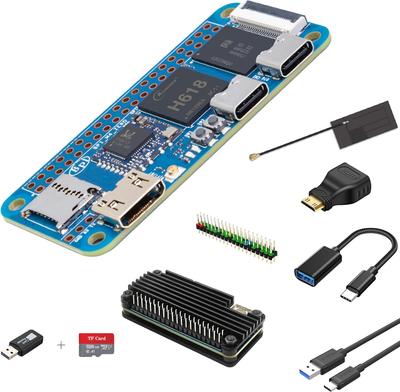
The first real difference is gpu model: ASUS Tinker Board S Mali-T760 MP4 against Banana Pi BPI-M4 Zero Mali-G31 MP2. Wireless is not the same on both, WiFi 5 on the ASUS Tinker Board S versus WiFi 6 on the Banana Pi BPI-M4 Zero. They differ on use case too, General Purpose on the ASUS Tinker Board S versus Ultra-Compact / Budget on the Banana Pi BPI-M4 Zero.
ASUS Tinker Board S vs Banana Pi BPI-M4 Zero: which one fits your build
The ASUS Tinker Board S suits digital signage and kiosk displays needing reliable boot storage and always-on embedded installs avoiding SD card failure, though it is the wrong buy for new projects needing current-generation performance and GPU-intensive or 4K video applications. Buy the Banana Pi BPI-M4 Zero for battery-powered IoT sensors needing WiFi 6 and ultra-compact embedded projects with tight space budgets, though it is not built for projects depending on the Pi Zero HAT ecosystem and beginners wanting maximum tutorial availability. Our rating of the ASUS Tinker Board S (6.5/10): dated performance-wise, but the onboard eMMC still makes it a sensible pick for always-on signage and kiosk deployments. Our rating of the Banana Pi BPI-M4 Zero (6.7/10): A capable, WiFi 6-equipped Pi Zero rival for battery-powered IoT projects, held back mainly by a thinner tutorial and HAT ecosystem than the official Pi Zero line.
Which is cheaper, ASUS Tinker Board S or Banana Pi BPI-M4 Zero?
Cost splits them too. Banana Pi BPI-M4 Zero sits at $20.00, ASUS Tinker Board S at $79.00, 295% more.
Frequently asked questions
Do the ASUS Tinker Board S and Banana Pi BPI-M4 Zero differ on storage type?
Yes. Storage Type reads eMMC on the ASUS Tinker Board S versus microSD on the Banana Pi BPI-M4 Zero.
Is the CPU Architecture the same on the ASUS Tinker Board S and Banana Pi BPI-M4 Zero?
It is. Both are listed at ARM, so it is not a reason to pick one over the other.
Specs and benchmarks
Brand
- ASUS Tinker Board S
- ASUS
- Banana Pi BPI-M4 Zero
- Banana Pi
CPU Architecture
- ASUS Tinker Board S
- ARM
- Banana Pi BPI-M4 Zero
- ARM
Model Number
- ASUS Tinker Board S
- Tinker Board S
- Banana Pi BPI-M4 Zero
- BPI-M4 Zero
Memory
- ASUS Tinker Board S
- 2GB LPDDR3
- Banana Pi BPI-M4 Zero
- 2 GB
Storage Type
- ASUS Tinker Board S
- eMMC
- Banana Pi BPI-M4 Zero
- microSD
SoC Model
- ASUS Tinker Board S
- Quad-Core Cortex-A17 up to 1.8GHz
- Banana Pi BPI-M4 Zero
- Allwinner H618, Quad-Core Cortex-A53 @ 1.5GHz
Has AI Accelerator / NPU
- ASUS Tinker Board S
- No
- Banana Pi BPI-M4 Zero
- No
Wireless
- ASUS Tinker Board S
- WiFi 5
- Banana Pi BPI-M4 Zero
- WiFi 6
GPIO Header
- ASUS Tinker Board S
- Yes
- Banana Pi BPI-M4 Zero
- Yes
Price
- ASUS Tinker Board S
- 79 USD
- Banana Pi BPI-M4 Zero
- 20 USD
Use Case
- ASUS Tinker Board S
- General Purpose
- Banana Pi BPI-M4 Zero
- Ultra-Compact / Budget
GPU Model
- ASUS Tinker Board S
- Mali-T760 MP4
- Banana Pi BPI-M4 Zero
- Mali-G31 MP2


Which one should you pick?
Choose ASUS Tinker Board S if you already have it on hand or find it at a lower price.
Choose Banana Pi BPI-M4 Zero if you already have it on hand or find it at a lower price.
Price comparison
| Retailer | ASUS Tinker Board S | Banana Pi BPI-M4 Zero |
|---|---|---|
| Consumercarts listing | $79.00 View on Consumercarts listing | $20.00 View on Consumercarts listing |
Disclaimer: The price and specification of the given product may differ from the actual product. Please confirm on the retailer's website before buying.
Verdict
ASUS Tinker Board S
6.5 / 10 Expert Rating
Dated performance-wise, but the onboard eMMC still makes it a sensible pick for always-on signage and kiosk deployments.
Banana Pi BPI-M4 Zero
6.7 / 10 Expert Rating
A capable, WiFi 6-equipped Pi Zero rival for battery-powered IoT projects, held back mainly by a thinner tutorial and HAT ecosystem than the official Pi Zero line.