
Consumercarts is reader-supported. Learn more
ASUS Tinker Board S vs Banana Pi BPI-SM10: Comparison
ASUS Tinker Board S vs Banana Pi BPI-SM10: the cpu architecture difference
The first real difference is cpu architecture: ASUS Tinker Board S ARM against Banana Pi BPI-SM10 RISC-V. They differ on use case too, General Purpose on the ASUS Tinker Board S versus AI / Machine Learning on the Banana Pi BPI-SM10.
ASUS Tinker Board S vs Banana Pi BPI-SM10: which one fits your build
The ASUS Tinker Board S is the one to take for digital signage and kiosk displays needing reliable boot storage and always-on embedded installs avoiding SD card failure, though it is not built for new projects needing current-generation performance and GPU-intensive or 4K video applications. it is not the pick for beginners wanting a plug-and-play dev board like a Raspberry Pi. It also earns its place with developers who specifically want early access to the SpacemiT K3 RISC-V platform. Avoid it for anyone who needs a verified, benchmarked NPU today rather than a manufacturer claim. Our rating of the ASUS Tinker Board S (6.5/10): dated performance-wise, but the onboard eMMC still makes it a sensible pick for always-on signage and kiosk deployments. Our rating of the Banana Pi BPI-SM10 (6.5/10): interesting silicon, risky purchase. Great if you want to be first on SpacemiT K3, but the 60 TOPS NPU claim is unverified and this is a compute module, not a beginner-friendly dev board.
Which is cheaper, ASUS Tinker Board S or Banana Pi BPI-SM10?
Cost splits them too. ASUS Tinker Board S sits at $79.00, Banana Pi BPI-SM10 at $449, 468% more.
Frequently asked questions
Do the ASUS Tinker Board S and Banana Pi BPI-SM10 differ on gpu model?
Yes. GPU Model reads Mali-T760 MP4 on the ASUS Tinker Board S versus Integrated 3D GPU on the Banana Pi BPI-SM10.
Is the GPIO Header the same on the ASUS Tinker Board S and Banana Pi BPI-SM10?
It is. Both are listed at Yes, so it is not a reason to pick one over the other.
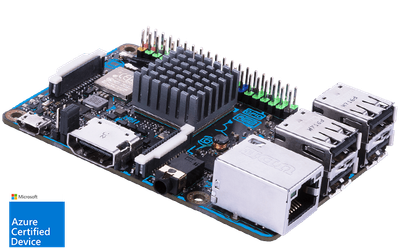
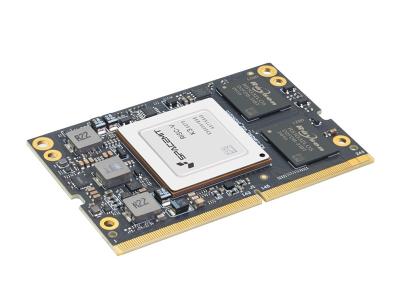
Specs and benchmarks
Brand
- ASUS Tinker Board S
- ASUS
- Banana Pi BPI-SM10
- Banana Pi
CPU Architecture
- ASUS Tinker Board S
- ARM
- Banana Pi BPI-SM10
- RISC-V
Memory
- ASUS Tinker Board S
- 2GB LPDDR3
- Banana Pi BPI-SM10
- 32 GBBest
Storage Type
- ASUS Tinker Board S
- eMMC
- Banana Pi BPI-SM10
- Onboard UFS (128GB standard), microSD, NVMe / M.2
SoC Model
- ASUS Tinker Board S
- Quad-Core Cortex-A17 up to 1.8GHz
- Banana Pi BPI-SM10
- SpacemiT K3 RISC-V AI chip (RVA23 profile, RVV 1.0)
Has AI Accelerator / NPU
- ASUS Tinker Board S
- No
- Banana Pi BPI-SM10
- Yes
Wireless
- ASUS Tinker Board S
- WiFi 5
- Banana Pi BPI-SM10
- None (Ethernet only) on reference carrier; WiFi/BT available via optional M.2 Key E module
GPIO Header
- ASUS Tinker Board S
- Yes
- Banana Pi BPI-SM10
- Yes
Price
- ASUS Tinker Board S
- 79 USD
- Banana Pi BPI-SM10
- 449 USD
Use Case
- ASUS Tinker Board S
- General Purpose
- Banana Pi BPI-SM10
- AI / Machine Learning
GPU Model
- ASUS Tinker Board S
- Mali-T760 MP4
- Banana Pi BPI-SM10
- Integrated 3D GPU (Vulkan, OpenCL, OpenGL ES)


Which one should you pick?
Choose ASUS Tinker Board S if you already have it on hand or find it at a lower price.
Choose Banana Pi BPI-SM10 if you want the higher memory (32 GB vs 2GB LPDDR3).
Price comparison
| Retailer | ASUS Tinker Board S | Banana Pi BPI-SM10 |
|---|---|---|
| Consumercarts listing | $79.00 View on Consumercarts listing | $449.00 View on Consumercarts listing |
Disclaimer: The price and specification of the given product may differ from the actual product. Please confirm on the retailer's website before buying.
Verdict
ASUS Tinker Board S
6.5 / 10 Expert Rating
Dated performance-wise, but the onboard eMMC still makes it a sensible pick for always-on signage and kiosk deployments.
Banana Pi BPI-SM10
6.5 / 10 Expert Rating
Interesting silicon, risky purchase.