
Consumercarts is reader-supported. Learn more
Banana Pi BPI-M2 Zero vs Pine64 PineTab: Comparison
What is the difference between Banana Pi BPI-M2 Zero and Pine64 PineTab?
Gpu model is the dividing line, Banana Pi BPI-M2 Zero Mali-400MP2 against Pine64 PineTab Mali-400 MP2. There is a split on soc model as well, Allwinner H2+, Quad-Core Cortex-A7 @ 1.2GHz on the Banana Pi BPI-M2 Zero versus Quad-Core Cortex-A53 up to 1.2GHz on the Pine64 PineTab. They differ on use case too, Ultra-Compact / Budget on the Banana Pi BPI-M2 Zero versus General Purpose on the Pine64 PineTab.
Banana Pi BPI-M2 Zero vs Pine64 PineTab: which one fits your build
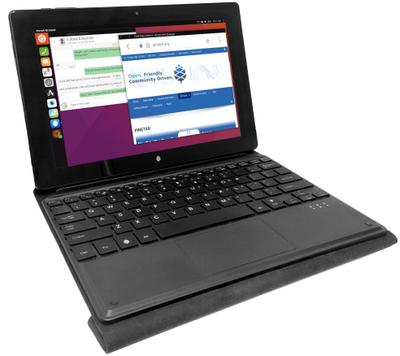
The Banana Pi BPI-M2 Zero suits extremely simple headless IoT or sensor nodes and learning basic embedded Linux at minimal cost, though it is the wrong buy for any workload needing more than 512MB RAM and desktop use or anything CPU-intensive. It is not the one for new builds where the Pi Zero 2 W's price difference is small. The Pine64 PineTab is the one to take for mobile Linux OS development (postmarketOS, etc.) and open-hardware tablet tinkering and repair, though it is not the pick for users wanting mainstream tablet performance and media-heavy or gaming use. Our rating of the Banana Pi BPI-M2 Zero (5.5/10): A functional, extremely cheap Pi Zero clone for the lightest headless tasks, but its 512MB RAM ceiling and dated CPU make the Zero 2 W or BPI-M4 Zero better investments for most new projects. Our rating of the Pine64 PineTab (6/10): A niche but valuable open-hardware tablet for Linux mobile OS development, not a mainstream tablet alternative.
Banana Pi BPI-M2 Zero vs Pine64 PineTab price
The Pine64 PineTab asks 560% more, $99.00 against $15.00 for the Banana Pi BPI-M2 Zero.
Frequently asked questions
Do the Banana Pi BPI-M2 Zero and Pine64 PineTab differ on storage type?
Yes. Storage Type reads microSD on the Banana Pi BPI-M2 Zero versus eMMC on the Pine64 PineTab.
Is the CPU Architecture the same on the Banana Pi BPI-M2 Zero and Pine64 PineTab?
It is. Both are listed at ARM, so it is not a reason to pick one over the other.

Specs and benchmarks
Brand
- Banana Pi BPI-M2 Zero
- Banana Pi
- Pine64 PineTab
- Pine64
CPU Architecture
- Banana Pi BPI-M2 Zero
- ARM
- Pine64 PineTab
- ARM
Model Number
- Banana Pi BPI-M2 Zero
- BPI-M2 Zero
- Pine64 PineTab
- PineTab
Memory
- Banana Pi BPI-M2 Zero
- 1 GB
- Pine64 PineTab
- 2GB LPDDR3Best
Storage Type
- Banana Pi BPI-M2 Zero
- microSD
- Pine64 PineTab
- eMMC
SoC Model
- Banana Pi BPI-M2 Zero
- Allwinner H2+, Quad-Core Cortex-A7 @ 1.2GHz
- Pine64 PineTab
- Quad-Core Cortex-A53 up to 1.2GHz
Has AI Accelerator / NPU
- Banana Pi BPI-M2 Zero
- No
- Pine64 PineTab
- No
Wireless
- Banana Pi BPI-M2 Zero
- WiFi 5
- Pine64 PineTab
- WiFi 5
GPIO Header
- Banana Pi BPI-M2 Zero
- Yes
- Pine64 PineTab
- No
Price
- Banana Pi BPI-M2 Zero
- 15 USD
- Pine64 PineTab
- 99 USD
Use Case
- Banana Pi BPI-M2 Zero
- Ultra-Compact / Budget
- Pine64 PineTab
- General Purpose
GPU Model
- Banana Pi BPI-M2 Zero
- Mali-400MP2
- Pine64 PineTab
- Mali-400 MP2


Which one should you pick?
Choose Banana Pi BPI-M2 Zero if you already have it on hand or find it at a lower price.
Choose Pine64 PineTab if you want the higher memory (2GB LPDDR3 vs 1 GB).
Price comparison
| Retailer | Banana Pi BPI-M2 Zero | Pine64 PineTab |
|---|---|---|
| Consumercarts listing | $15.00 View on Consumercarts listing | $99.00 View on Consumercarts listing |
Disclaimer: The price and specification of the given product may differ from the actual product. Please confirm on the retailer's website before buying.
Verdict
Banana Pi BPI-M2 Zero
5.5 / 10 Expert Rating
A functional, extremely cheap Pi Zero clone for the lightest headless tasks, but its 512MB RAM ceiling and dated CPU make the Zero 2 W or BPI-M4 Zero better investments for most new projects.
Pine64 PineTab
6 / 10 Expert Rating
A niche but valuable open-hardware tablet for Linux mobile OS development, not a mainstream tablet alternative.