
Consumercarts is reader-supported. Learn more
BeagleBoard.org BeagleBone AI-64 vs ClockworkPi uConsole: Comparison
What is the difference between BeagleBoard.org BeagleBone AI-64 and ClockworkPi uConsole?
Onboard storage is the dividing line, BeagleBoard.org BeagleBone AI-64 16GB eMMC, microSD against ClockworkPi uConsole 4 GB. On memory there is little in it, 4GB LPDDR4 on the BeagleBoard.org BeagleBone AI-64 versus 2GB to 8GB depending on core module on the ClockworkPi uConsole. They differ on soc model too, TI TDA4VM, Dual-Core Cortex-A72 @ 2.0GHz + C7x DSP... on the BeagleBoard.org BeagleBone AI-64 versus Raspberry Pi Compute Module 4 or Rockchip RK3566 on the ClockworkPi uConsole. There is a split on connectivity as well, Gigabit Ethernet, USB 3.0 , M.2 E-key PCIe on the BeagleBoard.org BeagleBone AI-64 versus USB-C, USB-A, mechanical QWERTY keyboard, optional 4G/LTE module on the ClockworkPi uConsole.
BeagleBoard.org BeagleBone AI-64 vs ClockworkPi uConsole: which one fits your build
Take the BeagleBoard.org BeagleBone AI-64 for industrial robotics, drone, and real-time computer vision projects needing heterogeneous compute and guaranteed low-latency sensor processing. It is the wrong buy for general-purpose computing, media centers, or hobbyist projects, this board's specialized architecture is wasted outside vision/robotics workloads. The ClockworkPi uConsole suits portable Linux terminal for coding on the go and retro gaming emulation handheld, though it is the wrong buy for users wanting maximum raw performance and budget-first buyers (bare SBCs are cheaper). Our rating of the BeagleBoard.org BeagleBone AI-64 (7/10): A purpose-built heterogeneous compute board for industrial robotics and vision work, wasted on anything general-purpose. Our rating of the ClockworkPi uConsole (7/10): A fun, genuinely useful portable Linux terminal for tinkerers who want a keyboard and screen without building their own.

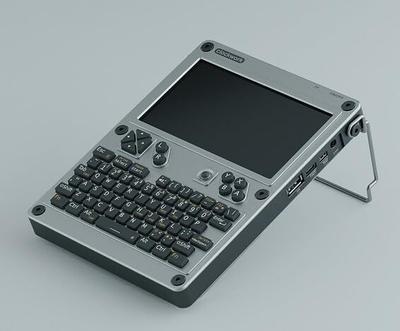
Specs and benchmarks
Brand
- BeagleBoard.org BeagleBone AI-64
- BeagleBoard.org
- ClockworkPi uConsole
- ClockworkPi
Model Number
- BeagleBoard.org BeagleBone AI-64
- BeagleBone AI-64
- ClockworkPi uConsole
- uConsole
Memory
- BeagleBoard.org BeagleBone AI-64
- 4GB LPDDR4Best
- ClockworkPi uConsole
- 2GB to 8GB depending on core module
SoC Model
- BeagleBoard.org BeagleBone AI-64
- TI TDA4VM, Dual-Core Cortex-A72 @ 2.0GHz + C7x DSP + 6x Cortex-R5F + 2x C66x DSP
- ClockworkPi uConsole
- Raspberry Pi Compute Module 4 or Rockchip RK3566 (interchangeable core module)
Onboard Storage
- BeagleBoard.org BeagleBone AI-64
- 16GB eMMC, microSD
- ClockworkPi uConsole
- 4 GB
Connectivity
- BeagleBoard.org BeagleBone AI-64
- Gigabit Ethernet, USB 3.0 (Type-C + 2x Type-A), M.2 E-key PCIe (WiFi)
- ClockworkPi uConsole
- USB-C, USB-A, mechanical QWERTY keyboard, optional 4G/LTE module


Which one should you pick?
Choose BeagleBoard.org BeagleBone AI-64 if you want the higher memory (4GB LPDDR4 vs 2GB to 8GB depending on core module).
Choose ClockworkPi uConsole if you already have it on hand or find it at a lower price.
Price comparison
| Retailer | BeagleBoard.org BeagleBone AI-64 | ClockworkPi uConsole |
|---|---|---|
| Consumercarts listing | $2,194.00 View on Consumercarts listing |
Disclaimer: The price and specification of the given product may differ from the actual product. Please confirm on the retailer's website before buying.
Verdict
BeagleBoard.org BeagleBone AI-64
7 / 10 Expert Rating
A purpose-built heterogeneous compute board for industrial robotics and vision work, wasted on anything general-purpose.
ClockworkPi uConsole
7 / 10 Expert Rating
A fun, genuinely useful portable Linux terminal for tinkerers who want a keyboard and screen without building their own.