
ClockworkPi uConsole
Expert rating7 / 10
- SoC:
- Raspberry Pi CM4 or Rockchip RK3566 (swappable core)
- Form Factor:
- Handheld Clamshell
- Display:
- 5-inch IPS Touchscreen
Consumercarts is reader-supported. Learn more
Disclaimer: The price and specification of the given product may differ from the actual product. Please confirm on the retailer's website before buying.
Manufacturer: ClockworkPi Last updated: 2026-09-12
ClockworkPi uConsole Review
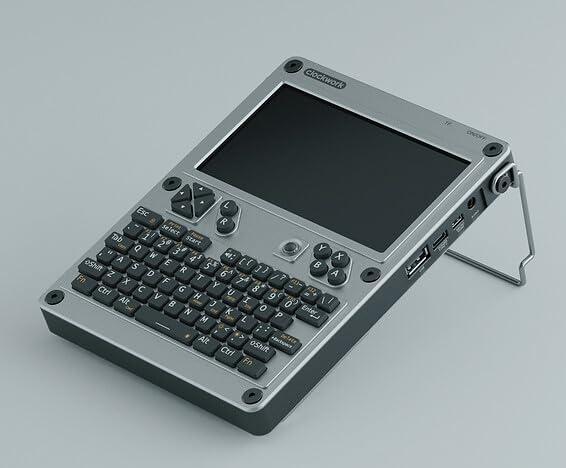
ClockworkPi uConsole is a modular clamshell handheld built around a swappable SBC core module, either a Raspberry Pi Compute Module 4 or a Rockchip RK3566 board, paired with a mechanical keyboard, 5-inch touchscreen, and optional cellular modem for a pocketable Linux terminal.
The uConsole is what happens when a single-board computer gets its own keyboard, screen, and battery instead of sitting exposed on a desk. Because the actual compute core is a removable module, you can start with the cheaper Rockchip version and later drop in a Raspberry Pi CM4 for better software support, all inside the same retro-styled clamshell chassis.
An SBC You Can Put in Your Pocket
Rather than being a bare board, the uConsole wraps its compute module in a full handheld form factor: physical keyboard, IPS touchscreen, battery, and speaker, turning what would otherwise be a headless Pi project into a genuinely portable Linux terminal for coding, retro emulation, or ham radio digital modes.
Swappable Core Philosophy
ClockworkPi's modular design means the uConsole's brain, CM4 or RK3566, can be replaced without buying a whole new device, a rare degree of upgradability in the handheld SBC space and one that echoes desktop compute-module carrier board thinking.
Comparison to Alternatives
Against the Raspberry Pi Compute Module 5 used bare in a custom project, the uConsole trades raw flexibility for a finished, portable enclosure with keyboard and screen included. Compared to the Seeed reTerminal, another CM4-based device with a screen, the uConsole is aimed at portable general computing while the reTerminal targets fixed industrial HMI installs.
Our verdict
Reviewed by Burooj Alam. Rated by us, not by users.
Expert rating7 / 10
A fun, genuinely useful portable Linux terminal for tinkerers who want a keyboard and screen without building their own.
Best for
- Portable Linux terminal for coding on the go
- Retro gaming emulation handheld
- Ham radio and SDR field use with a real keyboard
Not for
- Users wanting maximum raw performance
- Budget-first buyers (bare SBCs are cheaper)
- Heavy multitasking desktop replacement
Specifications
What these specs meanIdentity
| Brand | ClockworkPi |
|---|---|
| Model Number | uConsole |
Processor
| SoC Model | Raspberry Pi Compute Module 4 or Rockchip RK3566 (interchangeable core module) |
|---|
Storage
| Onboard Storage | 4 GB |
|---|
Physical and software
| Official OS | Ubuntu, Raspberry Pi OS, Debian |
|---|
| CPU Architecture | ARM |
|---|---|
| Memory | 2GB to 8GB depending on core module |
| Storage Type | microSD |
| Has AI Accelerator / NPU | No |
| Wireless | WiFi 5 |
| GPIO Header | Yes |
| Price | 219 USD |
| Use Case | Ultra-Compact / Budget |
FAQs
What are the key specifications of the ClockworkPi uConsole (Handheld Computer/Raspberry Pi CM4 or RK3566 Core/Clamshell Keyboard and Screen/Modular SBC Terminal)?
Key specs for the ClockworkPi uConsole: SoC Raspberry Pi Compute Module 4 or Rockchip RK3566 (interchangeable core module), CPU Architecture ARM, Storage Type microSD, Storage microSD, plus eMMC on CM4 variant, Memory 2GB to 8GB depending on core module, Wireless WiFi 5.
Will the ClockworkPi uConsole (Handheld Computer/Raspberry Pi CM4 or RK3566 Core/Clamshell Keyboard and Screen/Modular SBC Terminal) work with my current setup?
The ClockworkPi uConsole (Handheld Computer/Raspberry Pi CM4 or RK3566 Core/Clamshell Keyboard and Screen/Modular SBC Terminal) lists SoC is Raspberry Pi Compute Module 4 or Rockchip RK3566 (interchangeable core module). Check that against the hardware you already own before buying, since this is the field that most often decides whether a part fits.
Who is the ClockworkPi uConsole (Handheld Computer/Raspberry Pi CM4 or RK3566 Core/Clamshell Keyboard and Screen/Modular SBC Terminal) best suited to?
Best suited to: Portable Linux terminal for coding on the go; Retro gaming emulation handheld; Ham radio and SDR field use with a real keyboard.
What are the drawbacks of the ClockworkPi uConsole (Handheld Computer/Raspberry Pi CM4 or RK3566 Core/Clamshell Keyboard and Screen/Modular SBC Terminal)?
Not the best fit for: Users wanting maximum raw performance; Budget-first buyers (bare SBCs are cheaper); Heavy multitasking desktop replacement.
Compare and read more
- ASUS Tinker Board 3N (Single-Board Computer/Rockchip RK3568 Quad-Core Cortex-A55/LPDDR4X/Dual LAN/PoE PD/M.2 Expansion) vs ClockworkPi uConsole (Handheld Computer/Raspberry Pi CM4 or RK3566 Core/Clamshell Keyboard and Screen/Modular SBC Terminal)
- Banana Pi BPI-F3 (Single-Board Computer/SpacemiT K1/Octa-Core RISC-V/Dual Ethernet/PCIe 2.1) vs ClockworkPi uConsole (Handheld Computer/Raspberry Pi CM4 or RK3566 Core/Clamshell Keyboard and Screen/Modular SBC Terminal)
- Banana Pi BPI-M5 Pro (RK3576 / 8GB RAM / 6 TOPS NPU / Dual GbE) vs ClockworkPi uConsole (Handheld Computer/Raspberry Pi CM4 or RK3566 Core/Clamshell Keyboard and Screen/Modular SBC Terminal)
- BeagleBone AI-64 (Single-Board Computer/Texas Instruments TDA4VM/Dual-Core Cortex-A72 2.0GHz/4GB RAM/Robotics and Vision AI Pick) vs ClockworkPi uConsole (Handheld Computer/Raspberry Pi CM4 or RK3566 Core/Clamshell Keyboard and Screen/Modular SBC Terminal)
- BeagleBone Black (Single-Board Computer/TI Sitara AM3358/Single-Core Cortex-A8 1GHz/PRU Real-Time Coprocessors) vs ClockworkPi uConsole (Handheld Computer/Raspberry Pi CM4 or RK3566 Core/Clamshell Keyboard and Screen/Modular SBC Terminal)
- The SBC Spec Nobody Publishes: Mainline Linux or Vendor Kernel Fork?
- Best Single-Board Computers with an NPU for AI Inference