
Consumercarts is reader-supported. Learn more
AVerMedia Live Streamer CAM 513 vs Logitech C925e Business: Comparison
What is the difference between AVerMedia Live Streamer CAM 513 and Logitech C925e Business?
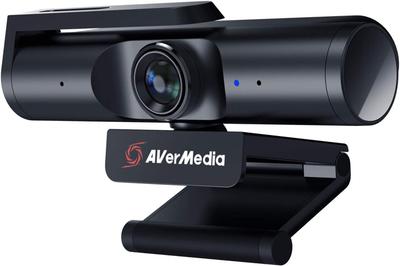
Frame rate is where these two genuinely part company, AVerMedia Live Streamer CAM 513 60 fps against Logitech C925e Business 30 fps, a 50% lead for AVerMedia Live Streamer CAM 513. AVerMedia Live Streamer CAM 513 also leads on field of view, 95 deg on the AVerMedia Live Streamer CAM 513 versus 78 deg on the Logitech C925e Business. They differ on resolution too, 4K30 on the AVerMedia Live Streamer CAM 513 versus 1080p30 on the Logitech C925e Business. Primary use case is not the same on both, Streaming, Content Creation on the AVerMedia Live Streamer CAM 513 versus Business Video Conferencing on the Logitech C925e Business. Privacy shutter is not the same on both, No on the AVerMedia Live Streamer CAM 513 versus Yes on the Logitech C925e Business.
Who each one is for
The AVerMedia Live Streamer CAM 513 suits streamers who need reliable HDR in backlit rooms and creators choosing between 4K static shots and 1080p60 motion, though it is not built for budget buyers who just need basic video calls and studio setups already invested in Elgato's software ecosystem. The Logitech C925e Business is the one to take for individual desk users needing reliable business-grade video and older business laptops that benefit from on-board H.264 encoding, though it is the wrong buy for small conference rooms needing a wider field of view and streamers or gamers wanting higher frame rates. Our rating of the AVerMedia Live Streamer CAM 513 (7/10): A genuinely capable 4K/HDR streaming webcam let down only by brand recognition compared to Logitech and Elgato. Our rating of the Logitech C925e Business (7/10): A well-rounded personal business webcam whose on-board encoding and privacy shutter earn it a place on corporate desk-refresh lists.
What AVerMedia Live Streamer CAM 513 and Logitech C925e Business have in common
Everything else lines up. Autofocus type read the same on both, so those are not worth weighing.

Specs and benchmarks
Resolution
- AVerMedia Live Streamer CAM 513
- 4K30 (1080p at 60fps)
- Logitech C925e Business
- 1080p30
Brand
- AVerMedia Live Streamer CAM 513
- AVerMedia
- Logitech C925e Business
- Logitech
Model Number
- AVerMedia Live Streamer CAM 513
- Live Streamer CAM 513
- Logitech C925e Business
- C925e
Frame Rate
- AVerMedia Live Streamer CAM 513
- 60 fpsBest
- Logitech C925e Business
- 30 fps-50%
Autofocus Type
- AVerMedia Live Streamer CAM 513
- Autofocus
- Logitech C925e Business
- Autofocus
Field of View
- AVerMedia Live Streamer CAM 513
- 95 degBest
- Logitech C925e Business
- 78 deg-18%
Primary Use Case
- AVerMedia Live Streamer CAM 513
- Streaming, Content Creation
- Logitech C925e Business
- Business Video Conferencing
Privacy Shutter
- AVerMedia Live Streamer CAM 513
- No
- Logitech C925e Business
- Yes


Which one should you pick?
Choose AVerMedia Live Streamer CAM 513 if you want the higher frame rate (60 fps vs 30 fps) and the higher field of view (95 deg vs 78 deg).
Choose Logitech C925e Business if you already have it on hand or find it at a lower price.
Price comparison
| Retailer | AVerMedia Live Streamer CAM 513 | Logitech C925e Business |
|---|---|---|
| Newegg | View on Newegg |
Disclaimer: The price and specification of the given product may differ from the actual product. Please confirm on the retailer's website before buying.
Verdict
AVerMedia Live Streamer CAM 513
7 / 10 Expert Rating
A genuinely capable 4K/HDR streaming webcam let down only by brand recognition compared to Logitech and Elgato.
Logitech C925e Business
7 / 10 Expert Rating
A well-rounded personal business webcam whose on-board encoding and privacy shutter earn it a place on corporate desk-refresh lists.