
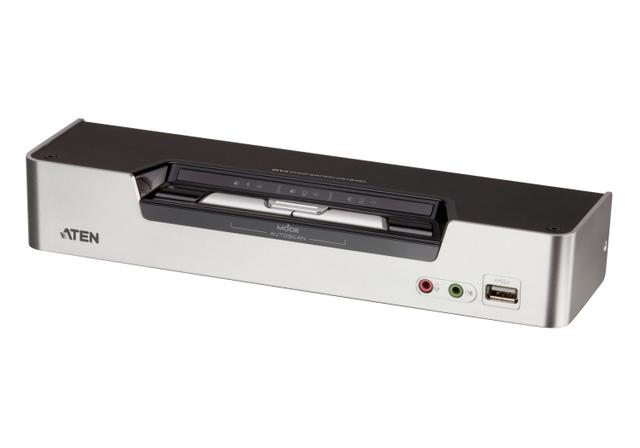
ATEN CS1642A
Expert rating8 / 10
- Port Count:
- 2 computers, dual monitor
- Video Standard:
- DVI (Dual-Link)
- Max Resolution:
- 2560x1600 @ 60Hz
- USB Hub Ports:
- 2
Consumercarts is reader-supported. Learn more
Disclaimer: The price and specification of the given product may differ from the actual product. Please confirm on the retailer's website before buying.
Manufacturer: ATEN Last updated: 2026-10-06
ATEN CS1642A Review
The ATEN CS1642A is a 2-port dual-link DVI dual-display KVMP switch with 2560x1600 at 60Hz, audio, a 2-port USB hub and mouse switching.
It switches two computers that each drive two DVI monitors, at up to 2560x1600 per screen. That makes it a good fit for older workstations and 30-inch DVI panels. It is not a 4K or DisplayPort switch. Most new graphics cards have no DVI ports, and DisplayPort to dual-link DVI needs active adapters, so on a modern PC we recommend the DisplayPort ATEN CS1944 instead. Everything the computers need is in the box: two KVM cables and two dual-link DVI cables.
Specifications
Computers: 2, each with two displays
Video: dual-link DVI-I
Max resolution: 2560x1600 at 60Hz; 1920x1200 at 120Hz for 3D displays
Port selection: hotkey, pushbutton, mouse
Console: 2x DVI-I, 2x USB Type-A, mic and speaker jacks
USB hub: 2x Type-A (1 front, 1 rear)
Daisy chain: 1x RJ-45 to link a second CS1642A or CS1644A
Audio: 3.5mm mic and speakers, switched independently
Power: 5.3V DC, 3.77W
Size: 26.23 x 7.68 x 4.40cm, 0.56kg, plastic and metal
In the box
ATEN lists the switch, two KVM cables (dual-link DVI-D, USB and audio, 1.8m), two dual-link DVI-D cables (1.8m), a power adapter and instructions.
That covers every computer-side connection. Monitor cables are not listed, so bring two dual-link DVI cables for your screens if they are not already attached.
Design and build
A small box, 26.23 x 7.68 x 4.40cm and 0.56kg, in plastic and metal. It draws 3.77W.
The front panel has three pushbuttons and separate LEDs for KVM, audio and USB link on each port. That matters here, because the three can point at different computers. The lights tell you at a glance where your keyboard, speakers and USB devices currently are.
One hub port is on the front, one on the rear. Put a flash drive on the front and a printer on the back.
The headline claim, examined
ATEN quotes 2560x1600 at 60Hz over DVI. That number only works because the CS1642A is dual-link.
One DVI link tops out at a 165 MHz pixel clock. 1920x1200 at 60Hz with reduced blanking needs 154 MHz, so it fits on one link. 2560x1600 at 60Hz needs 268.5 MHz. That is beyond one link and inside the 330 MHz two links provide.
The 3D figure works the same way. 1920x1200 at 120Hz needs about 317 MHz, again dual-link territory.
The catch: every cable in the chain must be dual-link. One single-link cable and you drop to 1920x1200.
The defining limitation: DVI in a DisplayPort world
Your new PC probably has no DVI port. Most current graphics cards ship with DisplayPort and HDMI only.
Passive DisplayPort to DVI adapters carry single-link signals, which caps you at 1920x1200. Getting 2560x1600 from a DisplayPort card needs an active dual-link adapter for each output, four of them for two dual-monitor PCs.
If your machines and monitors are already DVI, none of this matters and the CS1642A is a tidy fit. If they are not, buy a DisplayPort switch.
Living with it
ATEN lets you switch keyboard and mouse, USB and audio focus independently. Leave the speakers on one machine while typing on the other.
Power-on detection moves to the next powered computer automatically if one is switched off.
ATEN's Video DynaSync is meant to stop boot-up display problems. ATEN does not say whether the idle PC keeps seeing your monitors, so set Windows 11 to remember window positions: Settings, System, Display, Multiple displays, tick "Remember window locations based on monitor connection".
Versus the competition
ATEN CS1944: two computers, two monitors, DisplayPort at 4K60. Winner for any PC built in the last few years.
ATEN CS1644A: the same dual-link DVI design with four computer ports. Winner if a third machine is likely.
Rose MEM-2U2V: 2-port dual-head DVI or VGA over CATx, 1920x1200 per head, up to 500ft extension per our catalog. Winner if the computers live in another room.
Adder AV4PRO-DVI-DUAL: 4-port dual-head DVI at 2560x1600 with mouse switching and an optional remote. Winner for buyers who want four ports from Adder.
Our verdict
Reviewed by Burooj Alam. Rated by us, not by users.
Expert rating8 / 10
A well-equipped dual-monitor dual-link DVI switch for two computers, best suited to desks already wired for DVI at up to 2560x1600.
Best for
- Two dual-monitor workstations with DVI graphics and DVI monitors
- 30-inch 2560x1600 DVI panels
- Desks that want USB and audio switched independently of the keyboard and mouse
Not for
- Modern DisplayPort or HDMI setups (see the ATEN CS1944)
- 4K monitors
- More than two computers (see the CS1644A)
Specifications
What these specs meanIdentity
| Brand | ATEN |
|---|---|
| Model Number | CS1642A |
| Switching Method | Pushbutton, hotkey, mouse |
Topology
| Computers Supported | 2 computers, dual monitor |
|---|---|
| KVM Segment | Desk |
Video & Features
| Video Standard | DVI (Dual-Link) |
|---|---|
| Max Resolution | 2560x1600 @ 60Hz (DVI dual link); 1920x1200 @ 120Hz (3D) |
| USB Hub Ports | 2 |
| Audio Support | Yes |
Per display capability
| Max Resolution Single Display | 2560x1600 |
|---|---|
| Max Refresh At Max Resolution | 60 Hz |
In the box and price
| Price | 398.72 USD |
|---|
FAQs
Can I connect a DisplayPort graphics card to the CS1642A?
Yes, with adapters. A passive DisplayPort to DVI adapter limits you to 1920x1200. For 2560x1600 you need an active dual-link adapter on each video output, four in total for two dual-monitor PCs.
Which cables come with the CS1642A?
Two KVM cables (dual-link DVI-D, USB and audio) and two dual-link DVI-D cables, all 1.8m. Monitor cables are not listed.
Does the CS1642A support 4K?
No. Its maximum is 2560x1600 at 60Hz over dual-link DVI. For 4K at 60Hz across two monitors, look at the DisplayPort ATEN CS1944.
Why do I only get 1920x1200 on my 30-inch monitor?
Something in the chain is single-link. 2560x1600 at 60Hz needs a 268.5 MHz pixel clock, beyond the 165 MHz one DVI link carries. Check every cable and adapter is dual-link.
Can I keep audio on one computer while working on the other?
Yes. ATEN switches KVM, USB and audio focus independently, so audio can stay put while you move the keyboard and mouse.
Is the CS1642A a good buy for a new PC?
Only if your monitors are DVI. With modern DisplayPort monitors and graphics cards, the adapters add cost and failure points, and a DisplayPort KVM is the better buy.
Compare and read more
- Adder ALIF1104T (HDMI KVM-over-IP Transmitter over 1GbE) vs ATEN CS1642A (2 Computers / Dual Monitor KVMP Switch)
- Adder AdderView PRO AV4PRO (4-8 Computers / 1-4 Monitors / DVI-VGA / Modular Multi-Head) vs ATEN CS1642A (2 Computers / Dual Monitor KVMP Switch)
- Adder ADDERView PRO (AV4PRO-DVI) (4 Computers / DVI / Secure Desktop KVM) vs ATEN CS1642A (2 Computers / Dual Monitor KVMP Switch)
- Adder AdderLink IPEPS (IPEPS) (1 Server / IP-Based Remote KVM over IP / Single-Port Extender) vs ATEN CS1642A (2 Computers / Dual Monitor KVMP Switch)
- Adder ALIF1002P (Network DVI Extender Transmitter & Receiver) vs ATEN CS1642A (2 Computers / Dual Monitor KVMP Switch)
- Do KVM Switches Support 144Hz? What to Check Before You Buy
- EDID Emulation Explained: Why Your Monitor Resets When You Switch