
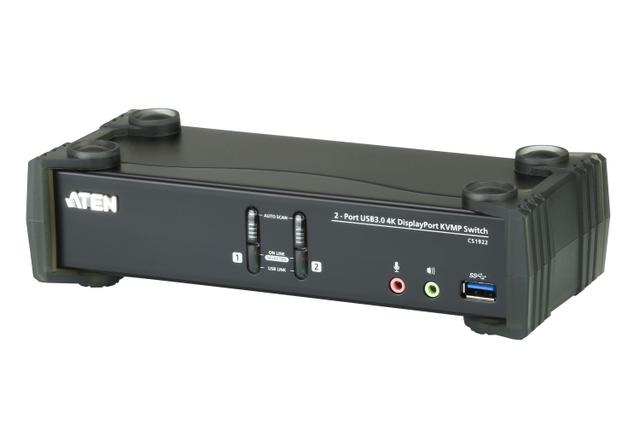
ATEN CS1922
Expert rating8 / 10
- Port Count:
- 2
- Video Standard:
- DisplayPort
- Max Resolution:
- 4096x2160 @ 60Hz
- USB Hub Ports:
- 2
Consumercarts is reader-supported. Learn more
Disclaimer: The price and specification of the given product may differ from the actual product. Please confirm on the retailer's website before buying.
Manufacturer: ATEN Last updated: 2026-10-06
ATEN CS1922 Review
The ATEN CS1922 is a 2-port USB 3.0 4K DisplayPort KVMP switch: two DisplayPort computers, one monitor, up to 4096x2160 at 60Hz or 2560x1440 at 144Hz, with a 2-port USB 3.1 Gen 1 hub.
Despite how some listings describe it, ATEN's page says the CS1922 is a DisplayPort switch, not a USB-C one. Both computer ports are DisplayPort plus USB 3.0 Type-B. You get 4K at 60Hz or 1440p at 144Hz on one monitor, mouse and hotkey switching, and cables in the box.
We recommend it for two DisplayPort desktops sharing one fast monitor. If your laptop only has USB-C, use a USB-C to DisplayPort cable or pick a hybrid like the ATEN CS1953. For two monitors, the CS1922M adds an MST hub.
Specifications
Computers: 2
Monitors: 1 (DisplayPort), more via MST daisy-chain monitors or hub
Video: DisplayPort 1.2, HDCP compliant, DP++
Max resolution: 4096x2160 at 60Hz, 2560x1440 at 144Hz
Switching: pushbuttons, hotkeys, mouse, Auto Scan
USB: 2x USB 3.1 Gen 1 Type-B to computers, 2-port USB 3.1 Gen 1 hub
Audio: speaker and mic jacks per port, HD audio over DisplayPort
Power: 5V DC, 2.00W typical
Size: 21.0 x 8.8 x 5.55cm, 0.73kg, metal and plastic
In the box
One CS1922, two DisplayPort 1.2 cables (1.5m), two USB 3.0 A-to-B cables (1.8m), four audio cables (1.8m), a power adapter and user instructions.
Everything for two DisplayPort computers. Nothing for USB-C: if one machine is a laptop with only USB-C, you need a USB-C to DisplayPort cable and a USB-C to USB-B cable, neither included.
The headline claim, examined
DisplayPort 1.2 runs four lanes at 5.4 Gbit/s: 21.6 Gbit/s raw, 17.28 Gbit/s of pixel data after 8b/10b encoding.
3840x2160 at 60Hz with reduced blanking needs about 533 MHz of pixel clock, 12.8 Gbit/s at 8-bit RGB. 4096x2160 at 60Hz needs about 13.4 Gbit/s. 2560x1440 at 144Hz needs about 14.1 Gbit/s.
All three fit inside 17.28, with 3 to 4.5 Gbit/s to spare.
ATEN's 4K60 and 1440p144 claims hold on DisplayPort 1.2. 4K at 120Hz or above would need DisplayPort 1.4 and DSC.
The defining limitation
ATEN's own footnote: a DisplayPort 1.4 monitor should be set to DisplayPort 1.2 mode in its on-screen menu to avoid compatibility problems. Most current 4K monitors ship in 1.4 mode, so expect to change this on day one.
ATEN makes no EDID emulation claim on this model. When you switch, the idle computer may lose the monitor and resize or move windows. On a single screen that is an annoyance, not a disaster.
Living with it
Windows 11: Settings, System, Display, Multiple displays. Tick "Remember window locations based on monitor connection" and untick "Minimize windows when a monitor is disconnected".
Windows 10 has no such switch. PersistentWindows, free on GitHub, restores layouts after a link drop.
macOS: in System Settings, Desktop and Dock, Mission Control, turn off "Automatically rearrange Spaces based on most recent use".
HD audio over DisplayPort follows the video. Use the 3.5mm jacks for independent audio.
Secondary limitation
ATEN lists MST support, but it needs either DisplayPort 1.2 daisy-chain monitors or a powered MST hub, and the computer must be DP 1.2 compliant. The switch has one DisplayPort console output.
And MST shares the one 17.28 Gbit/s link. Two 4K60 screens need 25.6 Gbit/s, so dual 4K means 30Hz.
Versus the competition
ATEN CS1922M: same two-port design with a built-in MST hub, DP and HDMI outputs, and RS-232. Winner if you want a second screen without daisy-chain monitors.
StarTech SV231DPU34K: two computers, DisplayPort 1.2, 4K. A direct alternative.
IOGEAR GCS1932: two-port DisplayPort 1.2 KVMP with a USB 3.1 Gen 1 hub. Another like-for-like option.
Level1Techs USB-C KVM Switch v3: USB-C inputs, DisplayPort 1.4 out, tested at 4K90. Winner for USB-C laptops and higher refresh.
Mouse Without Borders: free, if each PC has its own screen.
Our verdict
Reviewed by Burooj Alam. Rated by us, not by users.
Expert rating8 / 10
The flexible two-machine DisplayPort switch: pick 4K60 or 1440p144 depending on the day.
Best for
- Two DisplayPort desktops sharing one 4K60 or 1440p144 monitor
- Buyers who want cables and a USB 3.1 Gen 1 hub included
- Mixed Windows, Mac and Linux desks
Not for
- USB-C-only laptops without adapters (see the ATEN CS1953)
- Dual 4K60 monitors
- Desks needing more than two computers
Specifications
What these specs meanHow much this switch can do compared with other desk KVM switches, rated from its specifications.
Identity
| Brand | ATEN |
|---|---|
| Model Number | CS1922 |
Topology
| Computers Supported | 2 computers |
|---|---|
| Displays Per Computer | 1 displays |
| Video Path Type | Single head |
| KVM Segment | Desk |
Video & Features
| Video Standard | DisplayPort |
|---|---|
| Max Resolution | 4096x2160 @ 60Hz |
| USB Hub Ports | 2 |
| Audio Support | Yes |
Video interface
| Video Connector | DisplayPort |
|---|---|
| Video Interface Version | DisplayPort 1.2 |
| MST Support | Yes |
Per display capability
| Max Resolution Single Display | 4096x2160 |
|---|---|
| Max Refresh At Max Resolution | 60 Hz |
| Max Refresh At 4K | 60 Hz |
USB peripheral switching
| USB Switching Speed | USB 3.0 5Gbps |
|---|
Switching control
| Button Switching | Yes |
|---|---|
| Hotkey Switching | Yes |
| Mouse Or Cursor Switching | Yes |
Audio
| Analog Audio Jacks | Yes |
|---|
Physical and power
| External Power Required | Yes |
|---|
In the box and price
| Video Cables Included | 2 cables |
|---|---|
| USB Host Cables Included | 2 cables |
FAQs
Is the ATEN CS1922 a USB-C KVM?
No. ATEN's page lists two DisplayPort and two USB 3.1 Gen 1 Type-B computer ports. A USB-C laptop needs a USB-C to DisplayPort cable and a USB-C to USB-B cable.
Does it do 1440p at 144Hz?
ATEN lists 2560x1440 at 144Hz. It needs about 14.1 Gbit/s, inside DisplayPort 1.2's 17.28 Gbit/s.
My DisplayPort 1.4 monitor flickers or stays black.
ATEN says to set a DP 1.4 monitor to DP 1.2 mode in the monitor's menu.
Can I run two monitors?
Only through MST with DP 1.2 daisy-chain monitors or a powered MST hub. Both screens share one link, so dual 4K runs at 30Hz. The CS1922M has a built-in MST hub.
How do I switch?
Front pushbuttons, keyboard hotkeys, or mouse switching in emulation mode with a USB 3-button wheel mouse.
Are cables included?
Two DP 1.2 cables, two USB 3.0 cables and four audio cables, plus the power adapter.
CS1922 or CS1922M?
Get the CS1922 for one monitor. Get the CS1922M if you want a second display from one DisplayPort source or RS-232 control.
Featured in
Compare and read more
- Adder ALIF1104T (HDMI KVM-over-IP Transmitter over 1GbE) vs ATEN CS1922 (2-Port USB 3.0 4K DisplayPort KVMP Switch / 4096x2160@60Hz or 2560x1440@144Hz / 2-Port USB 3.1 Gen1 Hub / Button + Hotkey)
- Adder AdderView PRO AV4PRO (4-8 Computers / 1-4 Monitors / DVI-VGA / Modular Multi-Head) vs ATEN CS1922 (2-Port USB 3.0 4K DisplayPort KVMP Switch / 4096x2160@60Hz or 2560x1440@144Hz / 2-Port USB 3.1 Gen1 Hub / Button + Hotkey)
- Adder AdderLink IPEPS (IPEPS) (1 Server / IP-Based Remote KVM over IP / Single-Port Extender) vs ATEN CS1922 (2-Port USB 3.0 4K DisplayPort KVMP Switch / 4096x2160@60Hz or 2560x1440@144Hz / 2-Port USB 3.1 Gen1 Hub / Button + Hotkey)
- Adder ADDERView PRO (AV4PRO-DVI) (4 Computers / DVI / Secure Desktop KVM) vs ATEN CS1922 (2-Port USB 3.0 4K DisplayPort KVMP Switch / 4096x2160@60Hz or 2560x1440@144Hz / 2-Port USB 3.1 Gen1 Hub / Button + Hotkey)
- Adder ALIF1002P (Network DVI Extender Transmitter & Receiver) vs ATEN CS1922 (2-Port USB 3.0 4K DisplayPort KVMP Switch / 4096x2160@60Hz or 2560x1440@144Hz / 2-Port USB 3.1 Gen1 Hub / Button + Hotkey)
- Do KVM Switches Support 144Hz? What to Check Before You Buy