
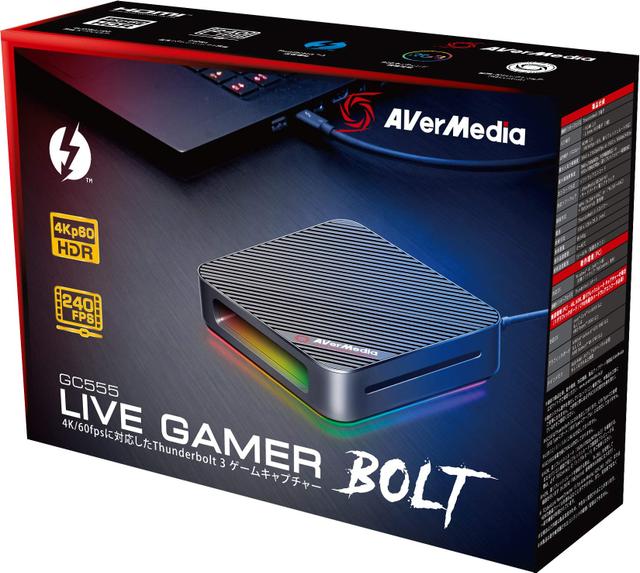
AVerMedia Live Gamer Bolt
Expert rating8 / 10
- Form Factor:
- Standalone (PC-Free)
- Max Recording Resolution:
- 4K30 HDR
- Passthrough Resolution:
- 4K60 HDR
- HDR Support:
- Yes
Consumercarts is reader-supported. Learn more
Disclaimer: The price and specification of the given product may differ from the actual product. Please confirm on the retailer's website before buying.
Manufacturer: AVerMedia Last updated: September 12, 2026
AVerMedia Live Gamer Bolt Review
The AVerMedia Live Gamer Bolt GC551 is a standalone, PC-free capture box that records 4K30 HDR straight to its own storage and streams over built-in WiFi, passing through 4K60 HDR to your display without a computer in the loop at all.
The Bolt is for people who want to record and stream console footage without a gaming PC or laptop anywhere in the setup. It has dual HDMI inputs, records directly to an internal SSD or external drive, and can push a stream out over its own WiFi connection to Twitch or YouTube. That independence costs real money and the interface is more limited than editing through OBS on a full PC, but for a pure console-to-stream pipeline with zero computer required, nothing else in this list does the same job.
Genuinely PC-Free Operation
Recording, streaming, and switching between the two HDMI inputs all happen on the Bolt's own hardware and touchscreen interface. You never need to plug it into a computer unless you want to pull footage off for editing.
Comparison to Alternatives
Against the AVerMedia Live Gamer Portable 2 Plus already in our catalog, the Bolt adds a second HDMI input, HDR support, and built-in WiFi streaming that the Portable 2 Plus lacks, at a meaningfully higher price. Against any of the internal PCIe cards in this list like the Live Gamer 4K GC573, the Bolt trades raw capture resolution and PC-side editing flexibility for the ability to run entirely without a computer.
Our verdict
Reviewed by Burooj Alam. Rated by us, not by users.
Expert rating8 / 10
The clear pick for genuinely PC-free console streaming, at a price that only makes sense if you actually need that independence.
Best for
- Console streamers who don't own or don't want to use a gaming PC.
- Multi-console setups needing to switch between two HDMI sources on one device.
- Anyone wanting an independent backup recorder that keeps working if the main PC crashes.
Not for
- PC-based streamers who already run OBS, a PCIe or USB card is cheaper and more flexible.
- Buyers wanting the highest possible capture resolution, PC-based cards go higher.
- Budget shoppers, standalone PC-free hardware costs a real premium over PC-tethered cards.
Specifications
What these specs meanIdentity
| Brand | AVerMedia |
|---|---|
| Model Number | Live Gamer Bolt (GC551) |
Design
| Form Factor | Standalone (PC-Free) |
|---|---|
| Connection Type | USB-C / Thunderbolt |
Performance
| Max Recording Resolution | 4K30 HDR |
|---|---|
| Passthrough Resolution | 4K60 HDR |
| HDR Support | Yes |
Signal handling
| Latency | 12 ms |
|---|
FAQs
What are the key specifications of the AVerMedia Live Gamer Bolt (GC551) (Standalone PC-Free / 4K30 HDR Capture to SSD / 4K60 HDR Passthrough / Built-in WiFi Streaming)?
Key specs for the AVerMedia Live Gamer Bolt: Form Factor Standalone (PC-Free), Connection Type USB-C / Thunderbolt, Max Recording Resolution 4K30 HDR, Passthrough Resolution 4K60 HDR, HDR Support Yes.
Who is the AVerMedia Live Gamer Bolt (GC551) (Standalone PC-Free / 4K30 HDR Capture to SSD / 4K60 HDR Passthrough / Built-in WiFi Streaming) best suited to?
Best suited to: Console streamers who don't own or don't want to use a gaming PC; Multi-console setups needing to switch between two HDMI sources on one device; Anyone wanting an independent backup recorder that keeps working if the main PC crashes.
What are the drawbacks of the AVerMedia Live Gamer Bolt (GC551) (Standalone PC-Free / 4K30 HDR Capture to SSD / 4K60 HDR Passthrough / Built-in WiFi Streaming)?
Not the best fit for: PC-based streamers who already run OBS, a PCIe or USB card is cheaper and more flexible; Buyers wanting the highest possible capture resolution, PC-based cards go higher; Budget shoppers, standalone PC-free hardware costs a real premium over PC-tethered cards.
Compare and read more
- AVerMedia Live Gamer Bolt (GC551) (Standalone PC-Free / 4K30 HDR Capture to SSD / 4K60 HDR Passthrough / Built-in WiFi Streaming) vs YoloLiv YoloBox Mini (Standalone Encoder / HDMI In-Out / 1080p60 microSD Recording / PC-Free Multi-Platform Streaming)
- AVerMedia Live Gamer Bolt (GC551) (Standalone PC-Free / 4K30 HDR Capture to SSD / 4K60 HDR Passthrough / Built-in WiFi Streaming) vs Magewell USB Capture HDMI Gen 2 (External USB 3.0 / HDMI In / 2048x2160 Capture / Zero-Latency Loop-Through / Driver-Free UVC)
- 4K Capture Cards: Passthrough Spec vs Actual Capture Resolution
- Why Your "4K60 HDR" Capture Card Can't Actually Do Both at Once