
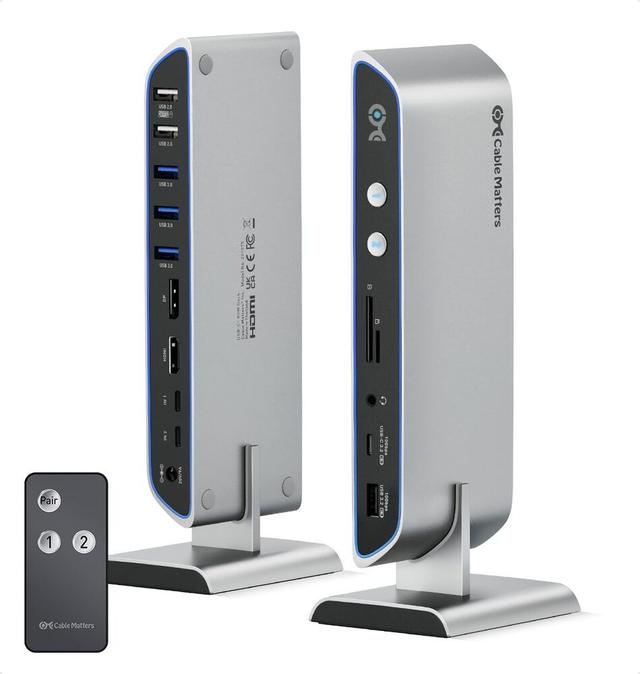
Cable Matters 201075 14-in-1 USB-C KVM Switch Dock
Expert rating6.9 / 10
- Price:
- $119.99
- Video:
- HDMI + DisplayPort, 8K@30Hz or dual 4K@60Hz
- USB:
- 6x USB-A + 1x USB-C
- Charging:
- 100W single / 65W dual
Consumercarts is reader-supported. Learn more
Disclaimer: The price and specification of the given product may differ from the actual product. Please confirm on the retailer's website before buying.
Manufacturer: Cable Matters Last updated: 2026-09-15
Where to buy
- Cable Matters StoreGo to store
- AmazonGo to store
Cable Matters 201075 14-in-1 USB-C KVM Switch Dock Review
Cable Matters 201075 14-in-1 USB-C KVM dock for 2 computers, sharing dual 4K@60Hz or 8K@30Hz video (HDMI + DisplayPort), 7 USB ports, SD/microSD card slots, and up to 100W (single) or dual 65W USB-C Power Delivery charging.
This one turns your desk into a proper docking hub for two laptops at once: dual 4K monitors, a full USB spread, card readers and enough charging power to keep both machines topped up while you flip between them with a button or the included remote.
Overview
Beyond basic KVM switching, the 201075 acts as a full docking station: 6 USB-A ports, a downstream USB-C port, SD and microSD card slots, and a 3.5mm audio jack, driven by a metal-and-plastic dock body with an included 180W power brick that splits into 100W for one connected laptop or 65W each for two.
Our verdict
Reviewed by Burooj Alam. Rated by us, not by users.
Expert rating6.9 / 10
A 14-in-1 USB-C KVM dock with 100W charging, a genuinely useful all-in-one for a 2-laptop hybrid desk; Cable Matters has a solid accessory-brand track record.
Best for
- Two-laptop hot-desks needing dual monitors and full docking
- Users who want card readers and audio jacks alongside KVM switching
- MacBook Pro / Thunderbolt 4 laptops needing simultaneous charging
Not for
- Budget single-monitor setups (see 202070/202071)
- Desktop-only workstations
- Users who don't need charging
Specifications
What these specs meanHow much this switch can do compared with other desk KVM switches, rated from its specifications.
Identity
| Switching Method | Front-panel button or included RF remote control |
|---|
Topology
| Computers Supported | 2 computers |
|---|---|
| Displays Per Computer | 2 displays |
| KVM Segment | Desk |
Video & Features
| Video Standard | Mixed (HDMI + DisplayPort) |
|---|---|
| Max Resolution | 8K |
| USB Hub Ports | 7 |
| Audio Support | Yes |
Per display capability
| Max Resolution Single Display | 7680x4320 |
|---|---|
| Max Refresh At Max Resolution | 8K@30Hz single display, or dual 4K@60Hz |
Display continuity
| EDID Emulation | No |
|---|---|
| VRR Passthrough | No |
USB-C and power delivery
| Power Delivery Wattage | 100 W |
|---|
Physical and power
| External Power Required | Yes |
|---|---|
| Power Supply | 180W AC power adapter |
In the box and price
| Price | 119.99 USD |
|---|---|
| Included Cables | 2x USB-C cables, 1x docking stand, 1x RF remote control, 1x 180W power adapter |
FAQs
What are the key specifications of the Cable Matters 201075 14-in-1 USB-C KVM Switch Dock (2 Computers / Dual 4K60Hz / 100W Charging)?
Key specs for the Cable Matters 201075 14-in-1 USB-C KVM Switch Dock: USB Hub Ports 7 (6x USB-A, 1x USB-C), Max Resolution 8K, Max Resolution Per Display 7680x4320, USB Version USB 3.2 (10Gbps), Audio Support Yes (3.5mm headphone/mic, 8-channel LPCM), Video Standard Mixed (HDMI + DisplayPort).
Who is the Cable Matters 201075 14-in-1 USB-C KVM Switch Dock (2 Computers / Dual 4K60Hz / 100W Charging) best suited to?
Best suited to: Two-laptop hot-desks needing dual monitors and full docking; Users who want card readers and audio jacks alongside KVM switching; MacBook Pro / Thunderbolt 4 laptops needing simultaneous charging.
What are the drawbacks of the Cable Matters 201075 14-in-1 USB-C KVM Switch Dock (2 Computers / Dual 4K60Hz / 100W Charging)?
Not the best fit for: Budget single-monitor setups (see 202070/202071); Desktop-only workstations; Users who don't need charging.
Compare and read more
- Adder AdderView PRO AV4PRO (4-8 Computers / 1-4 Monitors / DVI-VGA / Modular Multi-Head) vs Cable Matters 201075 14-in-1 USB-C KVM Switch Dock (2 Computers / Dual 4K60Hz / 100W Charging)
- Adder ALIF1002P (Network DVI Extender Transmitter & Receiver) vs Cable Matters 201075 14-in-1 USB-C KVM Switch Dock (2 Computers / Dual 4K60Hz / 100W Charging)
- Adder AdderLink IPEPS (IPEPS) (1 Server / IP-Based Remote KVM over IP / Single-Port Extender) vs Cable Matters 201075 14-in-1 USB-C KVM Switch Dock (2 Computers / Dual 4K60Hz / 100W Charging)
- Adder ADDERView PRO (AV4PRO-DVI) (4 Computers / DVI / Secure Desktop KVM) vs Cable Matters 201075 14-in-1 USB-C KVM Switch Dock (2 Computers / Dual 4K60Hz / 100W Charging)
- Adder ALIF1104T (HDMI KVM-over-IP Transmitter over 1GbE) vs Cable Matters 201075 14-in-1 USB-C KVM Switch Dock (2 Computers / Dual 4K60Hz / 100W Charging)
- Do KVM Switches Support 144Hz? What to Check Before You Buy
- EDID Emulation Explained: Why Your Monitor Resets When You Switch