
Consumercarts is reader-supported. Learn more
Disclaimer: The price and specification of the given product may differ from the actual product. Please confirm on the retailer's website before buying.
Manufacturer: CKL Last updated: September 11, 2026
CKL 922HUA-5 Review
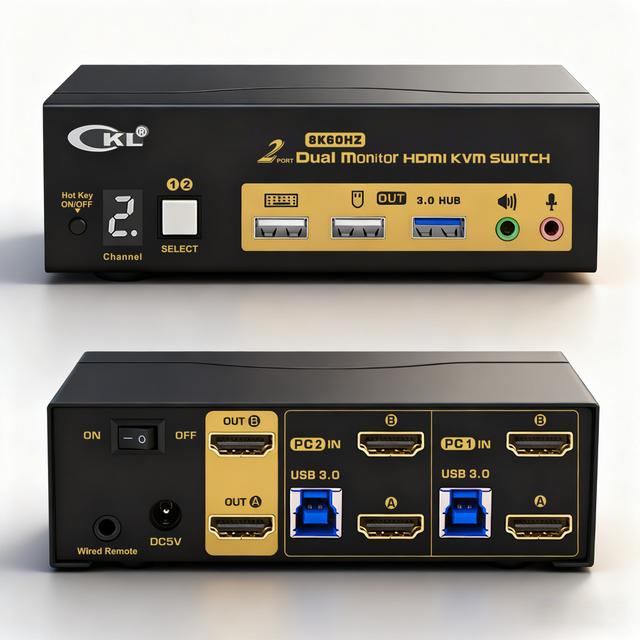
The CKL 922HUA-5 is a 2-port HDMI 2.1 KVM switch supporting dual monitors, 8K@60Hz or 4K@144Hz, a USB 3.0 hub, and both extended and mirrored display modes.
HDMI 2.1 bandwidth is what makes 8K@60Hz or high-refresh 4K@144Hz possible here, putting this switch well ahead of the HDMI 2.0-based competitors that cap out around 4K@60Hz. Dual monitor extended mode means both displays stay active and usable as a single desktop across whichever computer is selected, rather than forcing a single-display workflow common on cheaper dual-monitor switches. Versus the JCYMELE 4K@144Hz KVM Switch, that matches the 144Hz refresh ceiling on a single monitor, worth it for buyers who don't need dual-monitor support. Versus the CKL 622DP, that's DisplayPort-based without 8K support, worth it for buyers already on a DisplayPort monitor setup.
HDMI 2.1 Enables 8K and High Refresh
HDMI 2.1 bandwidth is what makes 8K@60Hz or high-refresh 4K@144Hz possible here, putting this switch well ahead of the HDMI 2.0-based competitors that cap out around 4K@60Hz.
True Extended Dual-Monitor Mode
Dual monitor extended mode means both displays stay active and usable as a single desktop across whichever computer is selected, rather than forcing a single-display workflow common on cheaper dual-monitor switches.
Comparison to Alternatives
Versus the JCYMELE 4K@144Hz KVM Switch, that matches the 144Hz refresh ceiling on a single monitor, worth it for buyers who don't need dual-monitor support. Versus the CKL 622DP, that's DisplayPort-based without 8K support, worth it for buyers already on a DisplayPort monitor setup.
Our verdict
Reviewed by Burooj Alam. Rated by us, not by users.
Expert rating8 / 10
An HDMI 2.1 dual-monitor KVM switch that hits 8K@60Hz or 4K@144Hz, well ahead of HDMI 2.0 competitors.
Best for
- Dual-monitor desks wanting 8K or high-refresh 4K support across two computers.
Not for
- Single-monitor users who don't need the dual-display extended mode.
Specifications
What these specs meanHow much this switch can do compared with other desk KVM switches, rated from its specifications.
Identity
| Brand | CKL |
|---|---|
| Model Number | 922HUA-5 |
Topology
| Computers Supported | 2 computers |
|---|---|
| Displays Per Computer | 2 displays |
| Total Video Inputs | 4 |
| Total Video Outputs | 2 |
| Video Path Type | Independent heads |
| KVM Segment | Desk |
Video & Features
| Video Standard | HDMI |
|---|---|
| Max Resolution | 7680x4320 @ 60Hz |
| USB Hub Ports | 1 |
| Audio Support | Yes |
Video interface
| Video Connector | HDMI |
|---|---|
| Video Interface Version | HDMI 2.1 |
Per display capability
| Max Resolution Single Display | 7680x4320 |
|---|---|
| Max Refresh At Max Resolution | 60 Hz |
| Max Refresh At 4K | 144 Hz |
Display continuity
| EDID Emulation | Yes (learns each monitor) |
|---|
USB peripheral switching
| USB Switching Speed | USB 3.0 5Gbps |
|---|
Switching control
| Button Switching | Yes |
|---|---|
| Hotkey Switching | Yes |
| Wired Remote Included | Yes |
| Mouse Or Cursor Switching | Yes |
Audio
| Analog Audio Jacks | Yes |
|---|
Physical and power
| External Power Required | Yes |
|---|
In the box and price
| Video Cables Included | 4 cables |
|---|---|
| USB Host Cables Included | 2 cables |
| Price | 115 USD |
FAQs
What are the key specifications of the CKL 922HUA-5 (HDMI 2.1 / 2 Computers / Dual Monitor / 8K@60Hz or 4K@144Hz)?
Key specs for the CKL 922HUA-5: Max Resolution 7680x4320 @ 60Hz, Max Resolution Single Display 7680x4320, Max Refresh At Max Resolution 60 Hz, Max Resolution Per Display 7680x4320, Connection Type HDMI 2.1, Audio Support Yes.
Who is the CKL 922HUA-5 (HDMI 2.1 / 2 Computers / Dual Monitor / 8K@60Hz or 4K@144Hz) best suited to?
Best suited to: Dual-monitor desks wanting 8K or high-refresh 4K support across two computers.
What are the drawbacks of the CKL 922HUA-5 (HDMI 2.1 / 2 Computers / Dual Monitor / 8K@60Hz or 4K@144Hz)?
Not the best fit for: Single-monitor users who don't need the dual-display extended mode.
Featured in
Compare and read more
- Adder AdderView PRO AV4PRO (4-8 Computers / 1-4 Monitors / DVI-VGA / Modular Multi-Head) vs CKL 922HUA-5 (HDMI 2.1 / 2 Computers / Dual Monitor / 8K@60Hz or 4K@144Hz)
- Adder ALIF1104T (HDMI KVM-over-IP Transmitter over 1GbE) vs CKL 922HUA-5 (HDMI 2.1 / 2 Computers / Dual Monitor / 8K@60Hz or 4K@144Hz)
- Adder AdderLink IPEPS (IPEPS) (1 Server / IP-Based Remote KVM over IP / Single-Port Extender) vs CKL 922HUA-5 (HDMI 2.1 / 2 Computers / Dual Monitor / 8K@60Hz or 4K@144Hz)
- Adder ALIF1002P (Network DVI Extender Transmitter & Receiver) vs CKL 922HUA-5 (HDMI 2.1 / 2 Computers / Dual Monitor / 8K@60Hz or 4K@144Hz)
- Do KVM Switches Support 144Hz? What to Check Before You Buy