
Consumercarts is reader-supported. Learn more
Corsair Ironclaw RGB Wireless vs Razer Naga Trinity: Comparison
Corsair Ironclaw RGB Wireless and Razer Naga Trinity separate most on weight: Corsair Ironclaw RGB Wireless at 105, Razer Naga Trinity at 120, 14% in favour of Corsair Ironclaw RGB Wireless. They match on 4 other specifications, including grip type, shape and sensor tier.

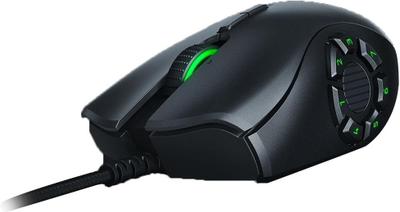
Specs
| Specification |  |  |
|---|---|---|
| Brand | Corsair | Razer |
| Connectivity | Wireless (2.4GHz SLIPSTREAM), Bluetooth | Wired |
| Grip Type | Right-Handed | Right-Handed |
| Model | Ironclaw RGB Wireless | Naga Trinity |
| Shape | Ergonomic | Ergonomic |
| Sensor Tier | Mid-High | Mid-High |
| Buttons | 7 | Up to 19 (swappable 2/7/12-button side plates) |
| Polling Rate | 1000 Hz | 1000 Hz |
| Weight | 105 | 120-14% |
| Sensor | PixArt PMW3391 Optical, up to 18,000 DPI | Razer 5G Optical, up to 16,000 DPI |
| Switches | Omron | Mechanical, rated 50 million clicks |
Verdict
Corsair Ironclaw RGB Wireless
7 / 10 Expert Rating
A comfortable large-hand ergonomic mouse, though its weight and 24-hour battery trail newer ultralight flagships.
Razer Naga Trinity
7 / 10 Expert Rating
An older design, but the swappable side-plate concept remains genuinely useful for multi-genre players on a budget.
More comparisons in Gaming Mice
- Cooler Master MM720 vs Corsair Ironclaw RGB Wireless
- Corsair Dark Core RGB Pro vs Corsair Ironclaw RGB Wireless
- Corsair Ironclaw RGB Wireless vs Zowie (BenQ) Zowie FK2-B
- Corsair Ironclaw RGB Wireless vs Razer DeathAdder V3 Pro
- Corsair Ironclaw RGB Wireless vs G-Wolves HTS Pro
- Corsair Ironclaw RGB Wireless vs Corsair M75 Wireless