
Framework Laptop 13 DIY Edition
Expert rating8.2 / 10
- CPU:
- Ryzen AI 7 350
- RAM:
- 32GB DDR5 (0 slots free)
- Storage:
- 1TB NVMe
- Display:
- 13.5" 2.2K IPS
- Class:
- Thin and Light, fully repairable
Upgrade and repair this laptop
Consumercarts is reader-supported. Learn more
Disclaimer: The price and specification of the given product may differ from the actual product. Please confirm on the retailer's website before buying.
Manufacturer: Framework Last updated: 2026-10-10
Framework Laptop 13 DIY Edition Review
Framework Laptop 13 DIY Edition, AMD Ryzen AI 7 350, Radeon 860M graphics, 32GB DDR5 SO-DIMM, 1TB M.2 NVMe SSD, 13.5 inch 2.2K matte IPS display, USB4, modular repairable laptop.
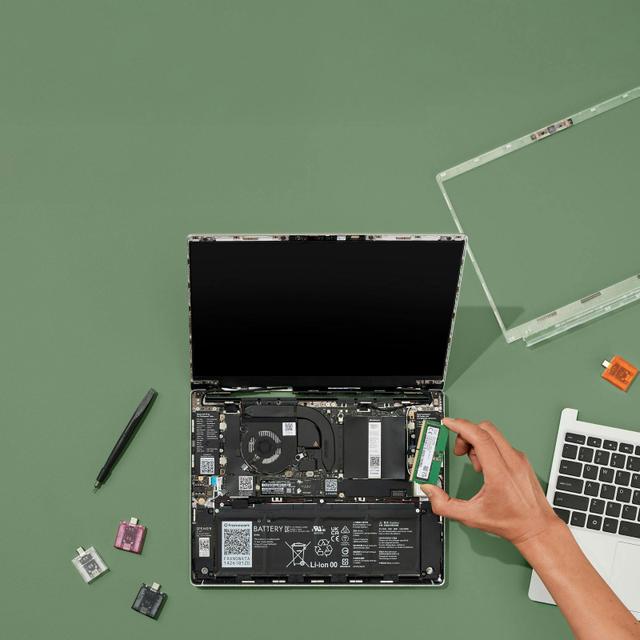
The modular, repairable Framework Laptop 13 on AMD's Ryzen AI 300 platform: standard SO-DIMM RAM and a standard M.2 slot in a chassis explicitly designed to be opened and serviced.
Performance
AMD Ryzen AI 7 350 (8 cores) with integrated Radeon 860M graphics. Framework also offers Ryzen AI 5 340 and Ryzen AI 9 HX 370 options in the same chassis for lower cost or higher performance.
Upgradability
This is the anti-soldered design point of the category: standard DDR5 SO-DIMMs (2 slots, up to 96GB) and a standard M.2 2280 NVMe slot, both explicitly designed for end users to open and replace. This 32GB/1TB configuration ships with both RAM slots filled and the one storage slot occupied, but every component is a swap away from being upgraded, unlike soldered competitors at this size.
Battery life
61Wh battery, rated by Framework to retain about 80% capacity after 1,000 charge cycles, a durability figure rather than a runtime one; Framework does not publish a light-load hours figure.
Display
13.5-inch 3:2 matte display; this configuration uses the base 2.2K (2256x1504) panel at 60Hz. A 2.8K (2880x1920) panel is also offered.
Design and ports
1.3kg. Modular Expansion Card port system (USB4/USB-C bays that swap for USB-A, HDMI, DisplayPort, storage, etc.), 1080p webcam. Wi-Fi 6E.
Our verdict
Reviewed by Burooj Alam. Rated by us, not by users.
Expert rating8.2 / 10
The Framework Laptop 13 is designed to be opened and repaired. It has a Ryzen AI 7 350, 32GB of DDR5 in SO-DIMM slots and a 13.5-inch 2256 x 1504 IPS panel in a 1.3 kg body. USB4 and a 61Wh battery suit right-to-repair buyers who want to upgrade RAM or storage later.
It is not the thinnest or lightest 13-inch laptop. Check the operating system situation first if you want Windows or macOS preinstalled.
Best for
- Right-to-repair buyers who want a laptop designed to be opened
- Anyone who wants to self-upgrade RAM or storage down the line
- Tinkerers who value modular, swappable ports over fixed I/O
Not for
- Buyers who want the thinnest or lightest possible 13-inch laptop
- Anyone who wants Windows or macOS preinstalled out of the box
- Users prioritizing brand-name support networks over DIY assembly
Specifications
What these specs meanIdentity and variant
| Brand | Framework |
|---|---|
| Series | Framework Laptop 13 |
| Series ID | framework-laptop-13-amd-ryzen-ai-300 |
| SKU Name | Ryzen AI 7 350 / 32GB DDR5 / 1TB |
| Chassis Code | DIY Edition |
| Region Sold | Global |
Class and platform
| Laptop Class | Thin and Light |
|---|---|
| Release Year | 2024 |
| Operating System | No OS |
| Weight | 1.3 kg |
Processor
| CPU Brand | AMD |
|---|---|
| CPU Model | AMD Ryzen AI 7 350 |
| CPU Cores | 8 |
Sustained power
| Sustained Power Source | Not Measured |
|---|
Graphics
| GPU Brand | AMD |
|---|---|
| GPU Model | AMD Radeon 860M |
| VRAM | 0 GB |
| Graphics Switching | Integrated Only |
Memory
| RAM Capacity | 32 GB |
|---|---|
| RAM Type | DDR5 |
| Memory Form Factor | SO-DIMM |
| Memory Soldered | No |
| Max RAM Supported | 96 GB |
Upgradability
| RAM Slots | 2 |
|---|---|
| RAM Slots Free | 0 |
| Storage Slots | 1 |
| Storage Slots Free | 0 |
| Storage Form Factor | M.2 2280 |
| Storage Interface | PCIe 4.0 x4 |
| SATA Bay Present | No |
Storage as shipped
| Storage Capacity | 1000 GB |
|---|---|
| Storage Type | NVMe SSD |
Display
| Display Size | 13.5 inches |
|---|---|
| Resolution Width | 2256 px |
| Resolution Height | 1504 px |
| Refresh Rate | 60 Hz |
| Panel Type | IPS |
| sRGB Coverage | 100 % |
| Touchscreen | No |
Battery and ports
| Battery Capacity | 61 Wh |
|---|---|
| Thunderbolt Support | USB4 |
| WiFi Standard | WiFi 6E |
FAQs
Can you upgrade the RAM in the Framework Laptop 13 DIY Edition?
Yes. It uses SO-DIMM memory in 2 slots (all filled as shipped). It ships with 32 GB of DDR5. The maximum supported is 96 GB.
Can you upgrade the SSD in the Framework Laptop 13 DIY Edition?
Yes. It has 1 M.2 2280 slot (PCIe 4.0 x4). As shipped the slot is in use, so upgrading means replacing the existing drive. It ships with 1000 GB NVMe SSD.
What display does the Framework Laptop 13 DIY Edition have?
The Framework Laptop 13 DIY Edition has a 13.5-inch, 2256x1504, IPS, 60 Hz non-touch display.
Does the Framework Laptop 13 DIY Edition have Thunderbolt?
It lists USB4 rather than Thunderbolt. Many Thunderbolt devices work over USB4, but check the device maker's compatibility notes first.
How big is the battery in the Framework Laptop 13 DIY Edition?
The Framework Laptop 13 DIY Edition has a 61 Wh battery.
Compare and read more
- Apple MacBook Air 13-inch (M4, 16GB, 256GB) vs Framework Laptop 13 DIY Edition (Ryzen AI 7 350, 32GB, 1TB)
- Dell XPS 13 9350 (Core Ultra 7 256V, 16GB, 512GB) vs Framework Laptop 13 DIY Edition (Ryzen AI 7 350, 32GB, 1TB)
- Framework Laptop 13 DIY Edition (Ryzen AI 7 350, 32GB, 1TB) vs HP Pavilion Aero 13 (Ryzen 7 8840U, 16GB)
- Framework Laptop 13 DIY Edition (Ryzen AI 7 350, 32GB, 1TB) vs MSI Prestige 13 Evo A13M (Core i7-1360P, 16GB, 512GB)
- Framework Laptop 13 DIY Edition (Ryzen AI 7 350, 32GB, 1TB) vs Xiaomi Book Air 13 2024 (Core Ultra 5 125H, 16GB, 512GB)
- 2-in-1 vs Touchscreen Laptops: What's the Real Difference?
- What Does the Core Ultra 'X' Mean? Panther Lake Explained